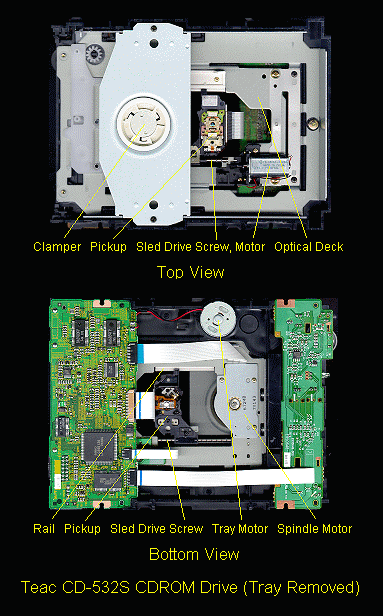
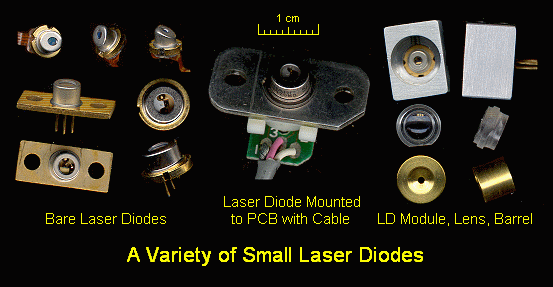
Contents:
Notes on the Troubleshooting and Repair of Compact Disc Players and CDROM Drives
Copyright (c) 1994, 1995, 1996, 1997, 1998
All Rights Reserved
Reproduction of this document in whole or in part is permitted if both of the following conditions are satisfied:
The transformation of CD players and CDROMs from laboratory curiosities
to the economical household appliances that have revolutionized the musical
recording industry and have made possible multimedia computing depend on
the availability of two technologies: low power low cost solid state
laser diodes and mass produced large scale integrated circuits.  Without
these, a CD player using 1960's technology would be the size of dishwasher!

Most of us take all of this for granted rarely giving any thought to
the amazing interplay of precision optics and complex electronics - at
least until something goes wrong.  The purpose of this document is to
provide enough background on CD technology and troubleshooting guidance
so that anyone who is reasonably handy whether a homeowner, experimenter,
hobbiest, tinkerer, or engineer, can identify and repair many problems
with CD players and possibly laserdisc players, CDROM drives, and optical
storage drives as well.

Even if you have trouble changing a light bulb and do not know which end of
a soldering iron is the one to avoid, reading through this document will
enable you to be more knowledgeable about your CD player.  Then, if you
decide to have it professionally repaired, you will have a better chance of
recognizing incompetence or down right dishonesty when dealing with the
service technician.  For example, a bad laser is not the most likely cause
of a player that fails to play discs - it is actually fairly far down on the
list of typical faults.  A dirty lens is most likely.  There - you learned
something already!
This document was developed specifically for the troubleshooting and repair
of the CD players in component stereo systems, compact stereos, boomboxes, car
units and portables, as well as CDROM drives (including the Sony Playstation).

The primary differences between these types will relate to how the disc is
loaded - portables usually are top loaders without a loading drawer or tray:

However, as a result of the level of miniaturization required for portables
and to a lesser extent, CDROM drives, everything is tiny and most or all of
the electrical components are surface mounted on both sides of an often
inaccessible printed circuit board with the entire unit assembled using
screws with a mind of their own and a desire to be lost.

For other types:

* Laserdisc players and optical disk storage units have much in common
  with CD players with respect to the mechanical components and front-end
  electronics.  Therefore, the information contained in this document can
  represent a starting point for their troubleshooting as well.  However,
  they may include additional servo systems (optical pickup tilt, for
  example), as well as additional and/or different signal processing
  subsystems.

* DVD (Digital Versatile - or Video - Disc) players (which are just now
  becoming widely available), will suffer from many of the same problems as
  CDs and Laser Discs.  Thus, a familiarity with the operating and repair of
  current technology will give you a head start on the amazing wonders (and
  similarly amazing problems) to come.  There is a great deal of information
  on DVD technology in the DVD FAQ.  Electronics Now, December, 1997, has a
  nice article by Steven J. Bigelow covering everything from the DVD format to
  installing and using a DVDROM drive in your PC.

Note that throughout this document, the term 'CD player' is used most often.
However, it should be understood that in most cases, the information applies
to CDROM drives, game machines using CDs like the Sony Playstation, laserdisc
players, MiniDisk players/recorders, DVD players, and other types of optical
disk systems.  Also see the document specifically devoted to these other
technologies: "Notes on the Troubleshooting and Repair of Optical Disc Players
and Optical Data Storage Drives".  Also, where I remember, the term 'disc' is
used to denote a read-only medium (e.g. a regular audio CD or LD) while 'disk'
is used for one that is recordable (e.g., CD-R or MiniDisk).

Note: Links to all the diagrams and photographs referenced from this document
can be found in Sam's CD FAQ Files.
Many common problems with CD players can be corrected without the need for
the service manual or the use of sophisticated test equipment (though a
reliable multimeter will be needed for any electrical tests and an oscilloacope
of at least 5 MHz bandwidth is highly desireable for servo alignment and more
advanced troubleshooting).  The types of problems found in a CD player can be
classified into several categories:

1. Mechanical - dirt, lubrication, wear, deteriorated rubber parts, dirty/bad
   limit switches, physical damage.  A dirty lens (coated with dust, tobacco
   smoke residue, or condensed cooking grease) - easily remedied - is probably
   the number one cause of many common problems: discs not being recognized,
   seek failure, audible noise, and erratic tracking, sticking, or skipping.

   Even many professionals may mistake (either accidentally or on purpose)
   these symptoms being due to much more serious (and expensive) faults.
   Don't be fooled!

   Cleaning of the lens and any other accessible optical components (usually
   only the turning mirror, if that) and a mechanical inspection should be the
   first things done for any of these problems (and as periodic preventive
   maintenance especially if the equipment is used in a less than ideal
   environment).  See the section: "General inspection, cleaning, and lubrication".

2. Electrical Adjustments - coarse tracking, fine tracking, focus, laser power.
   However, some CD players no longer have some of these adjustments.  The
   servo systems are totally digital - they either work or they don't.

3. Power problems (mostly portables) - weak batteries, inadequate, defective,
   or improper AC wall adapter.

4, Bad connections - broken solder on the pins of components that are stressed
   like limit or interlock switches, or audio or power jacks, internal
   connectors that need to be cleaned and reseated, broken traces on flexible
   cables, or circuit board damage due to a fall.

5. Electrical Component Failure.  These are rare except for power surge (storm
   and lightning strike) related damage which if you are lucky will only blow
   out components in the power supply.  (Or, plugging a 3 V portable into the
   12 V of your automobile.  You can probably forget about this even being a
   CD player again.)

6. Incompatible geographic location :-).  This doesn't really apply to CD
   players but may be a factor with equipment like Sony PlayStations and
   very likely with DVD players.  In their infinite wisdom (or greed),
   manufacturers are including 'country codes' on the discs so that a game
   or movie sold in one place cannot be used in another.  So, if you bought
   a disc on the other side of the world and it doesn't work at home, thank
   the lawyers.....

You can often repair a CD player which is faulty due to (1) or (2) except
for laser power which I would not attempt except as a last resort without
a service manual and/or proper instrumentation if needed - improper adjustment
can ruin the laser.  If discs are recognized at all or even if the unit only
focuses correctly, then laser power is probably ok.  While the laser diodes
can and do fail, don't assume that every CD player problem is laser related.
In fact, only a small percentage (probably under 10%) are due to a failure
of the laser diode or its supporting circuitry.  Mechanical problems such as
dirt and lubrication are most common followed by the need for electrical
(servo) adjustments.

The solutions to category (3) and (4) problems are obvious - but it may take
a conscious effort to remember to check these out before assuming that the
fault is due to something much more serious.

Category (5) failures in the power supply of component (AC line powered) CD
players can also be repaired fairly easily.

Most other electrical failures will be difficult to locate without the service
manual, test equipment, and a detailed understanding and familiarity with
audio CD technology.  However, you might get lucky.  I have successfully
repaired problems like a seek failure (replaced a driver chip because it was
running excessively hot) and a door sensor failure (traced circuitry to locate
a bad logic chip).  Since so much of the intelligence of a CD player is in the
firmware - the program code inside the microcontroller, even the schematic may
be of only marginal value since I can pretty much guarantee that the firmware
will not be documented.  The service manuals rarely explain *how* the equipment
is supposed to work - and then perhaps only in poorly translated Japanese!

You can pretty much forget about repairing electrical problems in portable
equipment other than perhaps bad connections (usually around the audio or
power jacks, internal connectors, interlock switch (since it is stressed), or
elsewhere due to the unit being dropped).  Nearly everything in a portable
(and most CDROM drives for that matter though this is not quite as bad) is
itty-bitty surface mount components.  There is generally only minimal useful
information printed on the circuit board.  Tracing the wiring is a nightmare.
Even the test points and adjustments may be unmarked!
While CD players with new convenience features are constantly introduced, the
basic function of playing a CD has not changed significantly in 15 years.
None of the much hyped 'advancements' such as digital filters, oversampling,
one bit D/As, and such are likely to make any difference whatsoever in the
listening pleasure of most mortals.  The people who care, do so only because
they are more concerned with the technology than the musical experience.  Most
of these so called advances were done at least in part to reduce costs - not
necessarily to improve performance.

Therefore, unless you really do need a 250 disc CD changer with a
remote control that has more buttons than a B777 cockpit and 2000 track
programmability, a 10 year old CD player will sound just as good and
repair may not be a bad idea.  Many older CD players are built more solidly
than those of today.  Even some new high-end CD players may be built around
a mostly plastic optical deck and flimsy chassis.

If you need to send or take the CD player or CDROM drive to a service center,
the repair could easily exceed the cost of a new unit.  Service centers
may charge up to $50 or more for providing an initial estimate of repair
costs but this will usually be credited toward the total cost of the repair
(of course, they may just jack this up to compensate for their bench time).
Parts costs are often grossly inflated as well - possibly due to a deliberate
effort on the part of manufacturers to discourage repair of older equipment.
However, these expensive parts do not really fail nearly as often as is
commonly believed - the laser is not the most likely component to be bad!
Despite this, you may find that even an 'authorized' repair center will want
to replace the expensive optical pickup even when this is not needed.  I do
not know how much of this is due to dishonesty and how much to incompetence.

If you can do the repairs yourself, the equation changes dramatically as
your parts costs will be 1/2 to 1/4 of what a professional will charge
and of course your time is free.  The educational aspects may also be
appealing.  You will learn a lot in the process.  Thus, it may make sense
to repair that bedraggled old boombox after all.
Information on a compact disc is encoded in minute 'pits' just under the
label side of the CD.  The CD itself is stamped in much the same way as
an old style LP but under much more stringent conditions - similar to the
conditions maintained in the clean room of a semiconductor wafer fab.  The CD
pressing is then aluminum coated in a vacuum chamber and the label side is
spin-coated with a protective plastic resin and printed with the label.

CD-Rs - recordable CDs use a slightly different construction.  CD-R blanks
are prestamped with a spiral guide groove and then coated with an organic dye
layer followed by a gold film, resin, and label.  The dye layer appears
greenish and deforms upon exposure to the focused writing laser beam to form
pits and lands.

The newest variation - DVDs or Digital Versatile Disks (or Digital Video
Disks depending on who you listen to) - implement a number of incremental
but very significant improvements in technology which in total add up to a
spectacular increase in information density - almost 10:1 for the same
size disc.  These include higher frequency laser (670 or shorter visible
wavelength), closer track spacing, better encoding, and a double sided disc.
According to early reports on the final specifications, DVDs will be able
to store 8 times the audio of current CDs at a higher sampling rate and
bit resolution, 2 hours of MPEG encoded high quality movies, and
all kinds of other information.  Raw data capacity is somewhere between
5 and 10 GBytes.  See the section: "Comparison of CD and DVD Specifications"
for additional information.
The actual information to be recorded on a CD undergoes a rather remarkable
transformation as it goes from raw audio (or digital data) to microscopic pits
on the disc's surface. For commercial or professional audio recording, the
process starts with pre-filtering to remove frequencies above about 20 kHz
followed by analog-to-digital conversion, usually at a sampling rate of 48 K
samples/second for each stereo channel. The resulting data stream is then
recorded on multi-track digital magnetic tape. All mixing and pre-mastering
operations are done at the same sampling rate.  The final step is conversion
through re-sampling (sample-rate conversion including some sophisticated
interpolation) to the 44.1 K samples/second rate actually used on the CD (88.2
K total for both channels).  (In some cases, all steps may be performed at the
44.1 K rate.)

That is followed by extremely sophisticated coding of the resulting 16-bit
two's-complement samples (alternating between L and R channels) for the
purpose of error detection and correction. Finally, the data is converted to a
form suitable for the recording medium by Eight-to-Fourteen modulation (EFM)
and then written on a master disk using a precision laser cutting lathe.  A
series of electroplating, stripping, and reproduction steps then produce
multiple 'stampers', which are used to actually press the discs you put in
your player.

Of course, it is possible to create your own CDs with a modestly priced CD-R
recorder (which does not allow erasing or re-recording).  Now, re-writable CD
technology with fully reusable discs enables recording and editing to be done
more like that on a cassette tape

Like a phonograph record, the information is recorded in a continuous spiral.
However, with a CD, this track (groove or row of pits - not to be confused
with the selections on a music CD) starts near the center of the CD and
spirals (counterclockwise when viewed from the label side) toward the outer
edge.  The readout is through the 1.2 mm polycarbonate disc substrate to
he aluminized information layer just beneath the label.  The total length
of the spiral track for a 74 minute disc is over 5,000 meters - which is more
than 3 miles in something like 20,000 revolutions of the disc!

The digital encoding for error detection and correction is called the
Cross Interleave Reed Soloman Code or CIRC.  To describe this as
simply as possible, the CIRC code consists of two parts: interleaving
of data so that a dropout or damage will be spread over enough physical area
(hopefully) to be reconstructed and a CRC (Cyclic Redundancy Check) like error
correcting code.  Taken together, these two techniques are capable of some
remarkable error correction.  The assumption here is that most errors will
occur in bursts as a result of dust specs, scratches, imperfections such as
pinholes in the aluminum coating, etc.  For example, the codes are powerful
enough to totally recover a burst error of greater than 4,000 consecutive
bits - about 2.5 mm on the disc.  With full error correction implemented (this
is not always the case with every CD player), it is possible to put a piece
of 2 mm tape radially on the disc or drill a 2 mm hole in the disc and have no
audio degradation.  Some test CDs have just this type of defect introduced
deliberately.

Two approaches are taken with uncorrectable errors: interpolation and
muting.  If good samples surround bad ones, then linear or higher
order interpolation may be used to reconstruct them.  If too much data has
been lost, the audio is smoothly muted for a fraction of a second.  Depending
on where these errors occur in relation to the musical context, even these
drastic measures may be undetectable to the human ear.

Note that the error correction for CDROM formats is even more involved
than for CD audio as any bit error is unacceptable.  This is one of many
reasons why it is generally impossible to convert an audio CD player into a
CDROM drive.  However, since nearly all CDROM drives are capable of playing
music CDs, much can be determined about the nature of a problem by first
testing a CDROM drive with a music CD.
The information layer as mentioned above utilizes 'pits' as the storage
mechanism.  (Everything that is not a pit is called a 'land'.)  Pits are
depressions less than .2 um in depth (1/4 wavelength of the 780 nm laser light
taking into consideration the actual wavelength inside the polycarbonate
plastic based on its index of refraction).  Thus, the reflected beam is 180
degrees out of phase with incident beam.  Where there is a pit, the reflected
beam from the pit and adjacent land will tend to cancel.  This results in high
contrast between pits and lands and good signal to noise ratio.  Pits are
about .5 um wide and they come in increments of .278 um as the basic length of
a bit (encoded, see below) on the information layer of the disc.

Each byte of the processed information is converted into a 14 bit run length
limited code taken from a codebook (lookup table) such that there are no fewer
than 2 or more than 10 consecutive 0s between 1s.  By then making the 1s
transitions from pit to land or land to pit, the minimum length of any feature
on the disc is no less than 3*p and no more than 11*p where p is .278 um.
This is called Eight-to-Fourteen Modulation - EFM.  Thus the length of a pit
ranges from .833 to 3.054 um.

Each 14 bit code word has 3 additional sync and low frequency suppression bits
added for a total of 17 bits representing each 8 bit byte.  Since a single bit
is .278 um, a byte is then represented in a linear space of 4.72 um.  EFM in
conjunction with the sync bits assure that the average signal has no DC
component and that there are enough edges to reliably reconstruct the clock
for data readout.  These words are combined into 588 bit frames.  Each frame
contains 24 bytes of audio data (6 samples of L+R at 16 bits) and 8 bits of
information used to encode (across multiple frames) information like the time,
track, index, etc:

                Sync                    (24 + 3).
                Control and display     (14 + 3).
                Data                    (12 * 2 * (14 + 3)).
                Error correction        ( 4 * 2 * (14 + 3)).
                                        --------------------
                                        588 total bits/frame

A block, which is made up of 98 consecutive frames, is the smallest unit which
may be addressed on an audio CD and corresponds to a time of 1/75 of a second.
Two bits in the information byte are currently defined.  These are called P
and Q.  P serves a kind of global sync function indicating (among other
things) start and end of selections and time in between selections.  Q bits
accumulated into one word made of a portion of the 98 possible bits in a block
encodes the time, track and index number, as well as many other possible
functions depending where on the disc it is located, what kind of disc this
is, and so forth.

Information on a CD is recorded at a Constant Linear Velocity - CLV.  This is
both good and bad.  For CD audio - 1X speed - this CLV is about 1.2 meters per
second.  (It really isn't quite constant due to non constant coding packing
density and data buffering but varies between about 1.2 and 1.4 meters per
second).  CLV permits packing the maximum possible information on a disc since
it is recorded at the highest density regardless of location.  However, for
high speed access, particularly for CDROM drives, it means there is a need to
rapidly change the speed of rotation of the disc when seeking between inner
and outer tracks.  Of course, there is no inherent reason why for CDROMs, the
speed could not be kept constant meaning that data transfer rate would be
higher for the outer tracks than the inner ones.  Modern CDROM drives with
specs that sound too good to be true (and are) may run at constant angular
speed achieving their claimed transfer rate only for data near the outer edge
of the disc.

Note that unlike a turntable, the instantaneous speed of the spindle is not
what determines the pitch of the audio signal.  There is extensive buffering
in RAM inside the player used both as a FIFO to smooth out data read off of
the disc to ease the burden on the spindle servo as well as to provide
temporary storage for intermediate results during decoding and error
correction.  Pitch (in the music sense) is determined by the data readout
clock - a crystal oscillator usually which controls the D/A and LSI chipset
timing.  The only way to adjust pitch is to vary this clock.  Some high-end
players include a pitch adjustment.  Since the precision of the playback of
the any CD player is determined by a high quality quartz oscillator, wow and
flutter - key measures of the quality of phonograph turntables - are so small
as to be undetectable.  Ultimately, the sampling frequency of 44.1 K samples
per second determines the audio output.  For this, the average bit rate from
the disc is 4.321 M bits per second.

Tracks are spaced 1.6 micrometers apart - a track pitch of 1.6 um.  Thus a 12
cm disc has over 20,000 tracks for its 74 minutes of music.  Of course, unlike
a hard disk and like a phonograph record, it is really one spiral track over 3
miles long!  However, as noted above, the starting point is near the center of
the disc.  The width of the pits on a track is actually about .5 um.  The
focused laser beam is less than 2 um at the pits.  Compare this to an LP: A
long long playing LP might have a bit over 72 minutes of music on two sides or
36 minutes per side.  (Most do not achieve anywhere near this much music since
the groove spacing needs to vary depending on how much bass content the music
has and wide grooves occupy more space.)  At 33-1/3 rpm, this is just over
1,200 grooves in about 4 inches compared to 20,000 tracks on a CD in a space
of just over 1.25 inches!  The readout styles for an LP has a tip radius of
perhaps 2 to 3 mils (50 to 75 um).
To put the required CD player servo system performance into perspective, here
is an analogy:

At a constant linear velocity of about 1.2 meters per second, the required
tracking precision is astounding: Proper tracking of a CD is equivalent to
driving down a 10 foot wide highway (assuming an acceptable tracking error of
less than +/- .35 um) more than 3,200 miles for one second of play or over
14,400,000 miles for the entire disc without accidentally crossing lanes!
Actually, it is worse than this: focus must be maintained all this time to
better than 1 um as well (say, +/- .5 um).  So, it is more like piloting a
aircraft down a 10 foot wide flight path at an altitude of about 12 miles (4
mm typical focal length objective lens) with an altitude error of less than
+/- 7 feet!  All this while the target track below you is moving both
horizontally (CD and spindle runout of .35 mm) 1 mile and vertically (disc
warp and spindle wobble of up to 1 mm) 3 miles per revolution!  In addition,
you are trying to ignore various types of garbage (smudges, fingerprints,
fibers, dust, etc.) below you which on this scale have mountain sized
dimensions.  Sorry for the mixed units.  My apologies to the rest of the world
where the proper units are used for everything).

The required precision is unbelievable but true using mass produced technology
that dates to the late 1970s.  And, consider that a properly functioning CD
player is remarkably immune to small bumps and vibration - more so than an old
style turntable. All based on the reflection of a fraction of a mW of
invisible laser light!

Of course, this is just another day in the entertainment center for the CD
player's servo systems.  Better hope that our technological skills are never
lost - a phonograph record can be played using the thorn from a rosebush using
a potter's wheel for a turntable.  Just a bit more technology is needed to
read and interpret the contents of a CD!
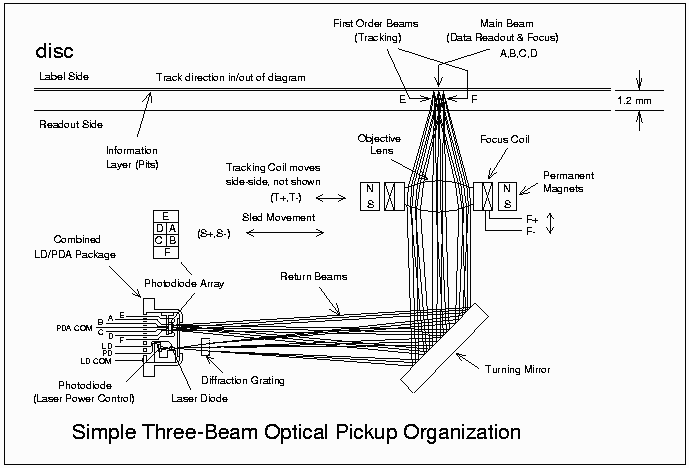
A diagram showing the major functional components of the three-beam optical
pickup described below is available in both PDF and GIF format:

* Get CDT3BP: cdt3bp.pdf or cdt3bp.gif.

This design is typical of older optical pickups (though you may come across
some of these).  Newer types have far fewer individual parts combining and
eliminating certain components without sacrificing performance (which may even
be better).  Additional benefits result is lower cost, improved robustness,
and increased reliability.  However, operating principles are similar.

The purpose of the optical pickup in a CD player, CDROM drive, or optical disk
drive, is to recover digital data from the encoded pits at the information
layer of the optical medium.  (With recordable optical disks, it is also used
to write to the disk medium.)  For CD players, the resulting datastream is
converted into high fidelity sound.  For CDROMs or other optical storage
devices, it may be interpreted as program code, text, audio or video
multimedia, color photographs, or other types of digital data.

Most of the basic operating principles are similar for single-beam CD pickups
and for pickups used in other digital optical drives.

It is often stated that the laser beam in a CD player is like the stylus of a
phonograph turntable.  While this is a true statement, the actual magnitude of
this achievement is usually overlooked.  Consider that the phonograph stylus
is electromechanical.  Stylus positioning - analogous to tracking and focus in
an optical pickup - is based on the stylus riding in the record's grooves
controlled by the suspension of the pickup cartridge and tone arm.  The analog
audio is sensed most often by electromagnetic induction produced by the
stylus's minute movements wiggling a magnet within a pair of sense coils.

The optical pickup must perform all of these functions without any mechanical
assistance from the CD.  It is guided only be a fraction of a mW of laser
light and a few milligrams of silicon based electronic circuitry.

Furthermore, the precision involved is easily more than 2 orders of magnitude
finer compared to a phonograph.  Sophisticated servo systems maintain focus
and tracking to within a fraction of a micrometer of optimal.  (1 um is equal
to 1/25,400 of an inch).  Data is read out by detecting the difference in
depth of pits and lands of 1/4 wavelength of laser light (about .15 um in the
CD)!

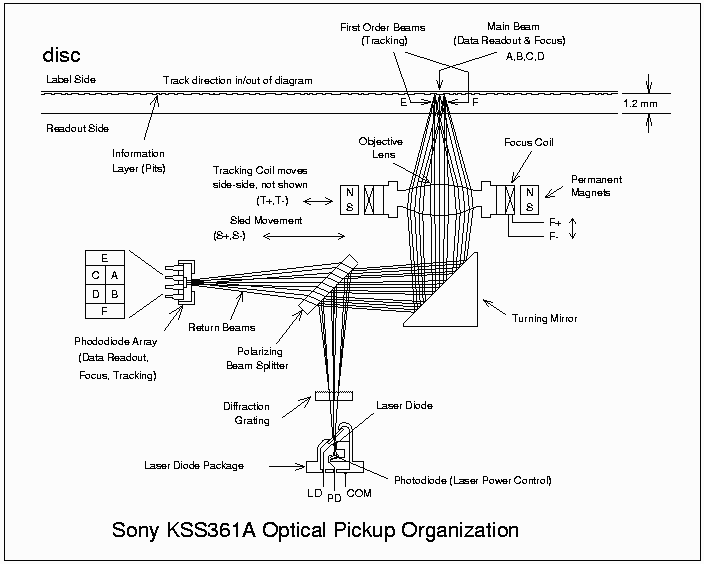
* The laser beam is generated by a solid state laser diode emitting at 780 nm
  (near IR).  Optical power from the laser diode is no more than a couple of mW
  and exits in a wedge shaped beam with a typical divergence of 10x30 degrees
  in the X and Y directions respectively.

* A diffraction grating splits the beam into a main beam and two (first order)
  side beams. (The higher order beams are not used).  Note that the diffraction
  grating is used to generate multiple beams, not for its more common function
  of splitting up light into its constituent colors.  The side beams are used
  for tracking and straddle the track which is being read.  The tracking servo
  maintains this centering by keeping the amplitude of the two return beams
  equalized.)

* Next, the laser beam passes through a polarizing beam splitter (a type of
  prism or mirror which redirects the return beam to the photodiode array), a
  collimating lens, a quarter wave plate, a turning mirror, and the objective
  lens before finally reaching the disc.

* The collimating lens converts the diverging beam from the laser into a
  parallel beam.

* A turning mirror (optional depending on the specific optical path used) then
  reflects the laser light up to the objective lens and focus/tracking
  actuators.

* The objective lens is similar in many ways to a high quality microscope
  objective lens.  It is mounted on a platform which provides for movement
  in two directions.  The actuators operate similarly to the voice coils
  in loudspeakers.  Fixed permanent magnets provide the magnetic fields
  which the coils act upon.  The focus actuator moves the lens up and down.
  The tracking actuator moves the coil in and out with respect to the disc
  center.

* The collimated laser beams (including the 2 side beams) pass through the
  objective lens and are focused to diffraction limited spots on the
  information - pits - layer of the disc (after passing through the 1.2
  millimeters of clear polycarbonate plastic which forms the bulk of the
  disc).

* The reflected beams retrace the original path up until they pass through the
  polarizing beam splitter at which point they are diverted to the photodiode
  array.  The polarizing beam splitter passes the (horizontally polarized)
  laser beams stright through.  However, two passes (out and back) through
  the quarter wave plate rotates the polarization of the return beam to be
  vertical instead and it is reflected by the polarizing beam splitter toward
  the photodiode array.

The return beams from the disc's information layer are used for servo control
of focus and tracking and for data recovery.

* A cylindrical lens slighlty alters the horizontal and vertical focal
  distances of the resulting spot on the photodiode array.  The spot will then
  be perfectly circular only when the lens is positioned correctly.  To close
  or to far and it will be elliptical (e.g., elongated on the 45 degree axis
  if too close but on the 135 degree axis if too far).

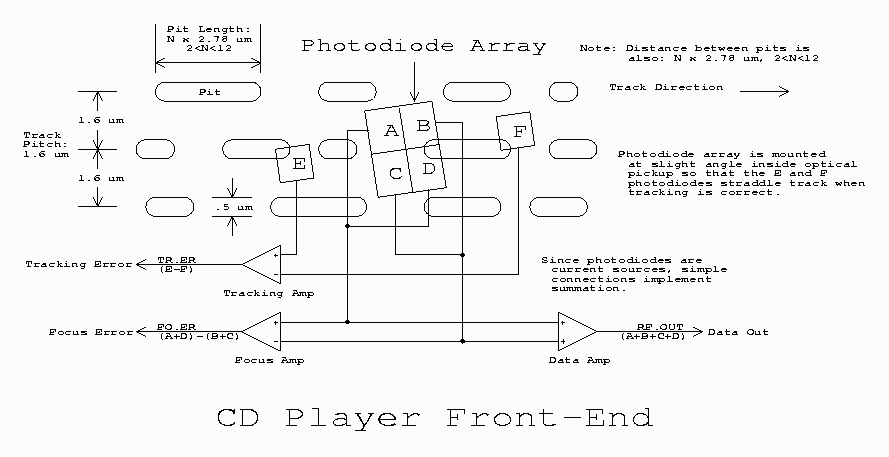
  The central part of the photodiode array is divided into 4 equal quadrants
  labeled A,B,C,D.  Focus is perfect when the signal = (A+C)-(B+D) = 0.

  The actual implementation may use an astigmatic objective lens rather than a
  separate cylindrical lens to reduce cost but the effect is the same.  Since
  the objective lens is molded plastic, it costs no more to mold an astigmat
  (though grinding the original molds may have been a treat!).  It is even
  possible that in some cases, the natural astigmatism of the laser diode
  itself plays a part in this process.

* The side beams created by the diffraction grating are positioned forward and
  back of the main beam straddling the track of pits being followed (not
  directly on either side as shown in the diagram - but that was easier to
  draw!).

  Segments on either side of the photodiode array designated E and F monitor
  the side beams.  Tracking is perfect when the E and F signals are equal.

* The data signal is the sum of A+B+C+D.

In essence, the optical pickup is an electronically steered and stabilized
microscope which is extracting information from tracks 1/20 the width of a
human red blood cell while flying along at a linear velocity of 1.2 meters
per second!

See the sections: "Parts of a CD player or CDROM drive" and "Startup Problems"
for more information on the components and operation of the optical pickup and
descriptions and photos of some typical laser diodes, optical pickups, and
optical decks.
The opto-mechanical design of optical pickups varies widely.  Originally, they
were quite complex, bulky, heavy, and finicky with respect to optical
alignment.  However, in their continuing effort to improve the design, reduce
the size and mass, and cut costs, the manufacturers have produced modern
pickups with remarkably few distinct parts.  This should also result in better
performance since each optical surface adds reflections and degrades the the
beam quality.  Therefore, the required laser power should be reduced and the
signal quality should improve.

* Generally, the most complex types are also the oldest.  With these, there
  were individual optical elements for each stage in the beam path and
  completely separate laser diode and photodiode array packages.  In short,
  while details varied, the overall construction was very similar to the
  diagram and description given in the section: "CD optical pickup operating principles".  These also had several optical adjustments - which in some
  cases needed frequent attention.

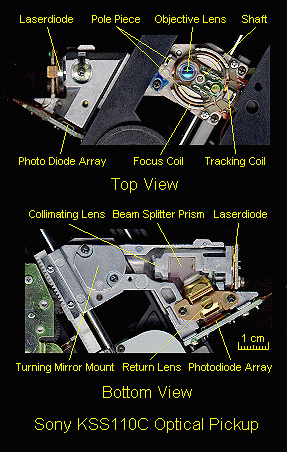
  An example of this type is the Sony KSS110C Optical Pickup.  Most components
  perform individual functions and it is larger and heavier than more modern
  designs.

* The most common types still have a separate laser diode and photodiode array
  but may have eliminated the cylindrical and collimating lenses and perhaps
  the polarizer and quarter wave plate.  There are few if any adjustments.

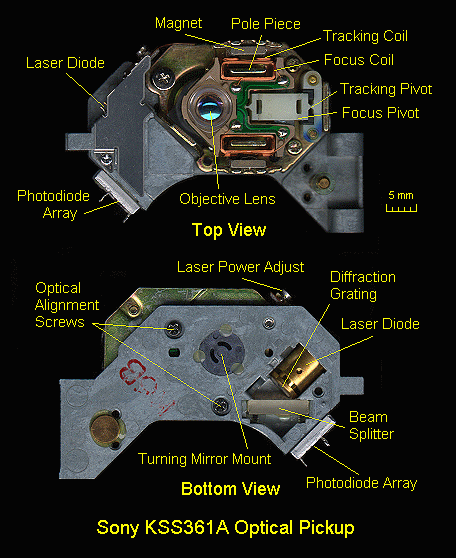
  The Sony KSS361A Optical Pickup is typical of these mainstream designs.
  With very minor variations (mostly in mounting), various models may be found
  in all types of CD players and CDROM drives manufactured by Sony, Aiwa, and
  others.

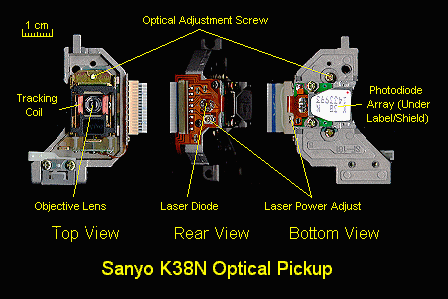
  Another similar design is used in the Sanyo K38N Optical Pickup which is
  somewhat newer and more compact.

  For a diagram and detailed description of these mainstream pickups, see the
  section: "Sony KSS series optical pickups".

* Some manufacturers have gone to a combined laser diode/photodiode (LD/PD)
  array package which looks like a large LD but with 8 to 10 pins.  Aside from
  the objective lens assembly, the only other part may be the turning mirror,
  and even this is really not needed.  Such a pickup can be very light in
  weight (which is good for fast-access CDROM drives) and extremely compact.

  Eliminating the components needed to separate the outgoing and return beams
  should result in substantial improvement in optical performance.  The only
  disadvantage would be that the beams are no longer perfectly perpendicular
  to the disc 'pits' surface and this may result in a very slight, probably
  negligible reduction in detected signal quality - more than made up for by
  the increased signal level.

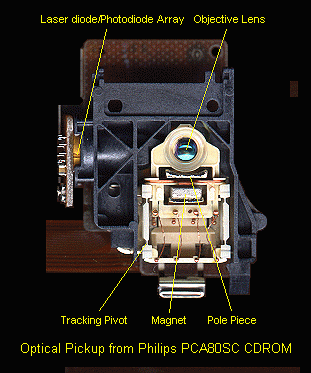
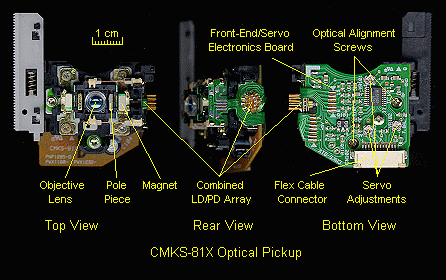
  The CMKS-81X Optical Pickup and Optical Pickup from Philips PCA80SC CDROM
  are typical of these modern designs.

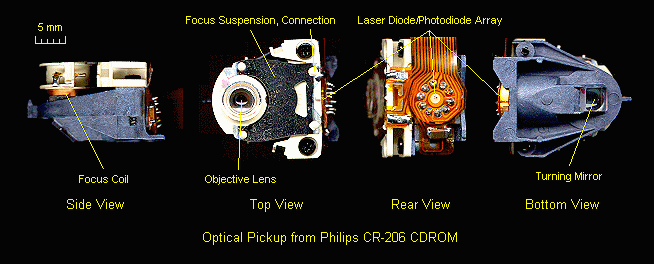
  The smallest ones such as the Optical Pickup from the Philips CR-206 CDROM
  are only about 1/2" x 5/8" x 3/4" overall - just about the size of the lens
  cover!  For this single-beam pickup, there are absolutely NO additional
  optical elements inside.  A three-beam pickup would have a diffraction
  grating in front of the laser diode.

  For a diagram and detailed description of this type of pickup, see the
  section: "Super simple optical pickups".
The books listed in the section: "Suggested references" include additional
information on the theory and implementation of digital audio, laserdisc,
and optical drive technology.

A Fundamental Introduction to the Compact Disc Player is a somewhat more
theoretical discussion of compact disc audio technology with diagrams and
even some equations.  If it doesn't put you to sleep, you will find quite a
bit of interesting information in this article.  In either case, it may prove
of value.

Andy Poggio's relatively short article: From Plastic Pits to "Fantasia"
provides a nice overview of CD technology.

A site with CD-R specific information including some repair tips is:
Proper care of a CD player does not require much.  Following the
recommendations below will assure peak performance and long life, and
minimize repairs.

* Locate the CD player in a cool location.  While the CD player is not
  a significant heat producer, keeping it cool will reduce wear and
  tear on the internal components and assure a long trouble free life.

* Don't locate CD players in dusty locations or areas of high (tobacco)
  smoke or cooking grease vapors.  I cannot force you to quit smoking,
  but it is amazing how much disgusting difficult to remove brown grime
  is deposited on sensitive electronic equipment in short order from
  this habit.

* Make sure all audio connections are tight and secure to minimize
  intermittent or noisy sound.

* Finally, store CDs away from heat.  The polycarbonate plastic used to
  mold CDs is quite sturdy but high temperatures will eventually take
  their toll.  Return them to their jewel cases or other protective
  container when not being played.
You no doubt have heard that a CD should be cleaned and checked periodically.
"Purchase our extended warranty" says the salesperson "because CD players
are very delicate and require periodic alignment".  For the most part, this
is nonsense.  CD players, despite the astonishing precision of the optical
pickup are remarkably robust.  Optical alignment is virtually never needed
for a component CD player and is rarely required even for portable or
automotive units.  In fact, modern CD players often don't even have any of
these adjustments - the components of the optical pickup are aligned at the
factory and then fixed in place with hardening sealer.

An occasional internal inspection and cleaning is not a bad idea but not
nearly as important as for a VCR.  Realistically, you are not going to do
any of this anyway.  So, sit back and enjoy the music but be aware of the
types of symptoms that would be indications of the need for cleaning or other
preventive or corrective maintenance - erratic loading, need to convince the
CD player to cooperate and play a disc, audio noise, skipping, sticking, and
taking longer than usual to recognize a disc or complete a search.

If you follow the instructions in the section: "General inspection, cleaning, and lubrication", there is minimal risk to the CD player.  However, don't go
overboard.  If any belts are in good condition (by appearance and stretch
test), just clean them or leave them alone.  Except for the Sony drawer
loading mechanism, belts are rarely as much of a problem in CD players as
in VCRs.

Of course, acute symptoms like refusal to play or open the door is a sign
of the need for emergency treatment.  This still may mean that a thorough
cleaning is all that is needed.
Every CD, stereo equipment, department, discount, store - and even sidewalk
venders - carries CD lens cleaning discs.  Are they of any value?  Can they
cause damage?

I generally don't consider CD lens cleaning discs to be of much value for
preventive maintenance since they may just move the crud around.  However,
for pure non-greasy dust (no tobacco smoke and no cooking grease), they
probably do not hurt and may do a good enough job to put off a proper
cleaning for a while longer.  However, since there are absolutely no sorts of
standards for these things, it is possible for a really poorly designed
cleaning disc to damage the lens.  In addition, if it doesn't look like a CD
to the optical pickup or disc-in sensor, the lens cleaning disc may not even
spin.  So, the drawer closes, the drawer opens, and NOTHING has been
accomplished!
Although CDs are considerably more tolerant of abuse than LPs, some
precautions are still needed to assure long life.  Also, despite the
fact that only one side is played, serious damage to either side can
cause problems during play or render the CD totally useless.

It is important that the label side be protected from major scratches which
could penetrate to the information layer.  Even with the sophisticated
error correction used on the CD, damage to this layer, especially
if it runs parallel to the tracks, can make the CD unusable.

The CD is read by focusing a laser beam through the bottom 1.2 mm of
polycarbonate.  As a result of the design of the optical system used in the
pickup, at the bottom surface, the beam diameter is about 1 mm and thus small
scratches appear out of focus and in many cases are ignored and do not cause
problems.

At the information layer with the pits, the beam diameter has been reduced
to under 2 um.  Still, scratches running parallel to the tracks are more
problematic and can cause the optical pickup to get stuck repeating a track,
jumping forward or back a few seconds, or creating noise or other problems
on readout.  In severe cases, the CD may be unusable especially if the
damage is in the directory area.

This is why the recommended procedure for cleaning a CD is to use soap and
water (no harsh solvents which may damage the polycarbonate or resin overcoat)
and clean in a radial direction (center to edge, NOT in the direction of the
tracks as you would with an LP).  While on the subject of CD care, CDs should
always be returned to their original container for storage and not left out
on the counter where they may be scratched.

If there is a need to put one down for a moment, the label side is probably to
be preferred since minor scratches have no effect on performance so long as
they do not penetrate to the storage layer below (in which case the CD is
probably history).  Protectors are available to prevent damage to the label
side of the disc.  Personally, I think this is taking care to an excessive
level but, hey, if you use your CDs as frisbies, go for it!
You do not need a fancy CD cleaning machine.

Use a soft cloth, tissue, or paper towel moistened with water and mild
detergent if needed.  Wipe from center to edge - NOT in a circular motion
as recommended for an LP.  NEVER use any strong solvents.  Even stubborn
spots will eventually yield to your persistence.  Washing under running
water is fine as well.

Gently dry with a lint free cloth.  Do not rub or use a dry cloth to clean
as any dirt particles will result in scratches.  Polycarbonate is tough
but don't expect it to survive everything.  Very fine scratches are not
usually a problem, but why press your luck?
Something that not everyone is aware of is the multilevel error handling
technology in a CD player.  Therefore, a dirty CD may not produce instantly
obvious audio problems but can nonetheless result in less than optimal
audio performance.

Very severe errors - long bursts - will result in audible degradation
including noise and/or muting of the sound.  Even this may not always be
detectable depending on musical context.

Shorter runs of errors will result in the player interpolating between
what it thinks are good samples.  This isn't perfect but will probably not
be detected upon casual listening.

Errors within the correcting capability of the CIRC code will result in
perfect reconstruction.

Not all players implement all possible error handling strategies.

Therefore, it is quite possible for CD cleaning to result in better
sound.  However, a CD that is obviously clean will not benefit and
excessive cleaning or improper cleaning will introduce fine (or not so
fine) scratches which can eventually cause problems.
So the droid in the CD store warned you that dirty CDs could do irepairable
harm to your CD player, your stereo, your disposition, etc.  "Buy our $19.95
Super-Laseriffic CD cleaning kit".

The claim made at one major chain was that dirt or dust on the laser eye would
cause heat build-up that would burn out the mechanism. This is different
from a dirty disc. The cleaner he was pushing was a little brush attached to
a CD that brushed off the lens as it played.

This is total rubbish.  The power of a CD laser is less than 1 mW and is not
concentrated at the lens.  And, as noted elsewhere, those cleaning CDs with
the little brush are next to useless on anything but the smallest amount of
dry dust.

There are a lot of suckers out there.  Save your money.

The worst that can happen is the CD will not play properly.  There may be
audible noise, it may fail to track properly, abort at random times, or not
even be recognized.  The electronics will not melt down.

It is just about impossible for a dirty CD to do any damage to the player.
A dirty lens will only result in disc recognition or play problems similar
to those caused by a dirty CD.  The laser will not catch fire.

The only way damage could occur is if you loaded a cracked CD and the crack
caught on the lens.

You do not need any fancy CD cleaners in any case - soap or mild detergent
and water and a soft cloth are all that are required.  If the CD looks clean,
it probably will be fine.  If there are serious smudges or fingerprints,
then cleaning could make a significant difference in performance.

For further information, see the sections "CD cleaning" and "General inspection, cleaning, and lubrication".
Unlike old or worn video tapes, it is unlikely that a 'bad' CD could damage
your player.  If the borrowed CD is dirty, clean it as described in the
section: "CD cleaning".  If it is badly scratched, the worst that will happen
is that it will sound bad - skipping and audible noise.  No damage to your
player will result.  However, if the CD is cracked or broken (this is really
difficult to do but I have gotten cracked CDs from public libraries), don't
even attempt to load it - a broken edge could catch on the lens and ruin
the optical pickup entirely.
The perhaps unexpected answer is a definite *yes* even though everyone has
heard about the virtues of non-contact laser playback.  There are several
ways that a broken or poorly designed or manufactured player can result in
scratched discs:

* If the lens moves too high while attempting to focus and the mechanical
  stop does not prevent it from hitting the disc, scratches can occur.  On
  some players, the objective lens can easily go this high if focus is not
  found on the first pass.  Note that in most cases, the lens will not suffer
  since it is protected by a raised ridge which is what actually scratches
  the disc.

* Mechanical misalignment of the spindle motor or plastic cabinet parts can
  result in the disc touching the bottom or top of the disc compartment and
  this can leave scratches.  This could be the result of poor or cheap design,
  shoddy manufacturing, or damage from a fall or other abuse.

* If the control logic gets confused, it may allow you to eject a disc while
  it is still spinning and not fully supported by the spindle platter.  A
  dirty disc that resulted in failure of the CLV servo to lock can result in
  a disc speed runaway condition with some players.  If the drawer is then
  opened too soon, the disc will still be spinning because the controller has
  no way of knowing its present status and will not have provided enough
  reverse torque to stop the spindle motor - or too much and it will be
  spinning in reverse.

The likelihood of any of these is increased with dirty, smudged, warped, or
previously damaged discs.

Minor scratches may not result in a serious problem and there are products
to polish them - don't know how well they work.  However, if these scratches
can be proven to be a direct consequence of a defective player still under
warranty, you should try to get some compensation from the manufacturer for
any seriously damaged and now unplayable CDs.
So your five year old decided that your favorite CD would make nice
frisbee - didn't really know much about aerodynamics, did he?

Now it sounds like a poor excuse for a 78 rpm record.  What to do?

There seem to be about as many ways of fixing scratches on CDs as producing
them in the first place.  However, they fall into 3 classes of techniques:

1. Mild abrasives: plastic or furniture polish, Brasso metal polish,
   toothpaste.  These will totally remove minor scratches.

2. Fillers: turtle wax, car wax, furniture wax.  Apply over the whole disc
   and buff out with a lint free cloth.  Filling larger scratches should
   be fairly effective but the disc will be more prone to damage in the
   future due to the soft wax.

3. Blowtorch.  At least one person who claims to have worked for several years
   in used CD store swears by this technique. Supposedly, he uses a pencil-type
   pocket butane torch and with great dexterity fuses the surface layer of the
   readout side of the disc so that all of those scratches and unsightly
   blemishes-well-melt away. Obviously, there are dangers in using fire on
   plastic and this is likely a last resort.  I would assume that you are
   rolling with hysterical laughter at this point.  In any case, I would not
   take this approach too seriously :-).

As with cleaning a CD, when applying or rubbing any of these materials,
wipe from the center to the outside edge.  A CD player can generally track
across scratches that are perpendicular to its path reasonable well, but
not those that run the parallel to the tracks.

A mild abrasive will actually remove the scratch entirely if it is minor
enough.  This is probably more effective where the surface has been scuffed
or abraded rather than deeply scratched.

Wax-like materials will fill in the space where the scratch is if the
abrasive was not successful.  Even deep scratches may succumb to this
approach.

A combination of (1) and (2) may be most effective.

Exorbitantly priced versions of these materials are available specifically
marketed for repair of CDs.  However, the common abrasives and waxes should
work about as well.

I cannot comment on the use of the blowtorch or how many years of practice is
required to get you CD repair license with this technique.  However, I am
highly skeptical that this works at all and suspect that destruction of the CD
is the most likely outcome - totally melting, warping, or cracking or
shattering from the thermal stress.  In other words, I don't recommend trying
the Blowtorch approach unless you have a stack of AOL or MSN CD to sacrifice
and you have sufficient accident insurance!

An alternative to CD home repair are companies specializing in this service.
A couple of these are: Aural Tech CD and CD Repairman.  I do not have
information as to their effectiveness or cost.  However, if you have a very
special irreplaceable CD that someone used as a skateboard, one of these may
be worth considering.
If scratches penetrate to the information layer, all bets may be off.  Much
of the optical system compliance with respect to damage depends on the short
depth of focus assuring that surface scratches *on the bottom* will be out
of focus and ignored.  This is not possible with damage to the pits.  Even
though the CIRC code should be able to deal with thousands of bad bits, such
damage can confuse the tracking servos to the point where the disc will be
unusable.

What if the aluminum (or gold) reflective layer has come off with no damage
to the plastic underneath?  First of all, I don't know how this could occur
unless you were attempting to clean them with a strong solvent.  Any physical
damage which removed the mirror coating will also damage the pits and recoating
will be useless.

(Note that I have unintentionally removed the gold coating on a CD-R using a
solvent similar to what is in Liquid Wrench(tm).  I was actually trying to
remove the label but went a little too far!  The solvent apparently dissolved
the greenish coating or binding underneath allowing the gold film and label
to just flake off - very strange behavior.  Most of the green layer was still
intact.  I now have a nice greenish somewhat transparent plastic coaster.)

Some discs may still work on some players or drives without the aluminum
coating.  However, this isn't that likely.  How to replace it?  Ideally,
vacuum deposition is needed.  The problem isn't only the reflectance but
the micro structure - the original coating was vacuum deposited to conform
to the pits and lands of the information layer.  It is perfectly uniform below
the resolution of the laser beam.  Modeling (silver or gold colored) paint is
amorphous and rough at these feature sizes and floppy disk write protect
stickers or other adhesive backed reflective films don't even come close
to contacting the information layer consistently.  Mirror paint may work
but is a long-shot.
While there are far fewer potential dangers involved in servicing a CD player
compared to a TV, monitor, or microwave oven, some minimal precautions are
still required when working with the cover removed.  These relate to electrical
connections to the AC line and exposure to the laser beam:

* Electrical: There may be a few exposed electrically live parts from the
  power line, usually around the power cord entrance, power transformer,
  and on/off switch.  If there are, tape them over or cover them somehow
  so you need not be concerned with a low tech shock!  Unless you are
  troubleshooting a primary side power supply problem, there will be no
  need to go near the AC line.

* Laser:  The laser in a CD player is infra red, near IR - 780 nm - border
  of visible range but for all intents and purposes invisible.  However, it
  is very low power (generally under 1 mW at the lens) and due to the optics,
  extremely unlikely that you could be in any danger.  Nonetheless, don't
  go out of your way to look closely into the lens while the unit is on!

  Caution: there is usually a very low intensity (in appearance) emission
  from an IR laser which appears deep red.  It will be visible as a spot the
  size of the period at the end of this sentence when the lens is viewed from
  an oblique angle.  This may be a spurious emission in the red part of the
  spectrum or just your eye's response to the near IR energy of the main beam.
  In either case, do not be mislead into thinking that the laser is weak as a
  result of noticing this.  The main beam is up to 10,000 times more intense
  than it appears!  Take care.  However, the red dot is an indication that the
  laser is being powered and probably functional, though it is no guarantee of
  the later.  You really need a laser power meter or at least an IR detector
  to confirm the existence of an IR laser beam.

  Whenever a full size (5-1/4") CD is in place, there is absolutely no danger
  of exposure to the laser beam.  Reflections of laser light at these power
  levels are harmless.  However, if you are testing with a 3-1/2" 'single' or
  homemade cut-down test CD (see the section: "Useful ways to mangle CDs"),
  avoid staring into the lens if there is any chance the laser is powered.
Many problems have simple solutions.  Don't immediately assume that
your problem is some combination of esoteric complex convoluted
failures.  For a CD player, it may just be a bad belt or dirty lens.
Try to remember that the problems with the most catastrophic impact on
operation (a CD player that will not play past track 6) usually have
the simplest solutions (the gears that move the optical pickup need
lubrication).  The kinds of problems that we would like to avoid at all
costs are the ones that are intermittent or difficult to reproduce: the
occasional audio noise or skipping or a CD player that refuses to play
classical CDs (depending on your tastes!) of music composed between the
years 1840 and 1910.

When attempting to diagnose problems with a CDROM drive, start by trying
to get it to play an audio CD.  Data readback is more critical since
the error correction needs to be perfect.  However, with audio playback
functional, all of the optical pickup and most of the servo systems and
front-end electronics must be working.  A CDROM drive which cannot even
play a music CD will have no chance of loading Windows 95.

If you get stuck, sleep on it.  Sometimes, just letting the problem
bounce around in your head will lead to a different more successful
approach or solution.  Don't work when you are really tired - it is both
dangerous and mostly non-productive (or possibly destructive).

Whenever working on precision equipment, make copious notes and diagrams.
You will be eternally grateful when the time comes to reassemble the unit.
Most connectors are keyed against incorrect insertion or interchange
of cables, but not always.  Apparently identical screws may be of differing
lengths or have slightly different thread types.  Little parts may fit in
more than one place or orientation.  Etc.  Etc.

Pill bottles, film canisters, and plastic ice cube trays come in handy for
sorting and storing screws and other small parts after disassembly.

Select a work area which is well lighted and where dropped parts can
be located - not on a deep pile shag rug.  Something like a large plastic
tray with a slight lip may come in handy as it prevents small parts from
rolling off of the work table.  The best location will also be relatively
dust free and allow you to suspend your troubleshooting to eat or sleep or
think without having to pile everything into a cardboard box for storage.

Another consideration is ESD - Electro-Static Discharge.  The electronic
components - especially the laser diode - in CD players, CDROM drives, and
similar devices, are vulnerable to ESD.  There is no need to go overboard but
do take reasonable precautions like not wearing clothing made of wool that
tends to generate static.  When working on component CD and laserdisc players,
get into the habit of touching a ground like the metal chassis before touching
any circuit components.  The use of an antistatic wrist strap would be further
insurance especially if the optical pickup assembly needs to be unplugged for
any reason.

A basic set of precision hand tools will be all you need to disassemble
a CD player and perform most adjustments.  However, these do not need to be
expensive.  Needed tools include a selection of Philips and straight blade
screwdrivers, needlenose pliers, wire cutters, tweezers, and dental picks.
A jeweler's screwdriver set is a must particularly if you are working on
a portable CD player or CDROM drive.

For making servo adjustments, non-metallic fine tip jeweler's screwdrivers
or alignment tools will be essential as some of the front-end circuitry may
be sensitive to body capacitance - contact with the slot may alter the
behavior of the player (for better or for worse).  In a pinch, wrapping
electrical tape around the part of a normal jeweler's that you grasp will
probably provide enough isolation.  However, with a tool with a blade made
out of an insulator, you will be less likely to accidentally short things
out as well

You should not need any CD specific tools except in the unlikely event you
get into optical alignment in which case the service manual will detail what
tools and special rigs are needed.

A low power fine tip soldering iron and fine rosin core solder will be
needed if you should need to disconnect any soldered wires (on purpose
or by accident) or replace soldered components.

See the document: "Troubleshooting and Repair of Consumer Electronics Equipment" for additional info on soldering and rework techniques.

For thermal or warmup problems, a can of 'cold spray' or 'circuit chiller'
(they are the same) and a heat gun or blow dryer come in handy to identify
components whose characteristics may be drifting with temperature.  Using the
extension tube of the spray can or making a cardboard nozzle for the heat
gun can provide very precise control of which components you are affecting.

For info on useful chemicals, adhesives, and lubricants, see "Repair Briefs,
an Introduction" as well as other documents available at this site.
Don't start with the electronic test equipment, start with some analytical
thinking.  Many problems associated with consumer electronic equipment
do not require a schematic (though one may be useful).  The majority
of problems with CD are mechanical and can be dealt with using nothing
more than a good set of precision hand tools; some alcohol, degreaser,
contact cleaner, light oil and grease; and your powers of observation
(and a little experience).  Your built in senses and that stuff between
your ears represents the most important test equipment you have.

A DMM or VOM is necessary for checking of power supply voltages and
testing of sensors, LEDs, switches, and other small components.  This does
not need to be expensive but since you will be depending on its readings,
reliability is important.  Even a relatively inexpensive DMM from Radio
Shack will be fine for most repair work.

For servo and other electronic problems, an oscilloscope will be useful.
However, it does not need to be fancy.  A 10 to 20 MHz dual trace scope
with a set of 10X probes will be more than adequate for all but the most
esoteric troubleshooting of CD players and CDROM drives.

To determine if the laser diode is working properly, a laser power meter is
very useful.  Such a device is expensive but is often essential to properly
and safely adjust laser power on many CD players and CDROM drives.  However,
for many problems, simply knowing that an IR laser beam is being emitted is
enough.  For this, the simple device described in the section: "IR detector circuit" is more than adequate.  Alternatively, an inexpensive IR detector
card or even some camcorders can perform the same function.

A stereo amplifier and loudspeakers is essential to allow your most important
piece of audio test equipment to function effectively - your ears.  A lot can
be determined by listening to the audio output to distinguish among dirt,
lubrication, servo, control, and other mechanical or electronic problems.
I would caution against the use of headphones as a sudden burst of noise
could blow your eardrums and spoil your entire day.

For testing of optical pickups, some additional equipment will be needed.
However, this will be detailed in the section: "Testing of Optical Pickup Assemblies".
An inexpensive test CD is nice to have just to be able to play known
frequencies and volume levels.  However, it is not essential - any
half decent CD will work just fine for most tests.  For many players,
even an old CDROM disc will be adequate to diagnose startup problems.
However, to fully exercise the limits of the player, a disc with a full
74 minutes of music will be needed - Beethoven's Ninth Symphony is a
good choice (even if you are not into classical music) since it is usually
very close (or sometimes slightly over) this length of time.

Keep those old demo CDs or even obsolete CDROM discs - they can be used
for testing purposes.  Where an optical deck has a servo problem, the
disc will end up spinning out of control.  Stopping this suddenly may
result is the CD scraping itself against the drawer or or base of the
deck and getting scratched.  Therefore, some 'garbage' discs are always
handy for testing purposes.

To evaluate tracking and error correction performance, any CD can be turned
into a test CD with multiple width strips of black tape, a felt tip marker,
or even a hand drill!  In fact, some professional test discs are made in
exactly this manner.

Also see the sections: "Comments on test discs" and "Custom test CDs using CD-Rs".
These suggestions will allow you to put some of those AOL CDs to good use
(well, besides making high tech coasters)!

* For portable CD players where the designers in their infinite wisdom put some
  of the servo adjustments *under* the spinning disc, a 3-1/2" CD 'single' is
  extremely handy.  A normal CD can be cut down as well - to whatever size you
  need as long as enough actual tracks are left so that the directory and a few
  minutes of music/data remain - this could be as little as about 2-1/2" to
  gain access to the adjustments on some models.  This surgery is best done on
  a band saw with a narrow fine tooth blade.  However, tiny cracks may grow in
  from the edge (overnight, even) if the disc is subjected to any heating or
  stress from cutting or smoothing.  Perhaps some annealing is needed to
  prevent these from getting started.

  Note that the lower mass (actually the lower moment of inertia for you
  purists) of the small CDs may alter the servo response somewhat.  Putting a
  heavy metal ring or washer on top should help.  However, this is still much
  much better than continually having to remove a normal CD to get at the
  adjustments, incrementally moving them one way or another, and then
  replacing the CD to see how you made out.  One can grow old doing this!  The
  little CDs will enable you to monitor the test points as the adjustments are
  made which is also a definite advantage :-).

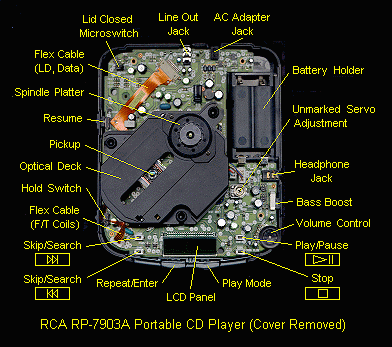
  The RCA RP-7903A Portable CD Player is an example of a design where this
  type of modified CD is invaluable for testing.

* A handy special miniature CD can be made to permit viewing of the focusing
  action on any CD player or CDROM drive as long as you can get to the top of
  the deck while testing.  Using a band saw, cut a garbage disc down so as to
  leave only a 1-1/2" diameter center hub with a 1/2" by 1/2" tab sticking out
  from it.  This can then be positioned by hand to just cover the lens while
  it is supposed to be doing its focus search.

* An alternative that will permit you to view both the laser output (from a
  safe distance) and the focusing action is to create a window in a garbage CD
  by removing the label and aluminum layers from an area of the CD at the inner
  tracks - at least a square inch worth.  Lacquer thinner (nail polish remover,
  with adequate ventilation) will probably work to remove the label.  Fine
  sand paper or steel wool will remove the aluminum and information pits/lands
  (grooves).  Then polish with a buffing wheel or old rag.

Caution: when using any of these cut-down or windowed test CDs, or 3-1/2"
'singles', avoid staring into the lens when the laser is powered.  See the
section: "SAFETY".
WARNING: you will void the warranty, if any.  You may make the problem worse,
possibly much worse.  If the player partially worked, it may no longer even
recognize the disc directory.  You may accidentally damage parts that were
perfectly fine.  If you should decide to then have the unit professionally
serviced, you may find that the shop simply refuses to touch it if they
suspect your tampering.  There is nothing worse than having to undo 'fixes'
introduced by a well intentioned do-it-yourselfer where the state of the
player is now a total unknown.  At best you will be charged for this effort on
a time and materials basis.  It may be very costly.  It may not be worth the
expense.

A CD player still under warranty should probably be returned for service for
any covered problems except those with the most obvious and easy solutions.

On the other hand, it is possible that you will do a better job than some
repair shops.  You will probably have a better understanding of the basic
theory and will certainly be able to spend much more time on the problem.
And, of course, hobbiest/handyman's time is cheap - as in free.

* Component CD players.  It is generally very easy to remove the top cover on
  most CD players.  There are usually some very obvious screws on the sides
  and possibly back as well.  These are nearly always Philips head type - use
  the proper screwdriver.  Once all the screws are out, the top cover will
  lift up or slide back and then come off easily.  If it still does not want
  to budge, recheck for screws you may have missed.

  Once the top cover is removed, the optical deck and electronics board will
  usually be readily accessible.

  In rare cases, removing the bottom cover will provide access to the solder
  side of the electronics board.  However, with most CD players, the bottom
  is solid sheet metal and the entire board would need to be unmounted.  On
  some, the electronics board is mounted upside-down so there is full access
  to the wiring side once the cover is removed.

* With most single play designs, the entire optical deck can be lifted out
  after removing 3 or 4 screws.  One screw may have a grounding contact under
  it.  Replace this in exactly the same position.  There may be fragile
  flexible cables.  Be careful so as not to damage any.  Usually, these cables
  plug in to connectors on the electronics board and permit the entire optical
  deck to be easily replaced if needed (not very common, however, despite what
  you may have heard).

* For changers, details will depend on the particular model but in general, it
  is more likely that removal of the entire changer mechanism will be more
  involved.  However, this is usually not needed unless there is an actual
  mechanical problem with it.  With Pioneer cartridge changes, for example,
  the optical deck is easily removed with just 4 screws.

* For portables, the bottom plate or top cover usually comes off after
  removing several very tiny screws - use the proper size Philips blade
  jeweler's screwdriver and don't lose them.  Then, you either have access to
  the bottom of the mainboard or the top of the mainboard blocked mostly by
  the optical deck.  With the RCA RP-7903A Portable CD Player, it is the latter
  and the pickup and/or normal size CD conveniently block all access to servo
  adjustments and test points (which as is often the case, are ummarked in
  this RCA unit).  These types of CD players are usually quite a pain to
  troubleshoot!  Of course, there are also many components including most of
  the large multilegged ICs surface mounted on the *bottom* side of the
  mainboard which makes for even more fun should probing be required!  You can
  easily see all the 'stuff' packed into a box just slightly larger than a CD!

* For CDROM drives, both top and bottom covers may be removable depending on
  model.  These are more wide open than portables, especially the newer models
  where everything has been shrunk to a tiny optical pickup and circuit board
  with a few large ICs.  Unfortunately, adjustments (if any) and test points
  are even less likely to be labeled on CDROM drives.  All testing will also
  require a working PC unless your model has built-in audio play capability.

Make notes of screw location and type and immediately store the screws away
in a pill bottle, film canester, or ice cube tray.

When reassembling the equipment make sure to route cables and other wiring
such that they will not get pinched or snagged and possibly broken, or have
their insulation nicked or pierced, and that they will not get caught in
moving parts.  Replace any cable ties that were cut or removed during
disassembly and add additional ones of your own if needed.  Some electrical
tape may sometimes come in handy to provide insulation insurance as well.
(This applies mostly to portables and CDROM drives - component CD players
are very wide open.
The process of reading a CD is digital.  I have seen and heard advertisements
for sonic rings or special magic markers to improve the quality of the digital
audio reproduction.  This is total bunk.  Don't waste your money.  These
products do nothing beyond depleting your pocketbook - and enhancing those
of the vendors.

For more amusement, see the section: "Totally worthless gadgets for CD enthusiasts".
While CD players and CDROM drives started out and still have much in common,
they are diverging.  The optical pickups remain similar but the data processing
and servo systems needed to support 16X speed CDROM technology are much more
sophisticated than those needed for 1X speed CD audio.  Therefore, should
you peak inside your shiny new CDROM drive, you may see parts that differ
considerably from those in a old Discman.
In component stereos units, there are normally linear supplies and thus very
reliable but easy to repair as well.  In portables, they are likely to be
switching supplies, possibly sealed in a shielded can (or at least all surface
mount components), and difficult to troubleshoot and repair.

Usually, at least three voltages are needed: logic power (e.g. +5 Vcc) and a
pair of voltages for the analog circuitry (e.g., +/- 15V).  However, some
designs use a variety of voltages for various portions of the analog (mainly)
circuitry.
This contains the microcomputer controller, servos, readback electronics,
audio D/A(s) and filters.  Most servo adjustment pots will be located
here.  In many cases they are clearly marked but not always.  DO NOT
turn anything unless you are sure of what you are doing - and then only
after merking their original positions precisely.
This subsystem includes all of the components to load and spin the disc,
the optical pickup, and its positioning mechanism.  Refer to the section:
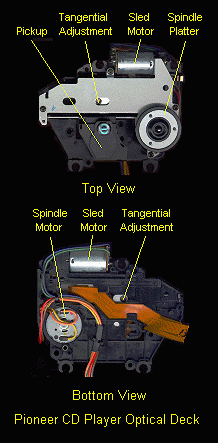
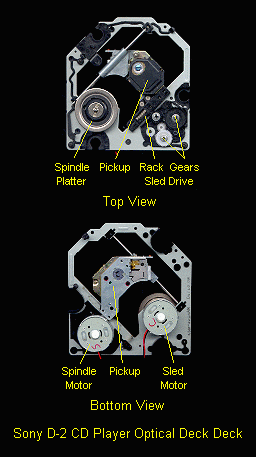
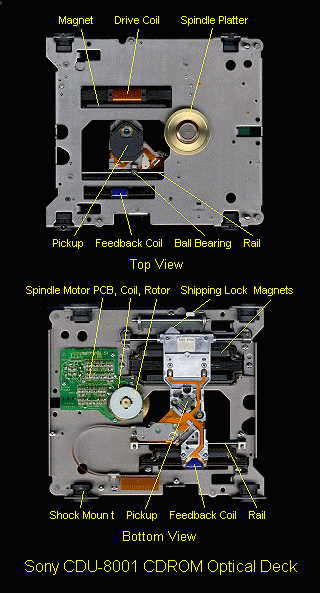
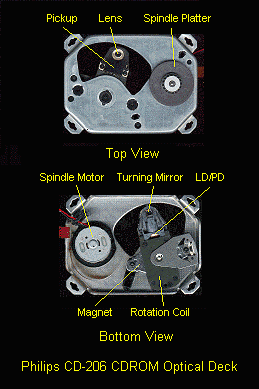
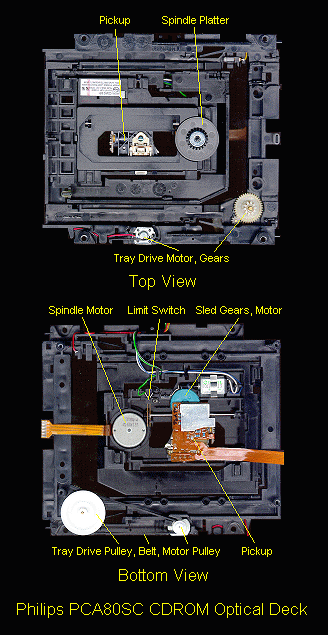
"Typical optical decks" for photos of some common models.

* Loading drawer - Most portable and many lower cost CD players or CDROM
  drives lack this convenience.  Most are motor driven.  However, some
  must be pushed in or pulled out by hand.

  Common problems: loose or oily belt causing drawer to not open or close,
  or to not complete its close cycle.  There can be mechanical damage
  such as worn/fractured gears or broken parts. The drawer switch may be dirty
  causing the drawer to decide on its own to close.  The motor may be
  shorted, have shorted or open windings, or have a dry or worn bearing.

* Spindle, spindle table, or spindle platter, we will use these names more or
  less interchangeably) - When the disc is loaded, it rests on this platform
  which is machined to automatically center it and minimize runout and wobble.

  Common problems: Dirt on table surface, bent spindle, dry or worn bearings
  if spindle not part of motor but is belt driven, loose spindle.

* Spindle motor - The motor that spins the disc.  Most often the spindle
  platform is a press fit onto the spindle motor.  Two types are common:
  The first is a miniature DC motor (using brushes) very similar to the
  common motors in toys and other battery operated devices.  The second type
  is a brushless DC motor using Hall effect devices for commutation.  If
  there are more than 2 wires attached to the motor or if it uses exposed
  coils and control board, it is likely of the brushless type.  In very
  rare cases, a belt is used to couple the motor to the spindle but most
  are direct drive - the spindle is the motor shaft.

  Common problems: partially shorted motor, shorted or open winding, dry/worn
  bearings, defective electronics.  The brushless type are much less likely
  to have electrical problems.

* Clamper - Usually a magnet on the opposite side of the disc from the
  spindle motor which prevents slippage between the disc and the spindle
  platform.  The clamper is lifted off of the disc when the lid or drawer
  is opened.  Alternatively, the spindle may be lowered to free the disc.

  Common problems: doesn't engage fully permitting disc to slip on spindle
  due to mechanical problem in drawer closing mechanism.

* Sled - The mechanism on which the optical pickup is mounted.  The sled
  provide the means by which the optical pickup can be moved across the
  disc during normal play or to locate a specific track or piece of data.
  The sled is supported on guide rails and is moved by either a worm or ball
  gear, a rack and pinion gear, linear motor, or rotary positioner similar
  to what is in a modern hard disk drive - in increasing order of performance.

  Note that a single-beam optical pickup can be used with either a linear or
  rotary mechanism.  However, a three-beam pickup will not work with a rotary
  positioner because the angle of the pickup changes with radial position.
  Functionally, neither type is fundamentally superior but most manufacturers
  seem to use the three-beam type.  Philips/Magnavox (and their other brand
  names) appear to be the principle exceptions.

  Common problems: dirt, gummed up or lack of lubrication, damaged gears.

* Pickup/sled motor - The entire pickup moves on the sled during normal play
  or for rapid access to musical selections or CDROM data.  The motor is
  either a conventional miniature permanent magnet DC motor with belt or gear
  with worm, ball, or rack and pinion mechanism, or a direct drive linear
  motor or rotary positioner with no gears or belts.

  Common problems: partially shorted motor, shorted or open winding, dry or
  worn bearings.

* Optical pickup - This unit is the 'stylus' that reads the optical information
  encoded on the disc.  It includes the laser diode, associated optics, focus
  and tracking actuators, and photodiode array.  The optical pickup is mounted
  on the sled and connects to the servo and readback electronics using
  flexible printed wiring cables.

  Common problems: hairline cracks in conductors of flexible cable causing
  intermittent behavior.
Some examples of common optical decks are shown in the following 3 sets of
photos.  Note: The disc loading components and clampers are not shown.

Note: The resolution of the optical deck photos is 37.5 dpi.  All other photos
include a scale indicator.

The first 4 are from consumer grade CD players:

* The Pioneer CD Player Optical Deck shows a typical sled-type using a PM
  motor driven screw.  This uses a three beam pickup.

  This model (or one similar to it) can be found in both Pioneer single (e.g.,
  PD5100) and changer (e.g., PDM500) type CD players.  In the latter case, the
  assembly is mounted upside-down with the clamper on the bottom.

* The Sony D-2 CD Player Optical Deck shows another common sled-type with a gear
  driven rack.  This model (and as far as I know, all others from Sony) use
  three-beam pickups.

  This deck (or one similar to it) can be found in the Sony Model D2 and
  other portable CD players.  (The flex cable, a common failure item, has been
  removed to provide unobstructed views.)

  It uses the Sony KSS220A optical pickup which is virtually identical to the
  Sony KSS361A Optical Pickup.

* The Sony D-14 CD Player Optical Deck is also uses a gear driven rack.  It
  has a three-beam pickup.

  This deck is from a very old D-14 portable CD player, possibly only the
  second portable model manufactured by Sony.

  The Sony KSS110C Optical Pickup it uses is distinctly different
  than other more modern Sony models.  In addition to being larger, the optics
  include a beam splitter prism, a negative lens in the return path, and the
  objective lens is mounted on a shaft enabling it to slide up and down (for
  focus), and rotate (for tracking).

* The Philips CD Player Optical Deck provides an example of a unit using a
  rotary type voice coil tracking actuator and uses a single-beam pickup.

  This one came from a front loading (flip down see-through door) Magnavox
  Model AH197M37 Modular Stereo System (includes dual cassette, AM/FM radio,
  and turntable).

  CD players and some CDROM drives manufactured by Philips (this includes the
  Magnavox and Sylvania brand names) seem to be the only ones still using
  rotary actuator technology in consumer products.  In older versions, parts
  of the optical pickup (like the laser diode) were pluggable and easily
  replaced.

The three below are from CDROM drives:

* The Sony CDU-31/33A CDROM Optical Deck is typical of the mechanism found in
  lower performance models that use a screw drive for sled positioning.  The
  pickup used is a three-beam KSS360A which is very nearly identical to the
  Sony KSS361A Optical Pickup (only the shape of the mounting bracket
  differs).  Like its consumer CD player counterpart, everything is glued in
  place at the time of manufacture - there are no adjustments.

  The CDU-31A 1X, CDU-33A 2X, and other CDROM drives using this deck were
  probably the most popular models in the early 1990s.  The CDU-31/33A used
  the Sony proprietary interface (also available on some sound cards) and were
  certainly nothing to write home about in the speed department.  These drives
  used a high quality brushless DC motor for the spindle while other similar
  performance CDROM drives of the era had cheap permanent magnet DC motors
  that were prone to failure.  However, they were the only popular front
  loading CDROM drives to NOT have the convenience of a motorized drawer
  mechanism - just a solenoid release.  Of course, there was less to break
  down!

* The Sony CDU-8001 CDROM Optical Deck provides an example of a unit using a
  direct drive linear motor for the coarse tracking actuator.  The pickup is a
  three-beam Sony KSS180A - quite similar to the Sony KSS361A Optical Pickup
  but appears to be more solidly constructed with at least one additional
  optical element that may be a collimating lens.  Unlike most consumer grade
  pickups, the KSS180A is not totally glued together and some adjustment of
  optical alignment is possible.

  This deck came from a Sony CDU-8001 CDROM Drive Unit - a speedy 1X drive
  (aren't you impressed?) used with a SCSI interface for an Apple MacIntosh
  computer.  The NEC Model CDR-82 CDROM Reader and others of the same vintage
  also use the same Sony KSS180A pickup.

  These were of the cartridge loading type (loading mechanism removed).  The
  spindle motor is a high quality DC brushless type.

  Some component CD players by Technics (Matsushita) and others (in addition
  to Sony) also used linear motor technology as early as 1983 (possibly even
  before) to provide fast (under 1/2 second) music seek times which is better
  performance than some of the early CDROM drives using screw or gear type
  actuators.

* The Philips CR-206 CDROM Optical Deck views provide an example of a drive
  using a rotary actuator for both coarse and fine tracking.  This uses a
  single-beam pickup where the laser diode and photodiode are apparently
  combined into one package which is mounted in a very simple compact optical
  assembly.

  This deck came from an inexpensive Philips CR-206 2X CDROM drive (vintage
  1994).  Note how much smaller this assembly is compared to the Philips CD
  player optical deck, above, which dates from around 1990.

Interestingly, most common popular higher performance CDROM drives (e.g.,
4X, 12X, even 16X or more) do not use linear motors or rotary positioners
to achieve rapid seek times.  They use a screw or gear drive powered by a
cheap permanent magnet DC motor!  However, they do all use high quality
brushless DC motors for the spindle since these high-X drives put a lot of
stress on this component (especially those which are the true CLV type and
vary speed based on track location).  Although the optical pickups themselves
have been simplified and have reduced mass, and the drive mechanism had been
speeded up compared to the typical cheap portable CD player, this type of
implementation is still far from optimal.  Therefore, while the transfer rate
may be pretty good (see the section: "CDROM drive speed - where will it end?"
for why this really isn't assured even with a 32X unit), seek times may be
mediocre - 250 ms full stroke being typical.

The next two are nearly complete CDROM drives of this type:

* The Philips PCA80SC CDROM Drive Optical Deck is a relatively modern design
  typical of low cost high spin-rate units.  This one is an 8X model.  The
  Optical Pickup from Philips PCA80SC CDROM appears to be a three-beam
  type.

  Apparently, many manufacturers used this basic mechanism.  I have an Aztech
  CDA-268-01A CDROM drive (2X) which has the same pickup and a very similar
  optical deck.

* The Teac CD-532S CDROM Drive is another popular design used in late model
  (1998) low cost high spin-rate units.  This one is a 32X (Max) model with a
  SCSI interface.  The 32X (Max) rating really means that it spins at constant
  speed roughly equivalent to a 13X rate and the 32X spec is only achieved for
  data located near the outer edge of the disc.

  The Sony KSS575B three-beam pickup used in this drive is quite compact but
  of the more complex design using a separate laser diode and photodiode array
  with beam splitter.  The optical path is equivalent to that of that of the
  Sony KSS361A Optical Pickup.  (See the section: "Sony KSS series optical pickups".)  The guts are located in a central box-like object about 1.5 cm
  on a side.  However, the pickup is mostly made of plastic - gone are the
  days of the cast metal optical block!  While this does make it weigh less,
  the difference would hardly seem to be significant for access speed given
  the primitive screw drive.

  The Sanyo K38N Optical Pickup used in the earlier (like all of 3 months!)
  Teac model, the 16X CD516s, is substantially similar to this but of more
  solid construction.  Teac CDROM drives from 6X (and possibly below) through
  this 32X unit appear virtually identical mechanically.

  Also notice how little electronics there is in this unit - nearly all the
  circuitry is on the single small circuit board on the left side of the
  bottom view.  On all the other CDROM drives, the logic board occupied all
  the space (and more in some models) above or below the optical deck!
All the parts described below are in the optical pickup.  As noted, the
optical pickup is usually a self contained and replaceable subassembly.
The actual complement and arrangement of parts depends on the specific
pickup design - a number of popular variations on the basic arrangement
are used.  Thus, should you actually end up dismantling a dead optical
pickup, it will probably not match this description exactly.  While the
relatively old Sony KSS110C Optical Pickup has most of the same
components as described below, the very common newer Sony and Sanyo optical
pickups combine multiple functions into fewer elements.  Typical examples are
found in the Sony KSS361A Optical Pickup and Sanyo K38N Optical Pickup.  The
even simpler CMKS-81X Optical Pickup
and Optical Pickup from
Philips PCA80SC CDROM combine the laser diode and photodiode array into
single package and eliminate all of the other optical components except for
the diffraction grating and turning mirror (and the latter could be eliminated
where space permits below the deck).  The resulting designs are much cheaper
to manufacture, more robust and reliable, and should have better performance
as well since there are fewer intermediate optical components to degrade the
beam.

Also see the section: "CD optical pickup operating principles".

Despite its being a precision optomechanical device, optical pickups
are remarkably robust in terms of susceptibility to mechanical damage.

* Laser Diode - This is Infra Red (IR) emitting usually at 780 nm - near IR,
  just outside the visible range of 400-700 nm.  The power output is no more
  than a few milliwatts though this gets reduced to .25-1.2 mW at the output
  of the objective lens.  A photodiode inside the laser diode case monitors
  optical power directly and is used in a feedback loop to maintain laser
  output at a constant and extremely stable value.

  The photos below show some of the types of laser diodes you may encounter in
  CD players, CDROM drives, laser printers, and bar code scanners:

  - A Variety of Small Laser Diodes (CD, laser printer, bar code scanner)

  - Closeup of Typical Laser Diode (from a laser printer)

  - Closeup of Laser Diode from the Sony KSS361A Optical Pickup (seen 'actual
    size' in the upper left corner of the group photo, above.)

  On an increasing number of pickups, the laser diode and photodiode array are
  combined into a single package.  These are recognizable by their 8 or 10
  lead package.  See the section: "Optical pickup complexity".

  Common problems: bad laser diode or sensing photodiode resulting in
  reduction or loss of laser output.

* Photodiode array - This is the sensor which is used to read back data and
  control beams.  These are usually integrated into a single chip with a clear
  plastic cover.  On an increasing number of pickups, the laser diode and
  photodiode array are combined into a single package.  These are recognizable
  by their 8 or 10 lead package.  See the section: "Optical pickup complexity".

  The photodiode array for a three-beam pickup has 6 segments - 4 in the
  center (A,B,C,D) and 1 on either side (E,F).  Only the center segments
  are used in a single-beam pickup.

  However, there are some CD players and CDROM drives are fitted with complete
  three-beam pickups, but don't take advantage of the side beams - the E and F
  segments of the photodiode array are simply grounded!  So, the blurb for
  these models may say "Featuring three-beam pickup" when only a single-beam
  is used!  Isn't marketing wonderful? :-).

  Common problems: bad photodiode(s) resulting in improper or absence of focus
  and weak or missing RF signal.  A missing bias voltage to the photodiode
  array would also result in lack of output.

* Collimating lens - This converts the wedge shaped beam of the laser diode
  into nearly parallel rays.  Not present in many (newer) designs.

* Diffraction grating - In a 'three-beam pickup', this generates two
  additional lower power (first order) beams, one on each side of the main
  beam which are used for tracking feedback.  It is absent in a 'single-beam
  pickup'.

* Cylindrical lens - In conjunction with the collimating lens, this provides
  the mechanism for accurate dynamic focusing by changing the shape of the
  return beam based on focal distance.  Modern pickups may actually combine
  this function into an astigmatic objective lens and/or take advantage of
  the natural astigmatism of the laser diode itself.

* Beam splitter - Passes the laser output to the objective lens and disc and
  directs the return beam to the photodiode array.  There will be no beam
  splitter (and related optics) if the laser diode and photodiode are combined
  in a single package.

* Turning mirror - Redirects the optical beams from the horizontal of the
  optical system to vertical to strike the disc.  Where space permits under
  the pickup, there is no need for a turning mirror as everything can be
  vertically oriented.

  Common problems: dirty mirror.  Unfortunately, this may be difficult to
  access for cleaning.  Note: the turning mirror is probably not silvered but
  is coated to reflect IR so do not be surprised if you can see through it.

The previous five items are the major components of the fixed optics.
Outside of damage caused by a serious fall, there is little to go bad.
Better hope so in any case - it is usually very difficult to access the
fixed optics components and there is no easy way to realign them anyhow.
Fortunately, except for the turning mirror, it is unlikely that they
would ever need cleaning.  Usually, even the turning mirror is fairly
well protected and remains clean.

Depending on the design of the pickup, many of the components of the optical
system listed above may be missing or combined into a single unit.  In fact,
the most modern pickup designs combine the laser diode and photodiode into a
single package with 8 to 10 leads.  With this approach, there is no need for a
beam splitter or related optical components as the outgoing and return beams
take nearly the same path.  The overall manufacturing process is simplified,
performance is improved, the cost is reduced, and reliability and robustness
are enhanced.  See the section: "Optical pickup complexity".

The following items are associated with focusing the laser beam down to a
microscopic point and maintaining it precisely on the CD's tracks:

* Objective lens - High quality focusing lens, very similar to a good
  microscope objective with a numerical aperture (N.A.) of .45 and focal
  length of 4 mm.  (Should you care, the N.A. is defined as the sine of
  the angle from the optical axis to the edge of the objective, as seen
  by the object.  An N.A. of .45 implies a very fast high quality lens.)

  If you examine CD player objective lenses closely, you will also note that
  they are aspheric - the surface is not shaped like the surface of a sphere
  (as is the case with most of the small lenses you are likely to encounter)
  but its radius of curvature changes from center to edge (it is somewhat
  pointed).  Because the light source (laser diode) is coherent and
  monochromatic, a low cost single element plastic molded lens with an
  antireflection coating (the blue tinge in the central area) can produce a
  diffraction limited spot (less than 2 um in diameter) at the disc
  information (pits) layer.  An expensive multielement lens system would be
  required if the light source were not coherent and monochromatic.  Of
  course, the entire technology would not be practical in this case!

  There is usually a ridge around its periphery to prevent the polished
  surface from being scratched should the assembly accidentally contact the
  spinning disc.

  Note: Some objective lenses (e.g., Philips/Magnavox) have a perfectly flat
  front surface.  This would appear to be more susceptible to damage but
  perhaps a mechanical stop prevents contact even at the extreme upper limit.

  The lens is suspended to permit movement in two directions: up and down
  (focus) and toward and away from the spindle (tracking).

  Common problems: dirty lens, dirt in lens mechanism, scratched lens, damage
  from improper cleaning or excessive mechanical shock.

* Focus actuator - Since focus must be accurate to 1 micron - 1 um, a focus
  servo is used.  The actuator is actually a coil of wire in a permanent
  magnetic field like the voice coil in a loudspeaker.  The focus actuator
  can move the objective lens up and down - closer or farther from the disc
  based on focus information taken from the photodiode array.

  Common problems: broken coil, damaged suspension (caused by mechanical
  shock or improper cleaning techniques).

* Tracking actuator - Like focus, tracking must be accurate to 1 um or
  better.  A similar voice coil actuator moves the objective lens from
  side-to-side (relative to the tracks - toward or away from the spindle)
  based on tracking feedback information taken from the photodiode array.

  Note: On pickups with rotary positioners, there may be no separate tracking
  coil as its function is subsumed by the positioner servo.  The frequency
  response of the overall tracking servo system is high enough that the
  separate fine tracking actuator is not needed.  These are also always of the
  single-beam type since the angle of the pickup changes with radial position
  and three-beam tracking control cannot be used.

  Common problems: broken coil, damaged suspension (caused by mechanical
  shock or improper cleaning techniques).
While there are a semi-infinite number of distinct things that can
go wrong with a CD player, any set of symptoms can be classified as
a hard failure or a soft failure:

1. Hard failure - door opening/closing problems, disc is not recognized,
   no sound, unit totally dead.

2. Soft failure - skips, continuous or repetitive audio noise, search or
   track seek problems, random behavior.

Both of these types of problems are common with CD players and CDROM
drives.  The causes in both cases are often very simple, easy to locate,
and quick and inexpensive to repair.
While it is tempting to blame the most expensive component in a CD player
or CDROM drive - the laser - for every problem, this is usually uncalled for.

Here is a short list of common causes for a variety of tracking and audio
or data readout symtoms:

  * Dirty optics - lens, prism, or turning mirror.
  * Drawer loading belts - worn, oily, flabby, or tired.
  * Sticky mechanism - dirt, dried up/lack of lubrication, dog hair, sand, etc.
  * Broken (plastic) parts - gear teeth, brackets, or mountings.
  * Need for electronic servo adjustments - focus, tracking, or PLL.
  * Intermittent limit or interlock switches - worn or dirty.
  * Bad connections - solder joints, connectors, or cracked flex cable traces.
  * Motors - electrical (shorted, dead spot) or mechanical (dry/worn bearings).
  * Laser - dead or weak laser diode or laser drive (power) problems.
  * Photodiode array - bad, weak, or shorted segments or no power.
  * Bad/heat sensistive electronic components.
  * Bad or missing optical pickup shield ground.

The following two areas cover the most common types of problems
you are likely to encounter.  For any situation where operation is
intermittent or audio output is noisy, skips, or gets stuck, or if
some discs play and others have noise or are not even recognized
consistently, consider these FIRST:

* Dirty lens - especially if your house is particularly dusty, the
  player is located in a greasy location like a kitchen, or there
  are heavy smokers around.  Cleaning the lens is relatively easy
  and may have a dramatic effect on player performance.

* Mechanical problems - dirt, dried up lubrication, damaged parts.
  These may cause erratic problems or total failure.  The first part
  of a CD may play but then get stuck at about the time location.

  If your CD player has a 'transport lock' screw, check that it is in
  the 'operate' position before breaking out the heavy test equipment!
The following chart lists a variety of common problems and nearly all possible
causes.  Diagnostic procedures will then be needed to determine which actually
apply.  The 'possible causes' are listed in *approximate* order of likelihood.
Most of these problems are covered in more detail elsewhere in this document.

While this chart lists many problems, it is does not cover everything that can
go wrong.  However, it can be a starting point for guiding your thinking in
the proper direction.  Even if not listed here, your particular problem may
still be dealt with elsewhere in this document.

Problem: CD player is totally dead.
Possible causes:

 1. Power outlet, wall adapter, or batteries are dead (as appropriate).
 2. Damage to line or wall adapter cord or plug.
 3. Bad connections or faulty component in power supply (including blown fuse).
 4. Defective microcontroller.

Problem: CD player is operational but there is no display or partial display.
Possible causes:

 1. Burned out back-light bulb(s).
 2. Bad connections to display panel (totally dead or erratic).
 3. Bad solder connections on display panel (some segment work).
 4. Bad power supply (EL panel filament, driver voltages).

Problem: CD player ignores you.
Possible causes:

 1. Bad connections to one or more buttons or sets of buttons.
 2. Microcontroller failed to reset properly.
 3. Missing/bad voltages from power supply.
 4. Defective microcontroller or other logic.

Problem: Drawer does not open or close.
Possible causes:

 1. Worn, stretched, oily, flabby, belt.
 2. Dirty mechanism or gummed up lubrication.
 3. Stripped gear or other mechanical damage.
 4. Defective motor or bad connections to motor.
 5. Bad drawer/eject button.
 6. Missing/bad voltages from power supply.
 7. Defective microcontroller or other logic.

Problem: Drawer operation is erratic.
Possible causes:

 1. Dirty sense switch contracts or bad connections.
 1. Worn, stretched, oily, flabby, belt.
 2. Dirty mechanism or gummed up lubrication.
 3. Defective motor or bad connections to motor.
 4. Stripped gear or other mechanical damage.
 5. Missing/bad voltages from power supply.
 6. Defective microcontroller or other logic.

Problem: Drawer does not close (or open) completely.
Possible causes:

 1. Worn, stretched, oily, flabby, belt.
 2. Dirty mechanism or gummed up lubrication.
 3. Foreign object like toy, rock, or runaway disc blocking drawer.
 4. Stripped gear or other mechanical damage.
 5. Gear timing is messed up.

Problem: CD changer jams when selecting or ejecting CDs.
Possible causes:

 1. Bad belts, dirt or need for lubrication.
 2. Foreign obejcts, chipped or broken gears, or other mechanical damage.
 3. Messed up gear timing.
 4. Defective sensor (microswitch or opto-interrupter.
 5. Defective motor, driver, or power supply.
 6. Logic or microcontroller problem.

Problem: Spindle table loose or sticks to clamper upon eject.
Possible causes:

 1. Set screw loosened or glue failed holding spindle to motor shaft.
 2. Parts of spindle table broke.

Problem: Intermittent or erratic operation.
Possible causes:

 1. Dirty, scratched, or defective disc.
 2. Dirty lens.
 3. Extended length discs too long for player.
 4. Loading (mechanical) not completed reliably.
 5. Bad connections including missing/erratic optical deck shield.
 6. Cracks in ribbon cable to optical pickup.
 7. Dirty drawer or limit switches.
 8. Power supply or logic problems.
 9. External interference.

Problem: CD player or CDROM drive overheats.
Possible causes:

 1. Excessive ambient temperature - sauna or hot stereo components.
 2. Failing/marginal part in power supply, logic, or optical pickup.

Problem: Operation is poor or erratic when cold:
Possible causes:

 1. Gummed up grease or dirt inhibiting movement until warm.
 2. Condensation on optical components due to temperature change.
 3. Bad connections or dirty contacts affected by temperature.

Problem: Disc is not recognized displaying 'disc', 'error', etc.
Possible causes:

 1. Disc loaded upside-down.
 2. Transportation lock engaged.
 3. Dirty, scratched, or defective disc.
 4. Dirty or damaged objective lens.
 5. Loading (mechanical) not completed reliably.
 6. Damaged lens suspension or damaged lens cover preventing free movement.
 7. Dirt, gummed up lubrication, or damage in sled drive mechanism.
 8. Dirty/defective limit switch or sensor.
 9. Defective spindle motor.
10. Spindle table height incorrectly set.
12. Bad component in optical pickup.
13. Cracks in ribbon cable to optical pickup.
14. Need to adjust servo (or less likely, optical) alignment.
15. Faulty power supply, electronics, or control logic.
16. Bad connections including missing/erratic optical deck shield.
17. External interference.

Problem: Disc spins in wrong direction or overspeeds and is never recognized.
Possible causes:

 1. Disc loaded upside-down.
 2. Dirty, scratched, or defective disc.
 3. Dirty or damaged objective lens.
 4. Tracking or CLV servo out of adjustment or faulty.
 5. Bad component in optical pickup.
 6. Microcontroller or control logic problems.
 7. Bad connections or defective ribbon cable to optical pickup.

Problem: Pickup attempts to reset past inner track.
Possible causes:

 1. Dirty or defective limit switch, bad connections to it, or its electronics.
 2. Broken parts preventing limit switch from being activated.
 3. Tracking servo out of adjustment or faulty.
 4. Microcontroller or logic problems.

Problem: Player won't let you go near it and/or use your favorite lamp.
Possible causes:

 1. Missing optical deck shield, ground strap, or other connection.
 2. Outside interference.

Problem: Seek operations take too long or fail to complete.
Possible causes:

 1. Dirty, scratched, or defective disc.
 2. Transportation lock engaged.
 3. Dirty or damaged objective lens, suspension, obstruction, etc.
 4. Tracking or CLV servo out of adjustment or faulty.
 5. Mechanical problems with sled movement.
 6. Faulty sled motor or drive IC.
 7. Faulty control logic.
 8. Bad flex cable to optical pickup.

Problem: Search, seek, or play starts correctly, then loses time or position.
Possible causes:

 1. Dirty, scratched, or defective disc.
 2. Dirty or damaged objective lens, suspension, obstruction, etc.
 3. Tracking or PLL servo out of adjustment or faulty.
 4. Stuck button.
 5. Defective sled motor drive IC.
 6. Faulty control logic.

Problem: Short distance skipping.
Possible causes:

 1. Dirty, scratched, or defective disc.
 2. Dirty or damaged objective lens, suspension, obstruction, etc.
 3. Fine tracking servo out of adjustment or faulty.
 4. Weak laser or other defective part in the optical pickup.

Problem: Playback gets stuck (rapid repeat).
Possible causes:

 1. Dirty, scratched, or defective disc.
 2. Dirty or damaged objective lens, suspension, obstruction, etc.
 3. Dirt, gummed up lubrication, or damage in sled drive mechanism.
 4. Transportation lock engaged.
 5. Need for servo alignment.

Problem: Occasional long distance skipping or repeating.
Possible causes:

 1. Dirty, scratched, or defective disc.
 2. Dirty or damaged objective lens, suspension, obstruction, etc.
 3. Dirt, gummed up lubrication, or damage in sled drive mechanism.
 4. Transportation lock engaged.
 5. Need for servo alignment.

Problem: Player gets stuck at approximately same time on multiple discs.
Possible causes:

 1. Dirt, gummed up lubrication, or damage in sled drive mechanism.
 2. Sled reaching mechanical stop with extended length (>74 minute) disc.
 3. Transportation lock engaged.
 4. Need for servo alignment.
 5. Defective spindle motor.

Problem: Various tracking problems on portions of discs:
Possible causes:

 1. Dirty, scratched, or defective disc.
 2. Faulty spindle motor.
 3. Misalignment of spindle table and sled track.
 4. Need for CLV adjustment.

Problem: Repetitive noise at disc rotation rate.
Possible causes:

 1. Dirty, scratched, or defective (possibly warped) disc.
 2. Dirty or damaged objective lens, suspension, obstruction, etc.
 3. Loose spindle or foreign material on spindle table.
 4. Disc not firmly clamped.
 5. Bent spindle.
 6. Excessive spindle runout due to worn bearing.
 7. Need for servo alignment.
 8. Weak laser or other component in optical pickup.

Problem: Audio muting, noise, or distortion.
Possible causes:

 1. Dirty contacts on RCA jacks on CD player or amp.
 2. Bad connections to RCA jacks.
 3. Dirty/defective muting relay contacts.
 4. Defective components in the analog circuitry (final filter, muting, amp).
 5. Faulty power supply (for audio circuits if used).
 6. Dirty controls (probably on amp unless problem is with the headphones).
The following should be performed as general preventive maintenance or when
erratic behavior is detected.  The lens and its suspension, turning mirror,
drawer mechanism, spindle, and sled drive should be checked, and cleaned and/or
lubricated if necessary and appropriate.

You will have to get under the clamp to access the lens and spindle on drawer
loading models but the lens and its suspension, at least, should be readily
accessible on portable CD players with pop-up doors.  These types can collect
a lot of dust, dirt, and even fingerprints!  Realistically, you probably won't
do any of this for component CD players, CDROM drives, or other drawer loading
models until something goes wrong! :-)  (I don't blame you - getting one of
those out from the tangle of entertainment center wiring, dusting it off,
removing the cover, disassembling to whatever level is needed, and so forth
can be a royal pain.)

Cleaning the objective lens and turning mirror (if accessible) are the most
important general maintenance that can be done.  Even minor contamination of
their optical surfaces can easily result in 50 percent reduction in the
returned signal - and all sorts of problems.

* Objective lens - Carefully clean the lens assembly.  Be gentle! The lens
  is suspended by a voice coil actuated positioner which is relatively
  delicate.  A CD lens cleaning disc is nearly worthless except for the most
  minor dust as it will not completely remove grease, grime, and condensed
  tobacco smoke products (yet another reason not to smoke!) and make matters
  worse by just moving the crud around.

  First, gently blow out any dust or dirt which may have collected inside the
  lens assembly.  A photographic type of air bulb is fine but be extremely
  careful using any kind of compressed air source.  Next, clean the lens
  itself.  It is made of plastic, so don't use strong solvents.  There are
  special cleaners, but isopropyl alcohol us usually all that is needed for CD
  players and VCRs.  (91% medicinal is acceptable, pure isopropyl is better.
  Avoid rubbing alcohol especially if it contains any additives.)  However,
  sometimes, a drop of water will be needed to dissolve sugar based crud.
  There should be no problems as long as you dry everything off (gently!)
  reasonably quickly.  DO NOT LUBRICATE!  You wouldn't oil a loudspeaker,
  would you?

  You cannot generally get to the bottom surface of the lens but this isn't
  nearly as exposed as the top surface so it usually isn't a problem.

  Do NOT use strong solvents or anything with abrasives - you will destroy the
  lens surface rendering the entire expensive pickup worthless.

* Now, inspect the lens.  When clean, the lens should be perfectly shiny
  with a blue tinge uniform over the central surface.  Minor (barely visible)
  scratches will probably cause no harm but any major scratches may result in
  erratic tracking or total inability to even read the disc directory.  The
  pickup (or lens assembly) will need to be replaced in this case.

  It is easy to be misled into thinking that there are serious problems at
  the root cause of discs not being recognized, audible noise (CD players) or
  data errors (CDROM or optical drives), and tracking problems like skipping,
  sticking, or seek failures.  However, in many cases, it is simply a dirty
  lens!  Even people who repair CD players regularly may make an incorrect
  diagnosis since many of the symptoms **are** similar to those caused by a
  bad laser, spindle motor, or major logic failure.

* Turning mirror or prism.  If you can get to it under the lens without
  disturbing anything, clean this as well using the same procedure.  Cleaning
  this may be at least as important as the lens.  Unfortunately, the turning
  mirror may not be accessible without major (and difficult) disassembly.

  Cleaning the turning mirror is nearly as important as cleaning the lens
  (especially for Sony pickups apparently since it is relatively exposed).

  However, for the typical Sony pickup (also used in Sony PlayStations and by
  AIWA and other manufacturers), it is really pretty easy.  First, remove the
  black protective cover by prying the clips out on either side.  Use a
  toothpick or Q-tip stick to GENTLY lift up on the lens assembly taking care
  not to damage any of the fine wires.  Blow out any dust using an air bulb.
  There will be just enough room to get a Q-tip in between the lens and mirror.

  Note: The turning mirror is not silvered so don't expect a normal mirror
  appearance - it looks just like a piece of glass.  However, it is coated to
  be an excellent reflector for the 780 nm IR laser light.

  Of course, this procedure doesn't get to the beam splitter, photodiode, or
  laser diode window - but you can't have everything! :-)  Fortunately, these
  are usually better protected and less likely to collect dust and grime.

* Lens suspension for focus and tracking.  Check this for free movement
  and damage:

  - Focus: The lens should move up and down without sticking (turn the player
    or pickup upside-down carefully to watch the lens move without power and/or
    move it gently with a dry Q-tip).  It should remain parallel to the deck
    throughout its range and return to the center or just below center when
    released.  However, it is hard to say just how far below the center is
    enough to consider it bad.  Even a bottomed out lens might work - the
    focus servo can correct to a large extent - but could result in more
    susceptibility to skipping or other erratic operation particularly with
    less-then-perfect discs.  Also, see the section: "Comments on Sony KSS pickup suspension problems".

  - Tracking: Use a Q-tip to gently move the lens toward and away from the
    spindle.  It should move easily without sticking and remain parallel to
    the deck.  When released, it should return to approximately the middle
    position.

  A suspension which fails any of these tests probably means replacement of
  the pickup - or CD player - is needed.  However, the lens with its suspension
  is one of the few components of the optical pickup assembly that may be
  replaceable - at least in principle.  See the section: "Interchangeability of components in the optical pickup".

* Spindle bearing - Check the spindle bearing (this is primarily likely to
  cause problems with repetitive noise).  There should be no detectable side
  to side play.  I.e., you should not be able to jiggle the platform that the
  CD sits on.  If you find that the bearings are worn, it is possible to
  replace the motor (about $10 from various mail order houses), though removing
  and replacing the disc platform may prove challenging as a result of the
  usual press fit mounting.

  The focus servo can compensate for a vertical movement of the disc
  surface of 1 mm or so.  A small bearing side play can easily cause
  larger vertical errors - especially near the end (outer edge) of the disc.
  Even if you are not experiencing problems due to bearing wear, keep your
  findings in mind for the future.

  Sometimes there is a bearing runout adjustment screw on the bottom
  of the spindle if the spindle is not driven by a standard permanent
  magnet motor.  I have seen this in a Sony Discman which had a custom
  motor assembly. A small tweak to this may fix a marginal spindle problem.

To access the drawer mechanism and sled drive in component units, you will
probably need to remove the optical deck from the chassis. It is usually
mounted by 3 long screws (one of which may have a grounding doodad - don't
lose it.  In portables and CDROMs, the bottom panel of the unit will need
to be removed.  Try not to let any of the microscrews escape!  A good set of
jeweler's screwdrivers is a must for portables.

* Drawer mechanism (if present) - Check for free movement.  Test the belt for
  life - it should be firm, reasonably tight, and should return to its original
  length instantly if stretched by 25% or so.  If the belt fails any of these
  criteria, it will need to be replaced eventually, though a thorough cleaning
  of the belt and pulleys with isopropyl alcohol (dry quickly to avoid damaging
  the rubber) or soap and water may give it a temporary reprieve.

  Also, check the gears and motor for lubrication and damage and correct as
  necessary.  Clean and lubricate (if necessary) with high quality light
  grease suitable for electronic mechanisms such as MolyLube or Silicone
  grease.  A drop of light oil (electric motor oil, sewing machine oil) in
  the motor bearings may cure a noisy or dry bearing.

* Sled drive - check the components which move the pickup including (depending
  on what kind of sled drive your unit has) belt, worm gear, other gears, slide
  bearings.  These should all move freely (exception: if there is a lock to
  prevent accidental damage while the unit is being transported the pickup may
  not move freely or very far).  Inspect for damage to any of these components
  which might impede free movement.  Repair or replace as appropriate.  Clean
  and lubricate (if necessary) with just a dab of high quality light grease
  suitable for electronic mechanisms such as MolyLube or Silicone grease).  A
  drop of light oil (electric motor oil, sewing machine oil) in the motor
  bearings may cure a noisy or dry bearing.  Also see the section: "Testing the sled for mechanical problems".

Try to play a disc again before proceeding further.  I guess you have
already done this.
The short recommendation is: DO NOT add any oil or grease unless you
are positively sure it is needed.  Most moving parts are lubricated
at the factory and do not need any further lubrication over their lifetime.
Too much lubrication is worse then too little.  It is easy to add a drop
of oil but difficult and time consuming to restore an optical pickup
that has taken a bath.

NEVER, ever, use WD40!  WD40 is not a good lubricant despite the
claims on the label.  Legend has it that the WD stands for Water
Displacer - which is one of the functions of WD40 when used to coat tools
for rust prevention.  WD40 is much too thin to do any good as a general
lubricant and will quickly collect dirt and dry up.

A light machine oil like electric motor or sewing machine oil should be
used for gear or wheel shafts.  A plastic safe grease like silicone grease
or Molylube is suitable for gears, cams, or mechanical (piano key) type
mode selectors.  Never use oil or grease on electrical contacts.

Unless the unit was not properly lubricated at the factory (which is quite
possible), don't add any unless your inspection reveals the specific need.
In a CD player or CDROM drive, there are a very limited number of failures
specifically due to lubrication.

Note that in most cases, oil is for plain bearings (not ball or roller)
and pivots while grease is used on sliding parts and gear teeth.  If the
old lubricant is gummed up, remove it and clean the affected parts
thoroughly before adding new oil or grease.

In general, do not lubricate anything unless you know there is a need.
Never 'shotgun' a problem by lubricating everything in sight!  You might
as well literally use a shotgun on the equipment!
Check input power, power cord, fuse, power supply components.  Locate the
outputs of the power transformer and trace them to the rectifiers and
associated filter capacitors and regulators.  While the actual voltages
will probably not be marked, most of the power in a CD player will be
typically between +15 and -15 VDC.  Sometimes, the voltage ratings of the
filter capacitors and/or regulators will provide clues as to correct power
supply outputs.   Don't forget the obvious of the line cord, line fuse
(if present), and power switch - or outlet.  Most component CD players use
linear power supplies so troubleshooting is straightforward.

Portables CD players and CDROM drives often use DC-DC converters to produce
the various voltages required, and these are much more difficult to
troubleshoot even with a complete service manual.  Doing anything other than
checking for shorted or open components is virtually impossible without an
accurate schematic.  If an incorrect power adapter was used (or this happened
when you plugged or unplugged the power connector of a CDROM drive with power
on - a no-no), then major damage can result despite the various types of
protective measures taken in the design.  However, check for the obvious - a
blown fuse on the mainboard near the power connector.  These may be
picofuses(tm) which look like little green resistors, IC Protectors which look
like tiny transistors with only 2 legs, or something else marked F, ICP, etc.
You might get lucky.

I inherited a Sony Discman from a guy who thought he would save a few bucks and
make an adapter cord to use it in his car.  Not only was the 12-15 volts
from the car battery too high but he got it backwards!  Blew the DC-DC
converter transistor in two despite the built in reverse voltage protection
and fried the microcontroller.  Needless to say, the player was a loss but the
cigarette lighter fuse was happy as a clam!

Moral: those voltage, current, and polarity ratings marked on portable
equipment are there for a reason.  Voltage rating should not be exceeded,
though using a slightly lower voltage adapter will probably cause no harm
though performance may suffer.  The current rating of the adapter should
be at least equal to the printed rating.  The polarity, of course, must be
correct.  If connected backwards with a current limited adapter, there may be
no immediate damage depending on the design of the protective circuits.  But
don't take chances - double check that the polarities match - with a voltmeter
if necessary - before you plug it in!  Note that even some identically marked
adapters put out widely different open circuit voltages.  If the unloaded
voltage reading is more than 25-30% higher than the marked value, I would
be cautious about using the adapter without confirmation that it is acceptable
for your player.  Needless to say, if the player behaves in any strange or
unexpected manner with a new adapter, if any part gets unusually warm, or if
there is any unusual odor, unplug it immediately and attempt to identify the
cause of the problem.

See the document: "Notes on the Troubleshooting and Repair of Audio Equipment and other Miscellaneous Stuff" for more info on linear power supplies.  See
the document "Notes on the Troubleshooting and Repair of Small Switchmode Power Supplies" for more info on DC-DC convertors.
Where the display is very dim or totally out, suspect one or more burned out
bulbs for the backlight.  Sometimes the display uses miniature incandescent
lamps and these burn out.  Usually, alternatives to the high priced exact
replacement bulbs can be located.  Test the bulbs with an ohmmeter.  Measure
the voltage across the light bulb connections and then replace the bulb with
one of about 25-50% higher voltage.  These may not be quite as bright but
should last forever.

If the light bulbs are not at fault or there are no light bulbs, then check
for power to the display including bad connections or connectors that need
to be reseated.  There could also be a power supply (e.g., missing voltage
to the filament or segments for a vacuum fluorescent display) or driver
problem.

If only portions of the display are bad - some segments on multiple digits,
for example, check for bad connections to the driver chip.  The displays
are usually multiplexed meaning that a single output of the driver chip
actually is used for the same segment in multiple digits or even apparently
unrelated words or icons.  Thus, a single failure can result in strange
display behavior.  If no bad connections are found, the driver chip or actual
odisplay could be at fault.  Since the player works otherwise, unless you are
a purist, it make sense to just leave it alone.

In the case of a portable or car CD that uses a 'zebra stripe' type rubber
compression connector, cleaning the rubber piece, display, and circuit board
with alcohol and reinstalling may solve the problem.  If it uses a glued on
printed flex cable, DO NOT attempt to remove it.  Take extreme care when
working on such equipment as it is virtually impossible to repair a cable
of this type should it tear or pull free.
Symptoms are that the display comes up normal when power is turned on
but all (or certain) commands are ignored.

This could mean several things:

* Front panel problem - one or more buttons are not responding.  Reseat
  internal cables, clean or replace offending push button switches.  If
  your CD player has a remote control, see if it operates correctly.

* Reset failure - the player has failed to reset properly and is not ready
  for user input.  Try pulling the plug for a couple of minutes to see if
  it will reset.  Check power supply voltages, clean and reseat internal
  connectors.

* Controller and/or driver electronics for the affected functions are
  defective.  Check power supply voltages, reseat internal connectors.

For all but the first one, a service manual will probably be needed to
precede further if the problem is not with a bad power supply or bad
connections.
If the drawer doesn't open when the front panel button is pressed, listen
for motor attempting to open the drawer.  If you hear it whirring but nothing
happens, check for an oily/loose belt or other mechanical fault.  The belt
may be cleaned for temporary repair, replacement will be needed eventually.
If there is no attempt, motor, control chip, or front panel pushbutton (try
with the remote if you have one to eliminate this possibility) could be bad.
Sony players seem to have a built in timer that triggers the belt to go bad
after the warranty runs out.  Also see the section on "Small motors in CD players".
You are about to remove your favorite CD but the player beats you to it,
closes the drawer, and starts playing it over again.  Or, the drawer
reverses course halfway out.  Or, the drawer motor continues to whir
even after the door is fully open or closed and the front panel is
then unresponsive.

This is usually due to dirty contacts on the door position sense switches.
There are usually 3 sets of switch contacts associated with the drawer
mechanism.  If any of these get dirty, worn, or bent out of place, erratic
operation can result:

* Drawer closed sense switch - dirty contacts may result in the drawer motor
  continuing to whir after the door closes and the front panel may then
  be unresponsive.  Eventually, the drawer may open on its own.

* Drawer open sense switch - dirty contacts may result in the drawer motor
  continuing to whir after the door opens and the front panel may then
  be unresponsive.  Eventually, the drawer may close on its own.

* Drawer pushed sense switch - most CD players allow the user to start play
  by gently pushing on the drawer which depresses a set of switch contacts.
  If these are dirty, the result may be the drawer deciding to close on its
  own or reversing direction in the middle of opening or closing.

The solution to all these problems is usually to simply locate the offending
switches and clean their contacts.  These switches contacts are usually not
protected from dust, dirt, and grime so that these types of problems are
quite common.

If the drawer simply doesn't respond to your wishes - sometimes, there may be
a bad belt or bad motor.

* Sometimes, how long the player has been powered will affect the 'stickiness'
  of the belt - leave it on long enough and the belt will loosen and be too
  weak to operate the drawer.  See the section: "Drawer does not open or close".

* The drawer motor may have a 'dead spot' or be partially shorted.  See the
  chapter: "Motors and Spindles".
This is a symptom that may not be obvious.  The drawer may appear to close
but a loose or oily belt can prevent the mechanism from completing the close
cycle.  This can result in erratic behavior since the disc clamping action
is often controlled by the movement - sometimes not recognizing disc,
sometimes just opening the drawer, or more subtle things like tracking
problems, etc.  Clean the belt and see if there is any improvement.  Belt
replacement will be necessary eventually.  Check for gummed up lubrication
as well.

If it goes through the motions of closing and then stops short without
any further sounds, a gear may have jumped a tooth or broken some.  The
result is either that the mechanism is now incorrectly timed or not able
to complete the operation.  Examine the mechanism closely for broken
parts.  Cycle it manually by turning the appropriate motor pulley or gear
to see if the drawer gets hung up or is much more difficult to move at
some point.

If it continues to make a whirring sound after the drawer stops, there might
be some other kind of mechanical damage resulting in an obstruction or really
gummed up lubrication not allowing the operation to complete.

If you have small kids around, don't overlook the possibility that your CD
player is being used as a storage cabinet!  A favorite toy, rock, gummy bear,
jelly bean, or other organic or inorganic object may have found its way into
the CD compartment.  Or, perhaps, someone, somehow, managed to lodge a disc
inside despite the best efforts of the CD player's designers.  (This might
happen if it was transported upside-down, for example).
Unfortunately, this is the sort of problem one has to see to be able to make
specific recommendations.

* Check for flabby/oily belts (if any), dirt, or and gummed up lubrication.

* Double check that it is in good condition mechanically - no chipped gear
  teeth or broken parts.

* Gear timing may be messed up (especially if someone worked on the unit
  previously though I don't know which, if any CD changers, depend on this for
  proper operation).

Try to cycle the mechanism manually by turning the appropriate motor shafts.

* A defective sensor - either a microswitch or opto-interruptor - can result
  in improper commends being issued to the motors.

* Check for bad connections, defective motors and drivers, and power problems,
  if movement is weak, erratic, or non-existent.

* A logic problem is also possible but not very likely.

Get a bunch of garbage AOL or MSN (your choice) CDs to experiment with - it
should be able to cycle them just fine but the audio may sound weird :-).
(Hint: Turn the volume way down!)  Then, try to determine exactly what it is
trying to do and how it screws up.

For auto changers where one disc doesn't come out:

(From: Tony (tony@buffnet.net)).

Try removing all the CDs from the magazine and inserting the empty magazine
into the changer. Now turn on the unit and see if the cd goes back into the
magazine. If it does not, look for a reset button on the changer. It will be
a tiny hole near the eject button that requires a paper clip or toothpick to
be inserted to contact the switch. Try pushing this with the magazine
inserted. If you do not see a reset switch on the changer look for one on
the face of the radio or, if it is a removable face radio, remove the face
and see if there is a switch on the panel behind the face and try that. If
all of this does not work, the changer will have to be disassembled for the
CD to be removed. If the unit is under warranty, take it back so as not to
void your warranty by disassembling the unit.
When you remove the CD, you may have an added surprise - the platform upon
which the CD sits pops off as well, possibly jamming everything.  There may
also be startup and spindown problems.

Various models use different techniques to fasten the spindle table to the
motor shaft but this is strictly a mechanical problem.  Either a set screw
has worked loose, adhesive has weakened, or a press fit has come undone.

If there is no set screw, a drop of Epoxy may be what is needed.  However,
height is important to guarantee proper focus range so some care will be
needed if there no definite stop.  The disc and rotating clamper magnet
must be clear of any fixed structures and the correct distance from the
optical pickup.  Where something irreversible is involved like adhesive,
checking the service manual is highly recommended - the specification is
usually .1 mm accuracy.

A loose spindle table may also result in continued spinning upon eject or
sluggish or noisy startup or seek since the if the spindle is loose, the
motor will not be able to properly control disc speed during speed changes.
When a CD player appears to have a mood problem - playing fine sometimes or
for only part of a disc or aborting at random times, there can be several
possible causes including a dirty lens, dirty or worn interlock switch or bad
connections to interlock switch (mainly portables and boomboxes), flex cable
with hairline cracks in one or more conductors (or just misrouted and close to
a metal part of the chassis!), other bad connections, marginal power supply,
defective or extended length disc.

* Dirty, scratched, or defective CD - confirm that the CD is not the problem.
  Clean the disc and/or try another one.  However, not all CDs are created
  equal.  Both the overall quality of the information layer and plating as
  well as the amount of lead-in and blank space between music tracks varies.
  Thus, where some aspect of the CD player's optics or electronics is not
  perfect - or even variations in the microcontroller's programming - can
  result in the player not properly dealing with some discs.  The use of
  CD-Rs represents even more variability since they are increasingly written
  on low cost equipment of questionable quality.

* Dirty lens - a player that accepts some discs and not others or accepts
  discs sporadically may simply need its eyeglasses cleaned.

* Extended length discs - some players will simply not play discs which
  exceed about 74 minutes (the legal limit for CD playing time) to the end
  (or possibly at all).  Such CDs may be as long as 78 or 80 minutes or more.
  This means that certain aspects of the CD specifications were compromised.
  Both mechanical and electronic problems are possible.  See the section:
  "Problems with extended length discs".

* Mechanical - oily, flabby belts preventing full drawer closing or gummed
  up lubrication on the sled (may fail depending on ambient temperature.
  For example, if the music gets stuck at about the same time on every disc,
  then there may be gunk on the end of the sled track preventing the sled
  from moving any further.  This is especially likely if you just purchased
  a disc with an unusually long playing time - it has nothing to do with
  the musical tastes of the CD player!  (There was this Chinese restaurant
  where the Chinese cooking grease apparently collected on the unused end
  portion of the sled track and when they tried to play an extra long CD.....)

* Bad connections - there are often many little connectors used to get
  signals and power between the optical deck and main circuit board.  These
  are usually cheaply made and prone to failure.  Wiggling and reseating
  these may cure these problems.  There may even be bad solder connections
  on the pins of connectors or board mounted switches.  Slight flexing or
  just expansion and contraction may result in intermittent shutdown or
  other problems.  These problems are more likely with portables and
  boomboxes which may get abused.

  The connectors for any flex cables are particularly prone to developing
  erratic contact.  Where a locking bar is used, pull it up to release the
  cable; remove, clean, and reinsert the cable; and press the locking bar
  firmly into place may help.  Where there is no lock, gently pull the cable
  out of the connector, clean, and install.  I have seen problems of this
  type on a couple of CDROM drives - portable and component CD players use
  the same types of cables.

* A missing shield between the analog ground and the optical deck can result
  in all kinds of erratic behavior.  If these weird problems started after
  you had the player apart for some reason, check that you replaced the
  grounding strap or metal strip and/or didn't accidentally disconnect  or
  break any shield connection on the ribbon cable to the optical deck.

* Cracks in ribbon cable - The moving and fixed parts of the optical pickup
  are often joined with a printed flexible cable.  Constant flexing may
  cause one or more of the copper traces to crack.  This may show up as
  an inability to get past a certain point on every disc - the player may
  shut down or start skipping at around 23 minutes into every CD.

* Dirty switches - oily film or oxidation may be preventing any of the
  limit or interlock switches from making reliable contact.  If this is the
  case, the player may stop at random times, fail to accept a disc, close the
  drawer without your permission, etc.  Use contact cleaner and typing paper
  to clean the contacts.  Disassembly may be required for enclosed switches.

* Power supply or logic problems are also possible but rare.  However, if
  you have a scope, check the power supply outputs for ripple - a filter
  capacitor may have dried up and lost most of its capacitance.

* External interference from a powerful local radio station (probably AM
  but could also be CB or a ham operator), light dimmer, or other source.
  Sometimes reversing the AC plug, repositioning the equipment, or using
  higher quality cables may help.  Unfortunately, there are often no easy
  solutions to these sorts of problems.  A missing or broken optical deck
  shield ground (see above) could make the player more susceptible to this.
A CD player which becomes noisy or a CDROM drive that fails to recognize
discs or reliably read data after a few minutes may have a component that
is heating up and changing value.

First confirm that the ambient temperature is not excessive - CD players may
not like to operate in a sauna.  High power stereo components surrounding
the CD player may elevate its internal temperature enough to cause erratic
operation or total failure.  CDROM drives sandwiched in between high capacity
hard drives (this used to be more of a problem than it is today) may overheat.

Assuming your CD player is in an environment which is cool as a cucumber:

In general, there should not be much change in behavior from the instant
power is applied until the next millenniun.  There is not much in a CD player
or CDROM which runs hot and might change characteristics.  However, components
do sometimes fail in this manner.  Problems of this type need to be
diagnosed in much the same way as one would find overheating components
in a TV or computer monitor.

You will need a can of cold spray ('circuit chiller') and an oscilloscope,
if available.  Even a hair dryer on the no-heat setting will work in a pinch.

You are going to have to try cooling various components to try to determine
which one is bad.  However, on a unit that dies completely and suddenly
after it warms this will not be much fun since you will not have ample
opportunity to detect changes in behavior.  On a CD player that will play
but with tracking problems and/or audio noise, you should be able to monitor
the playback quality by simply listening for improvement when you have
cooled the flakey part.  For a CDROM drive, play an audio disc if possible
since this will provide the feedback you need to locate the bad part without
(hopefully) it constantly shutting down due to data errors or inability to
reliably access the file system.

First, I would recommend running with the covers removed and see if that has
an effect confirming a thermal problem.  Next, use the cold spray on
individual components like the LSI chips - quick burst, wait a few seconds
for something to change.  If you are using the hairdryer, make a funnel out
of paper to direct the air flow.  You will need to be more patient with this
approach.

If you have a scope, it would be nice to look at the RF 'eye' pattern during
this time and see if it decreases in amplitude and/or quality over the course
of an hour.  If it does, you may have an overheating problem in the laser diode
or its power supply.
This is somewhat the opposite of overheating and is usually NOT due to a
failing part - electronic components generally misbehave when hot, not cold.

For a system that is not exposed to the elements (e.g., a portable taken from
sub-zero outdoors and immediately put to use indoors), the most likely cause
is mechanical: Gummed up grease and dirt are stiffer when cold and inhibit
motion of the sled and other moving parts until the unit warms up.

However, for automotive units and portables - which are not well sealed,
condensation can form form on the optics if a cold player is exposed to a
humid environment.  This may be the case when you get into your car on cold
days until the CD player itself warms up to ambient temperature.  If a VCR
or camcorder detects condensation, it will flash a DEW warning and refuse
to do anything to protects itself.  For VCRs, this is critical because you
could end up with a mess and expensive repair bill if the video tape were to
stick to the spinning video head drum.  Unfortunately, CD players don't have
this feature since nothing catastrophic would happen.  A warning would be
nice, however!

A third possibility is that there are bad connections or dirty contacts
in the unit that are affected by temperature resulting in erratic behavior
as they expand.
Startup problems cover all situations where the player does not successfully
read the disc directory.  Nearly everything in the optical deck and much of
the mainboard electronics needs to be functional to read the directory.
Therefore, a single failure in any of a large number of places can prevent
successful startup (and subsequent play).

* On a single play unit, failure of the startup sequence may result in
  a display of no disc, disc, error; a full calander but no disc info;
  or it may just open the door and challenge you to provide it with a
  proper meal.

* On a changer, failure of the startup sequence will likely result in
  a similar display but then the unit will move on to the next position
  in the carousel or cartridge.  It will likely remember that it was
  unsuccessful at loading a disc for each position and eventually give
  up once all possible discs have been tried.

Possible causes for startup failure include: defective disc, dirty lens,
defective laser or photodiode array, bad focus or tracking actuator or driver,
dirty track, lack of or dried up lubrication, dirty or bad limit switches or
sensors, defective spindle motor, faulty electronics or control logic, damaged
parts, faulty optical alignment or need for servo adjustments, a missing
optical deck shield, or outside interference.

On the one hand this is a large number of possibilities.  The good news is
that with such a large number of possibilities, there is a good chance the
problem will be minor and inexpensive to fix.

Don't overlook the trivial: are you loading the disc correctly?  Most CD
players want the disc label-side up.  However, some, like Pioneer magazine
type changers want the label-side down.  If you have just acquired the
CD player, don't overlook this possibility.

On some poorly designed players - or where you are located in proximity to a
high power (or possibly not so high power) radio station - outside
interference can get into the player via the audio cables or line cord.  A
light dimmer on the same circuit might also produce interference via the power
supply.  Once inside, almost any type of behavior is possible.  See the
section: "Player won't let you go near it and/or use your favorite lamp" for
testing procedures.
There will be variations on the exact startup sequence of events depending
on the type of player and its design.  The result may be a blank display,
display of the word 'disc', 'error', --:--, flashing display, etc.  In any
case, you don't get your music.  By understanding the following summary as it
applies to your player, you should be able to determine what is going wrong.

A dirty lens - perhaps not even visibly dirty to your naked eyeball - can
result in any number of startup (or other) problems.  Therefore, cleaning of
the lens should be done before suspecting more obscure mechanical or
electronic faults.  See the section: "General inspection, cleaning, and lubrication".

BTW, as hard as it may be to believe, there have been rare instances of the
objective lens falling off!  So, if you don't see one, check for it bouncing
around in the bottom of the player!  See the section: "Objective lens popped out".

If this is a new player (at least for you) or has just been moved, check to
see if it has a transportation lock to prevent the pickup from bouncing around
during shipment.  This is common on older units but you may find such a
feature on the latest CD players and CDROM drives where a linear or rotary
positioner is used to achieve high speed access.  The lock migh prevent the
sled from moving to the area of the disc directory (and of course, from
playing properly).

What the CD player should do when a disc is inserted:

1.  Drawer closes (or with portables, lid is closed manually) and CD is
    clamped to spindle.

2.  Interlock (if present, always in portables) engages.  In others, there
    may be an optical sensor or the optical pickup may act as its own disc
    sensor assuming a disc is present when it detects reflected light from the
    disc's reflective information layer.

3.  Pickup resets to starting (index) location toward center of disc usually
    found with limit switch or optical sensor.

4.  For the following, refer to the diagram below or the slightly nicer
    version: CD Player Front-End showing the photodetector organization
    typical in units with a 'three-beam pickup'.  E and F will be absent in
    units with a 'single-beam pickup', though there may be other segments.
    The four quadrant photodetector is present in all systems.

    The front-end circuitry shown is for descriptive purposes only; refer to
    an actual CD player schematic for details.

                      |<--- Photodiode Array ---->|
                                +---+---+
    ---------_________ +---+  +-| A | B |-+  +---+
    Track--->          | E |- | +---+---+ | -| F | ________
                       +---+  | | C | D | |  +---+         ---------
                         |    | +---+---+ |    |           Track--->
                   /|    |    |   |   |   |    |
     Focus       / +|----|----+---|---+   |    |
     Error o---<    |    |    |   |   *   |    |    |\
     (A+D)-(B+C) \ -|----|----|---+-------+    +----|+ \       Tracking
                   \|    |    |   *       |         |    >---o Error
               FE Amp    +--------------------------|- /       (E-F)
                              |           |         |/ TE Amp
     * Since the photodiodes  |           |
       are current sources,   |           |         |\
       the simple junctions   |           +---------|+ \       Data Out
       implement a sum.       |                     |    >---o RF Test Point
                              +---------------------|- /       (A+B+C+D)
     All Amps: current mode inputs.                 |/ DO Amp

    The main return beam is detected by the array, ABCD.  The tracking beams
    return to E and F.  E is offset slightly off track on one side and F on
    the other.  Average signals from E and F will be equal when centered
    on track.

4a. Laser is turned on and focus search routine is started to position lens at
    correct vertical position.  Once correct focus is achieved, focus servo is
    activated to maintain it.  Focus, which must be accurate to 1 um, operates
    as follows: The optical path in the pickup includes a cylindrical lens
    (or this may be an equivalent component or astigmatic objective lens)
    which causes the laser beam spot to be circular when correctly focussed but
    elliptical otherwise with the major axis of the ellipse being offset 90
    degrees depending on whether the lens is to close or too far (e.g.,
    major axis of +45 degrees for too close and -45 degrees for too far).
    Focus Error = (A+D)-(B+C) = 0 for correct focus since with the circular
    spot, the outputs of all four quadrants will be equal.

4b. Disc starts spinning up to 500 rpm and Constant Linear Velocity (CLV) servo
    is activated to maintain correct speed.  CLV servo uses a PLL to lock to
    clock transitions derived from data read off of disc.  Data is derived from
    A+B+C+D.  (A buffered version of this signal can be monitored at the 'RF
    Test Point'.)  A partially shorted spindle motor can result in the disc
    spinning but never quite reaching the required 500 rpm.

4c. Tracking servo is activated to maintain laser beam centered on track.
    With 'three-beam pickup', 2 additional laser spots are projected onto
    the disc in front of and behind main beam.  These are offset on each side
    of the track just enough so that Tracking Error = E-F = 0 when centered.

    With a 'single-beam pickup', similar information is derived using only the
    main beam since Tracking Error = (A+B)-(C+D) = 0 for correct tracking.

5.  Disc directory is read and displayed.

6.  Unit shuts down awaiting command or goes into play mode depending on
    how it was activated.

The steps listed as (4a,b,c) may or may not be performed concurrently.
If any of 1-5 fail, then the laser is turned off and the machine will
display some kind of error no disc message (typically, it may display
Error, Disc, or go blank) and return to idle mode, or in the case of a
changer, load the next disc and try again.
The following procedure is used when the disc is not recognized but the drawer
closes completely.

First, double check the drawer closing/opening mechanism.  Without exception,
Sony CD players which have belts need them cleaned and eventually replaced.
If the drawer does not close completely, then the disc may not be clamped
properly or other erratic problems may occur.

Once you have verified that this is ok, you need to determine that
the lens is clean.  In general, the lens should look shiny with a blue
tinge.  Any scum or crud can degrade performance.  You may have to remove
part of the clamping mechanism to be able to see the lens.  If it is not
perfectly shiny, clean it using the procedures in the section: "General inspection, cleaning, and lubrication".

Assuming that this does not improve the situation, the next step is to
verify that the pickup has reset itself to the inner (center) track of
the disc.  If necessary manually move the pickup away from the center by
turning the appropriate pulley or gear, or in the case of a linear actuator
or rotary positioner (no gears or belts), just push the pickup gently and
observe the behavior when a disc is loaded.  The pickup should move smoothly
toward the center, usually tripping a limit switch and stopping.  If there is
no movement or movement is jerky or the pickup gets stuck at some point,
then lubrication may be needed or the motor or drive circuitry may be
faulty.  Also, check for broken or damaged gear teeth, a slipping belt, and
misaligned or damaged tracks.  Measure the voltage on the motor that moves
the pickup.  If there is none or it is very low (under a volt or so), then
there is a problem with the motor, its driver, or the system controller.

Determine if the machine attempts to focus.  On portables, it is sufficient to
defeat the door interlock to get the operations associated with reading of the
disc directory to begin (you may need to press play - this is model dependent).
In some component CD players, a disc actually has to be present to block an
optical sensor.  You should see the lens moving up and down (at least one
of these directions will have smooth movement) once or twice about 2 mm.
If a disc is in place, then the lens should quickly stop at the appropriate
focus position.  Admittedly, observing the lens may be difficult or
impossible with the disc in place.  Dentists are probably good at this!

If the focus action is identical whether a disc is in place or not - i.e.,
it keeps up the search pattern and then gives up - verify that the laser
is being powered.  In most cases,  you should be able to see a tiny spot
of red appearing light when the lens is viewed from an oblique angle during
the focus search.  From a safe distance of at least six inches and 45
degrees or more off to one side, you should be able to see this dim red light
in a darkened room while the unit is attempting to focus.  If you see this,
you can assume that the laser is being powered though it is not a sure test
for an actual IR laser beam or proper optical power output.  In most cases,
however, the red light indicates that the laser is working.  If there is no
dot of red light, then either the laser diode is bad, it is not being powered,
or you are not looking from the correct angle.  An IR detector would confirm
at least that there is an IR emission which in most cases means the laser is
working (though possibly not at the proper power level):

* You can purchase an inexpensive IR detector card from an electronics
  distributor.

* A tester can be constructed using a photodiode, a few resistors, a general
  purpose small signal transistor, and an LED running off a 9 V battery.  See
  the section: IR detector circuit.  This will useful for testing IR remote
  controls and other IR emitters as well.

* If you have a modern camcorder (one with a CCD pickup, not a tube), it may
  be sensitive to IR as well but using one to test a CD laser would be pretty
  clunky to say the least (you would probably need to grow an extra arm or
  two).  However, viewing the beam pattern projected on a white sheet of paper
  will enable the gross alignment to be checked easily - it should be fairly
  symmetric and centered above the lens.

If the lens is hitting the disc at the top of its excursion, there is a
possibility that the spindle table has been pushed too far down - by something
falling on it, for example.  (A bent shaft and wobbly spindle is also a
possibility in this case.)  Such an occurance is much more likely to have
happened to a top loading boombox or protable than a drawer loading machine.
(A friend of mine used to pound on his Sony boombox when it would not cooperate
and this didn't help matters.)  While hitting the disc with the spindle table
set at the correct height is not impossible on some players, it is unlikely.
(On most lenses, a ring around the outside of the lens itself prevents the
critical central area from actually contacting the disc so accidental contact
does not usually damage the lens but may scratch the disc.  However, I have
a portable where even this was not enough - the lens was seriously scratched
somehow).

Similarly, if the spindle is too high, the lens may not be able to reach
up to the proper focus position.

On a player with the height adjusted properly, there is usually about 2 mm
between the laser shroud and the bottom of the disc.  The spindle height is
not super-critical but if it is way off, proper focus cannot be established.
See the section: "Spindle motor replacement".

Incorrectly adjusted focus offset or gain may result in the lens search
pattern being too high or too low as well.

Once focus is established (and sometimes concurrent with this operation),
the spindle should begin to turn and quickly reach 500 rpm.  The speed
may be ramped up or controlled in some other search pattern since there is
no speed feedback until the data coming off of the disc is available.
A partially shorted motor will prevent the spindle from reaching 500 rpm
even though the disc will spin.  Check the voltage on the spindle motor
when it starts the disc spinning.  It should reach 2 volts or more.  If less
than this but not zero, a partially shorted motor or weak driver is likely.
If zero at all times then there may be a bad driver or the machine may not
realize that focus was established and is not issuing the spindle motor
start command.  The required speed of 500 rpm - just over 8 revolutions per
second - can be estimated by using a disc with a dramatic label or putting
a piece of tape on the side of the disc that is visible and watching it spin.

Note that a dirty lens can sometimes result in symptoms similar to a bad
spindle motor so cleaning the lens should always be the first step when
servicing a CD player.  I almost learned this the hard way.

Once the disc reaches the correct speed, the speed control (Constant Linear
Velocity, CLV) and tracking servos will be activated (or the tracking servo
may actually have been active all along) and directory data will be read
off of the disc.  Either of these could be faulty and/or misadjusted making
it impossible to access the disc directory.

During the time that the disc is spinning and the player is attempting to
read the disc directory, listen for that 'gritty' sound that CD players make
during normal operation. It is a byproduct of the focus and tracking servos
constantly adjusting lens position - the rapid movements of the lens produce
audible sound like a loudspeaker - and its presence is a good indication that
(1) the laser is working and (2) focus is being maintained.

On certain CD players, for example many Pioneer models, there is a TEST mode
which enables many of the individual functions such as focus and tracking
that are normally automatic to be manually enabled.  This is a very
useful aid is diagnosis and in adjusting a machine from an unknown state
as would be the case if someone else twiddled every internal adjustment
they could find!  See the section: "Pioneer PD/M series test mode".
The CD should always spin clockwise as viewed from the label side of
the CD.  This is usually the top but for some players you load the CD
upside-down (e.g. Pioneer magazine type changers).  If the CD should
consistently start spinning counterclockwise and continue for more than
a fraction of a revolution, or should the CD ever spin at a much faster
rate than normal - as though it is about to take off, there may be a serious
problem with the optical pickup, spindle servo, or control logic.  However,
behavior of this type could simply be the result of any of a number of minor
faults which you can diagnose and repair including a dirty lens, the disc being
loaded upside-down, or the internal adjustments being messed up due to someone
violating rule #1 - never wildly tweak any internal adjustments!

First confirm that the disc is loaded correctly and that the lens is clean.

Check for bad connections and cracks in any printed flexible cables to the
optical deck as well.  Clean and reseat connectors just to be sure.  Where
a brushless DC type spindle motor (rather than a PM motor) is used, even a
bad connection to the motor could result in strange behavior due to a missing
phase or feedback signal.

If this does not help, attempt to perform a servo system adjustment.  If you
have a service manual, by all means follow it!  If not, see the chapter:
"Servo Systems and CD Player Adjustments".  If it is a Pioneer CD player
or changer, see the section: "Pioneer PD/M series servo adjustment procedure"
(this may also apply to other non-Pioneer models with only minor changes).
Sled motor doesn't stop at the inner track but keeps clicking, clunking, or
whirring until the controller gives up and displays an error.

This may be due to a dirty, worn, or gummed up limit switch, bad connections,
bad mechanical alignment or broken parts, or logic problems.

Most limit switches are mechanical and easily checked with a multimeter.
Those that use exposed contacts can be cleaned and burnished; sealed switches
found to be erratic should be replaced though spraying inside though any
openings may help.  I have disassembled and cleaned similar type switches
(they snapped apart) but it is not fun.

Make sure the limit switch actually gets tripped when the sled reaches the
area of the innermost track.

Check for bad connections between the switch and the controller.

Logic problems may be difficult or impossible to locate even with schematics.
However, you might get lucky as was the case with a CDROM drive with a bad
74LS04 in the drawer switch interface!
Symptoms may include a player where the audio becomes noisy or even stops
completely or stuttering or skipping occurs, if you touch or go near it!

Note that there is an entire chapter: "Tracking (Seek and Play) Problems".
However, since a possible cause of this sort of behavior is more general
in nature and can affect many different aspects of CD player operation,
these faults are described separately.

* One area that may be overlooked as a cause is the shielding of the pickup low
  level signal cable and any metal parts of the optical deck.  These should all
  be connected to analog ground of the electronics board.  If this is missing or
  broken, there can be all kinds of strange symptoms.  If you have recently
  disassembled the unit and it is now behaving in this manner, this is a very
  alikely - easy to fix - possibility.  Check for a missing ground strap, jumper,
  or clip.  Hint: it has probably fallen under your workbench!

* External interference from a high power (or not so high power) radio station or
  even a light dimmer on the same circuit may make its way into the electronics
  and produce all sorts of strange behavior.

  On some poorly designed players - or where you are located in proximity to a
  high power (or possibly not so high power) radio station - outside interference
  can get into the player via the audio cables or line cord.  A light dimmer on
  the same circuit might also produce interference via the power supply.  Once
  inside, almost any type of behavior is possible.  If your problems seem to
  depend on the time of day, check out this possibility by relocating the CD
  player and seeing if the behavior changes substantially.  Disconnect the audio
  cables and see if it now displays the disc directory and appears to play
  properly - try headphones if possible.

  It may be difficult to eliminate the effects of this interference without
  moving the radio station or not using your favorite lamp.  However, relocating
  the CD player or even just its cables and/or plugging it into a different
  outlet may help.  Fortunately, these sorts of problems are not that common.
The term 'seek' refers to the operations needed to move the pickup and locate
the exact position (time) on the disc to begin or continue play (during
programmed track selection).  The term 'play' is self explanatory and refers
to the condition of reading off data continuously while outputting audio
signals to the headphones or amplifier.  Somewhat in between are the actions
performed during audible search forward or backward.

When playing at normal speed (e.g., 1X for music), the fine tracking servo
maintains the laser beam centered on the track (pits of the information
layer) of the CD while the coarse tracking servo moves the entire optical
pickup as needed to keep the tracking error within well defined limits.
See the section: "Servo systems".  Failures or marginal performance of any
of these systems can result in audio noise, skipping, sticking, or failure
of seek and search operations.

The following types of problems are common:

* Seek failure resulting in the inability to locate the starting track.
* Short or long distance skipping backward or forwards or sticking.
* Occasional or repetitive noise, clicking, or muting.

A dirty or badly scratched or warped disc, a dirty lens, damage to the lens
suspension or a smashed lens cover, a defective or improperly set AC adapter
(voltage too high, too low, inadequate current capacity, poor regulation, or
too much ripple), weak batteries or wrong type of batteries (NiCds may not
work in a player designed for normal 1.5 V AAs), or a missing optical deck
shield ground connection can result in similar symptoms as well.

Thus, if you experience any of the problems discussed in the next few sections,
first confirm that the disc is not dirty, scratched, smudged, warped, or
otherwise defective - inspect and clean it if necessary and/or try a different
one.  Check the AC adapter or batteries.  If no problems are found, manually
clean the lens.  If you recently had the player apart, check the grounding
of the optical deck.

The importance of doing these simple things first cannot be overemphasized as
many apparently unrelated problems can be caused by a bad disc, dirty lens,
or bad power.

Then, check for obvious mechanical faults like gummed up lubrication or a
worn spindle bearing.  Only after these efforts do not solve your problem
or at least identify the cause, should you consider adjusting any of the
servo systems.
Proper readout of the digital audio or data on a CD depends on the proper
functioning of the focus, and tracking servos and the system controller.
The basic operation of these has been confirmed by successful reading of
the disc directory.  However, additional logic and drive electronics are
called into action to actually seek to a particular track (even if it is
the first) and switch to play mode.

When initiating play or seeking to a particular track, the player must go
through the following 4 steps (exact details may vary depending on the design
of your particular CD player):

1. The sled motor moves the pickup to the estimated position of the selected
   track based on its time code.  For long jumps, this may be done partially
   open-loop.  However, at some point - possibly from the start - the time
   code on the CD will be sampled periodically to determine instantaneous
   sled/pickup position.

   To access the time code, tracking must be stable for long enough to read
   1/75th of a second of data (requiring tracking lock for up to 1/37th of
   a second if it just missed the start of a data block).  This is possible
   even when the sled is moving since the fine tracking servo can backtrack
   to maintain tracking lock.

2. Once in the vicinity of the selected track, the sled is moved in small
   increments forward (and backwards if it overshoots) until the lens is
   within the 'acceptance window' of the fine tracking servo.

   Again, the time code is read and a direction and distance is selected
   by comparing it with the desired destination.  On many players, you can
   actually hear this iterative process (by listening to the player - not the
   speakers) when using the >>| or |<< select keys.

3. With the fine tracking servo is engaged, the position of the lens is then
   jogged to home in on the exact time of the start of the track usually
   without moving the sled.  Once it is within, say 25 frames prior to the
   desired starting location (1/3 second), it will just start playing but
   with the sound muted.

   Sometimes, it may be possible to have stopped at just the wrong position
   just out of range of where it wants to be (using the fine tracking servo
   alone) so that the sled would then move based on the normal tracking error
   criteria - exceeding a threshold (since the fine tracking locked).

4. Once the exact starting point is located, audio is unmuted and normal
   play begins.

Though all of these steps require the optical pickup to be operational, they
each depend on different parts of the servo circuits - a failure could result
in one of these steps not operating properly.

Audible search maintains the fine tracking lock but jogs the lens to move
forward or backward.  Audio is unmuted for a fraction of a second and then
this process repeats.  Thus, (3) and (4) are repeated (with the jog direction
determined by which button is pressed) continuously.

Issuing a PAUSE command results in the fine tracking servo jogging the lens
to maintain a constant position (time code).

While playing, searching, seeking, or in pause, focus must be maintained
continuously despite spindle runout, a moderately warped disc, and minor
bumps or vibration.  Thus if focus adjustment is marginal, loss of focus
may complicate your diagnosis of tracking problems - make sure focus is
solid before moving on to tracking or rotation problems.
If you have a suitable oscilloscope, the following approach may help to narrow
down and correct the problem.  If not, you can use the alternative techniques
outlined in the sections relevant to your symptoms.  See the section: "The CD player 'eye' pattern" for a description of typical test points and signals.

Start with the RF test point.  It probably should be about 1 V p-p.  (However,
the exact value will depend on model.)  This should be the eye pattern.

Determine if it is weak, noisy, or erratic.  If you can get it somewhat
stable, try tweaking the various offsets (RF, focus, tracking) just a bit
to optimize its appearance.  The waveform should look approximately like
the diagram in the the section: "The CD player 'eye' pattern".

If the eye pattern is erratic, look at the focus error and tracking error
test points.  These should look like high frequency random noise but not be
jumping or changing erratically.  The DC offset of the tracking error should
increase gradually as the lens moves to follow the spiral track and then jump
back once the sled motor kicks in to re-center the pickup.

Use the buttons that move the sled to see if the rotation speed is correct
at the beginning, middle, and end of a disc. (500-350-200 rpm).  If it has
trouble at the beginning, a bad spindle motor or driver is possible; if it
has trouble at the end of the disc, a bad driver is possible.  Adjustment of
the PLL or VCO pot may correct for these types of problems.  Check the eye
pattern at the start and end of a long disc as well.
This means that attempting to seek to a particular music track results in
this never completing or going to the wrong place.  Alternatively, even
pressing the search forward or backward buttons may result in the failure
to go where directed.  The player may abort the disc and stop or (in the
case of a changer) go on to the next one.  Even the first track may never
be played.  However, it is assumed that the disc directory is read reliably.

Common causes: dirty lens, bad disc, tracking or CLV PLL adjustments needed,
transportation lock engaged, mechanical problems with pickup movement, faulty
sled motor or drive IC, faulty control logic, bad flex cable.

* If your CD player has a 'transport lock' screw, check that it is in the
  'operate' position.

* Inspect the disc for badly scratched or smudged areas and other defects or
  try another one.  Clean the lens.

* Eliminate the possibility of mechanical problems - see the section:
  "Testing the sled for mechanical problems".

* Check for a printed flex cable that has hairline cracks in one or more
  traces.  As the pickup moves past a certain location, a critical connection
  may open up resulting in this behavior.  Such a cause is more likely if the
  player aborts without warning during a seek or search.

If none of this uncovers the problem, there may be sled motor driver,
logic, controller, or other electronic problems.

Search, seek, or play starts correctly, then loses time or position.
-------------------------------------------------------------------

You may select music track 5, the player goes there quickly, starts to
play but immediately jumps to another location forward or backwards or
resets to the start of the disc.  Or, if play is started at any location,
instead of playing forward as would be expected, the numbers in the display
count down.

Common causes include a defective disc, dirty lens, stuck button, need to adjust
coarse tracking offset or tracking balance, bad sled motor drive IC, or faulty
control logic.

* First, try a different CD to make sure it is not defective.  Or, try different
  locations on the same CD as the CD would likely not be defective over its entire
  surface.

* A dirty lens is always possible.  Clean it.

* This may be a problem with coarse tracking offset or tracking balance.
  See the section: "Adjustment procedure for noise or skipping"

* To eliminate the possibility of a stuck button, it may be possible to
  operate the player with the relevant part of the front panel control
  unplugged using the remote control (if it has one) or the 'press the
  drawer' method of starting play.  If either of these results in the disc
  playing normally, then a stuck or dirty button is likely.  This will most
  likely require the disassembly and cleaning or replacement of the affected
  push button switch.

* It is possible that the sled motor driver IC or its logic is bad: when
  the tracking servo is closed, its output is highly unbalanced due to an
  internal failure.  Unless you want to take a shot in the dark and replace
  the chip, further troubleshooting of this problem will likely require a
  service manual.  However, I have lucked out when the driver IC on a Pioneer
  CD player was running excessive hot - replacing it cured this problem.
The general behavior will usually fall into one of the following categories:

1. It gets stuck and repeats a fraction of a second (1 rotation).

2. It gets stuck, jumps back, and repeats a few seconds.

3. It starts having repetitive noise at the disc rotation rate - about
   200-500 rpm (3-8 Hz).

4. It starts skipping continously or every few seconds either forward
   or backward.

Assuming your CD is clean and undamaged (check with different CDs),
then this sounds like a mechanical problem - proabably dirt in the
optical pickup worm screw or lack of or dried up lubrication.
It could also be a worn spindle bearing or an electronic adjustment.

If problems are most severe at the start of a disc, then spindle motor
problems or PLL adjustments are likely possibilities.

If problems are most severe near the end of a disc, spindle bearing,
track lubrication, and PLL adjustments are likely possibilities.

The next few sections deal with these types of problems in detail.
This means jumping forward or backward by a fraction of a second.  It may
occur occasionally or may appear as though the pickup is bouncing across
the disc.

Common causes include dirty lens, dirty or damaged disc, need to adjust fine
tracking offset/gain or tracking balance, weak laser or other defective part
in the optical pickup.

First, inspect the disc for badly scratched or smudged areas and other defects
or try another one.  Clean the lens.  See the chapters: "Servo Systems and CD Player Adjustments" and "Testing of Optical Pickup Assemblies".
This means repeating the same track or a small number of tracks (meaning
disc rotations, in this case).  The effect is somewhat like a 'broken
record' with an LP but at a much faster rate - 3 to 8 repeats per second
when repeating only a single track.

The most common underlying cause is a damaged or dirty disc.  However, if
the tracking (and sometimes focus as well) servos are not properly adjusted,
the CD player may exhibit excessive sensitivity to disc problems.

If the focus or tracking gais is set too high or the offsets/balance are not
centered, slight disc imperfections, scratches, or dirt may result in this
set of symptoms.

See the chapter: "Servo Systems and CD Player Adjustments".
Usually, several seconds of music will play without any trouble and then
there will be a skip forward or backwards by a few seconds or longer.  In
the latter case, the net effect may be to constantly repeat a section of
the CD.  Make sure you do not have any repeat modes enabled!

Common causes include a dirty lens; dirt, foreign materials, or lack of
lubrication in pickup drive; defective disc (surface defects, dirt, or
fingerprints); mechanical damage causing mechanism to bind.

* First, inspect the disc for badly scratched or smudged areas and other defects
  or try another one.  Clean the lens.

* A mechanical fault is quite likely.  These symptoms generally indicate that
  the coarse tracking servo is unable to properly move the pickup easily as
  it should - it is getting stuck and then either jumping back once the error
  is too great or breaking free and moving forward in spurts.

* Eliminate the possibility of mechanical problems - see the section:
  "Testing the sled for mechanical problems".
Common causes: transportation lock engaged, gummed up lubrication on pickup
tracks or worm gear, other mechanical problems like an obstruction or errant
wire getting in the way.  A flex cable with a hairline crack in one or more
conductors might also cause this symptom.

* Make sure the transportation lock, if any, is disengaged.

* Carefully inspect the sled gears and tracks for dirt and gummed up lubrication.
  If the player has been in commercial service always playing the same CD or
  set of CDs and now you are attempting to one that is someone longer, this may
  happen as the end of the track is unused and dirt collects at the boundary.

* Check for mechanical damage and obstructions like wires or cables.

* If you are attempting to play a CD which is longer than 74 minutes, the player
  may not be capable of accessing the last part of the CD.  It might either abort
  or get stuck and keep repeating a fraction of a second or several seconds.  See
  the section: "Problems with extended length discs"

* If play deteriorates gradually as the pickup moves toward the outer edge of
  the disc, the CLV servo may need adjustment or the spindle motor may be
  defective.
This means that one part of the disc (start or end) plays properly (or at least
with less problems) than another.  For example, the disc may play flawlessly
until approximately the 30 minute point and then develop noise, skipping, or
other similar problems.

Common causes: defective disc, faulty spindle motor, misalignment of spindle
table and sled track, need for CLV adjustment.

* Try some other discs to eliminate a defective disc as a possibility.

* If the problem is most severe at the start if the disc, the spindle motor may
  have trouble reaching the required 500 rpm rotation rate consistently.  See
  the chapter: "Motors and Spindles".

* The spindle table and track on which the sled moves may be misaligned.  This
  is especially likely if the player was dropped or otherwise abused.  See the
  section: "Testing the sled for mechanical problems".

* An adjustment of the servo that controls the Constant Linear Velocity (CLV)
  drive to the spindle motor may be needed.  See the chapter: "Servo Systems and CD Player Adjustments".
Common causes: dirty lens, bent spindle, excessive runout (wear) of spindle
bearing, loose spindle, foreign material on disc table, disc not firmly
clamped, warped disc, need to adjust focus or fine tracking offset/gain,
weak laser.

* First, inspect the disc for badly scratched or smudged areas and other defects
  or try another one.

* Clean the lens.

* Check for a loose spindle (sometimes there is a set screw that needs to be
  tightened or some adhesive may have broken free.

* Make sure there is no dirt or other foreign matter on the spindle table that
  could cause the disc to seat improperly.

* Observe the disc as it spins.  Is the edge moving up and down by more than
  a total of about 1 mm?  If so, the disc may be excessively warped, or possibly
  the spindle bearing is worn resulting is unacceptable runout, or (unlikely
  unless the player was thrown off a cliff) the spindle is bent.  The focus and
  fine tracking servos may be incapable of correcting such a large wobble.

  This could also be due to a disc clamper that is not working properly - the
  drawer closing mechanism may not be quite completing its cycle or possibly
  the magnet may have weakened.  Gently press down on the rotating part of
  the clamper while playing - if this reduces or clears up the playback and/or
  if you can feel the disc seat better, then this is a possibility.

* If the problem developed gradually and has been getting worse, than a worn
  spindle bearing is a distinct possibility.  Adjustment of focus and fine
  tracking offset (or possibly gain but usually less critical) may help.

* Alternatively, focus or fine tracking offset (or possibly gain but usually
  less critical) may simply have drifted a bit and adjustment is all that is
  needed.

* A weak laser may also result in these symptoms but do not attempt to
  adjust laser power until other possibilities have been investigated fully.
This may mean that some discs play properly while others have problems with
skipping, sticking, repeating, or noise in the audio.  Unfortunately, many
players, particularly portables and CDROM drives, do not have adjustments
that are labeled.  (For some portables, you may need the special test discs
described in the section: "Useful ways to mangle CDs".

Since one possible cause of these types of problems (after the lens and
mechanics have been ruled out) are servo adjustments.  See the chapter:
"Servo Systems and CD Player Adjustments".

Then, I would mark to precise positions of all the controls.  While playing a
disc that works but has minor skipping, noise, or similar problems, carefully
try adjusting each one on either side of its current position to see if that
will help.  Then if this helps, change to progressively more problematic discs
to see if you can home in on the optimal settings.  By observing the behavior
as you tweak each control, it may be possible to determine their functions.
Binding or obstructions would be indicated by any long distance skipping,
jumping, repeating, or failure to seek or search past some location (time)
on multiple discs.  Defective or erratic limit switches may result in
jamming or overrun at start or end of disc or unreliable reset during
startup.

Check for free movement of the optical pickup sled on its tracks or bearings.
Manually rotate the appropriate motor or gear or in the case of a voice
coil (linear or rotary) positioner, gently move the pickup back and forth
throughout its range.  There should be no sticky positions or places where
movement is noticeably more difficult.  If there are, inspect for mechanical
problems like broken or damaged gear teeth, dirt or other material that
should not be there, and gummed up lubrication - or that you didn't forget
to release the transportation locking device!  Damaged parts will need to be
replaced (or repaired - sometimes a fine file, Xacto knife, or dental pick will
work wonders but don't count on it).  Otherwise, cleaning and lubrication may
be all that is needed.  Remove the dirt and the old gummed up lubricants and
lubricate the tracks and/or gears using the proper oil or grease.  (See the
sections: "Lubrication of CD players"

Inspect the alignment of the track with respect to the spindle motor.  If
the spindle motor shaft is not at an exact right angle to the sled movement,
tracking may be affected on certain portions of the disc.  One best way to
this is to clamp a disc onto the spindle table and then manually move the
sled from end-to-end measuring the distance between the pickup and disc at
both extremes.  It should be equal.  A variation of more than a fraction of
a mm can cause tracking problems.

If these tests come up negative, check out the pickup (sled) motor for defects
such as a shorted or open winding, dead spot, partially shorted commutator, or
dry or worn bearings.  See the section: "Testing of motors".

As a double check, disconnect the motor from its driving circuit (extremely
important!).  Use a 3 V battery in series with a 25 to 50 ohm variable resistor
or a variable low voltage (e.g., 0 to 5 V) DC power supply to drive the motor.
Start at the highest resistance or lowest voltage and adjust it until the sled
just starts moving.  Run it from end-to-end in both direction.  The sled speed
should be fairly uniform with no sticking or binding.  There should not be any
excessive noise or grinding sounds.  If this is not the case, there are still
problems with motor or sled mechanism.

Another check would be to substitute a 15 ohm 1 W resistor for the motor and
see if a few volts appears across this when the player should be resetting
since this usually involves moving the sled to the inner limit.  If there is
none, the driver may be blown or lack power, or the controller is not providing
the proper commands.

In addition, check the proper functioning of any limit switches that are
present on the optical deck.  There will almost always be one for the inner
(reset - startup) track and there may be one for the outer track (end-of-disk)
as well.  Run the pickup manually or using the battery (see above) to both
ends without forcing and check for reliable operation of the switch contacts.
Silly me, what other kinds of problems are we talking about?  OK, I should
have said: audio signal chain problems.  The player appears to be working fine
(the disc is spinning; the time is incrementing correctly; seek, search, and
play operations behave normally) but there is either total silence, noise, or
distortion, on one or both channels.

However, also see the section: "Types of skipping problems" and those that
follow since these sorts of audio symptoms may be mistaken for those caused by
problems with servo alignment, the optical pickup, or front-end electronics.

There is a distinct boundary between the digital section where audio
information is encoded digitally and the analog domain where it is an
electrical waveform.
Problems in the digital domain will usually be obvious to the point of being
gross - extreme noise, noise correlated with the signal level, extreme
distortion, tones or frequencies that with no stretch of the imagination
were present in the original music, etc.

Characteristics will be distinctly different than the kind of noise or audio
distortion we are accustomed to in stereo equipment.  Small errors in the
digital reconstruction can result in totally gross changes in the audio output.
For example, a single bit error if in the MSB can totally corrupt the resulting
waveform.  Simple errors can result in sound frequencies not present in the
original.  Fortunately, these sorts of errors are relatively rare as most of
the circuitry is inside of very reliable LSI chipsets.

However, if the CD is recognized and appears to behave normally except that
there is absolutely no audio output, there can be problems in the audio
decoding LSI chips.  Other than hoping for an obvious bad connection, this
is way beyond the scope of anything you can hope to repair without the service
manual, test equipment, and a miracle.
Problems in the analog sections - D/A(s), sample-and-hold(s), post analog
filters, and muting relays - produce effects that are more familiar: noise,
decrease in signal strength, and distortion.  Except for parts of the D/A
which may be shared, there will be identical left and right channels to
compare if an audio problem develops.

If only one channel is affected, then the problem most likely has nothing to do
with tracking, the laser, or the mechanism.  Coming off of the disc, the left
and right channels are interleaved on a sample (16 bit word) basis so any disc
or pickup problem would equally impact both L and R.

You are left with the D/A and sample-and-hold or D/As or the final analog
filter and muting circuitry.  Many CD players multiplex the D/A between L
and R, so in these, even the D/A is ruled out since most of its circuitry
is common.

Swapping components one at a time between the identical left and right
channels is also a valid diagnostic technique.

* With a single D/A, there will be sample-and-hold circuits for each channel as
  well.

* Players without digital filters (or oversampling) have fairly complex analog
  filters after the D/A.  A bad or noisy component could conceivably be your
  problem.  Even players with fancy oversampling have some kind of a final
  analog (antialiasing) filter.  On an older player, there is probably a lot
  of discrete circuitry in the audio section.

* If you can get to the components in the analog filter (some are potted), then
  with a test CD which has a 'silence track' and a scope or signal tracer, you
  should be able to find out where the noise is being introduced. If it has
  separate D/As, then one of these would also be suspect.

* There may be separate power supply outputs for the audio section (this will
  be more likely with fancy expensive players).  In this case, a failure of
  one of these may result in either distorted audio or no sound at all.

The following will mostly result in static type noise, hum, or erratic audio
(sound not coming on or partial or total dropout for one or both channels):

* Don't overlook the simple problems of dirty contacts on the RCA jacks or bad
  connections where they are soldered to the main circuit board.  Test by
  jiggling the cable connectors and/or prodding the circuit board near the
  RCA jacks.  The cable may be bad (from flexing) as well - try another one.

  Check the connections and controls on your amplifier and other audio
  components as well!  Any bad connection in the audio path can lead to
  these symptoms.  Clean, repair, or replace as appropriate.  Perhaps your
  poor, helpless CD player isn't even at fault!

* Dirty muting relay contacts may result in intermittent or noisy output.
  If tapping the relay affects the symptoms, this is likely the problem.

  To test, remove the relay and bypass the suspect contacts with jumper wires.
  CAUTION: Turn your amplifier's volume control down when you start to play
  a disc - there may be unusual loud noises during startup that are now not
  blocked by the muting circuitry.

  If CDs now play without any audio problems, a bad relay is confirmed.

  It may be possible to snap off the cover(s) and renew them with contact
  cleaner and a burnishing tool or a strip of paper.  Otherwise, replacement
  will be required.
My first thought would be to say "how can the electronics know about the
voice separately?"  Well, the answer is "it cannot".  However, due to the
way vocals are often recorded, this behavior is possible, if unlikely.
What must happen is for the audio output to be the difference between the
left and right channels mostly cancelling the centered vocal track but not
having as much effect on the audibility of the instruments.

It is possible for this to happen as a result of a bad ground connection or
an electronic fault in the analog circuitry following the D/A stage but it
is quite unlikely to be due to a problem in the optical pickup or digital
decoding - though not out of the question.

What is suggested below can happen by accident should the shield connection
to the headphone or line out jack or cable become disconnected.

(From: Frank Fendley (frank.fendley@datacom.iglou.com)).

Actually, it is possible.   Modify a headphone so that the two ground
conductors are still connected together and to each earpiece, but no longer
connected to the sleeve of the headphone jack.   The two "hots" remain
connected to tip and ring on the jack.   Plug it in to a portable CD player
and listen to a pop or country CD with (preferably) a solo vocalist.

The vocals will almost disappear, while the instruments will still be
quite audible (although now in mono).

Normally, the lead vocals are 'centered' in the stereo imaging and are
in phase on each channel.   The instruments are panned more or less left
or right.   When you rewire the headphones, you effectively place the
two transducers in series, and they are now wired out of phase with
each other (the two "-" terminals are connected together on what used
to be the ground lead, and the two "+" terminals are connected to their
respective signal outputs from the channels - effectively since they
are now in series, they are wired out of phase).    Any signal which
is "identical" and "in phase" on both left and right channels tends
to cancel - the vocals.   Signal which is not identical on each channel
appears as the difference between the two sides - the instruments.

Some recordings are not made this way and this will have little or no
effect - you may have to try a few CD's to experience the 'phenomena'.
The specifications for the length of an audio CD is just over 74 minutes.  I
have seen them as long as 78 or 80 minutes which means that some of the basic
CD specifications have been compromised - either the track pitch has been
reduced or the track extends closer to the outside edge of the disc - or both.
If the track pitch has been reduced, there could be tracking or audible noise
problems throughout the disc.  If the track extends closer to the outer edge,
there could be problems near the end of the discs.  The player may not these
discs at all.  Any of the following symptoms are possible:

* No problems.  Your player is one of those that is perfectly happy playing
  really long CDs.  Most players will indeed be unaffected.

* The disc may be rejected resulting in the display showing 'disc' or 'error'
  as though damaged, improperly inserted, or missing.  In this case, the
  CD player's microbrain simply thinks anything with a total playing time
  exceeding 74 minutes and 15 seconds is invalid.

  Unless you want to redesign the player, there is nothing you can do to play
  these CDs.  It might only require changing a single byte in the player's
  firmware :-).

* There may be more of a tendency for skipping, sticking, or audible noise
  (probably near the end though it could happen anywhere if the track pitch
  has been reduced - including inability to read the disc's directory) since
  the servos are operating slightly outside their normal range.  The actual
  likelihood of these types of problems are very slight, however.

  It may be possible to adjust the servos as described in the chapter: "Servo Systems and CD Player Adjustments".  As with any adjustments, there is some
  risk of affecting performance for all discs - or totally messing things up.
  Or, if problems only occur near the end of these discs, just don't play them
  to the end!

* The sled on which the pickup is mounted ventures into new territory where
  no sled has ventured before (at least on this player).  Dirt, gummed up
  grease, hair, and other garbage may have collected there resulting in the
  sled drive mechanism getting stuck.  You may hear whirring, buzzing, or
  clicking as the motor attempts to move the immovable - or nothing at all.
  Eventually, the player should probably shut down.  In any case, kill power
  or remove the batteries to prevent damage to the gears.

  With luck, all you need to do is move the sled manually toward the spindle
  by turning the proper gear (freeing it up first, if necessary).  Then clean
  and relube the track and gears.  Hopefully, nothing is actually damaged
  since locating a replacement part may prove to be a challenge.

* The sled simply overran the end of the rack and the drive gear no longer
  is capable of returning it to more familiar territory.  You may hear some
  whirring, buzzing, or clicking as the gears attempt to mesh but do not
  quite succeed.

  Manually moving the sled so that the drive gear meshes with the rack - and
  then turning it a bit to be sure - should restore operation but, of course,
  you should not attempt to play these extended length discs to the very end
  in the future.
CD-Rs (recordable CDs, usually gold on the label side and greenish on the
readout side) can be quite variable in quality.  They are often produced
on a low cost writer of questionable design and calibration.  It is quite
common for a CD-R disc to play/read fine on one drive and not be recognized
at all on another.  There may not be any relation between cost of the CDROM
drive and its reliability with CD-Rs.
Consistently recording high quality CD-Rs is by no means as fool-proof as
reading typical CDs.  Any problems affect the recording quality permanently.

* Media - there is significant variability in the quality and consistency of
  CD-R blanks from different manufacturers.  You may have to experiment with
  multiple brands to determine those that work for you in your CD-R writer.

* Recorder - there may be significant variability in the performance of
  various manufacturer's hardware.  High price may not translate into high
  quality especially considering the rapid changes in the industry.

* Writing speed - while it really should not matter whether you record at 1X
  or 4X (or whatever your machine supports), this may not actually be the
  case.  If the servo systems are less stable at the higher rate, the quality
  of the recorded information may suffer.  Thus, writing at a slower rate may
  be better - or may not matter.  In any case, experimentation at different
  writing speeds should determine if this is an issue.

* Media cleanliness - you only get one shot.  A speck of dust or fingerprint -
  which might just decrease the signal to noise ratio when reading a CD - can
  degrade the writing laser beam resulting in malformed pits (oh no, not the
  dreaded malformed pit disease!).  Inspect each CD-R blank before inserting
  it into the writer.  Reject it if you see any visible surface damage or
  manufacturing defects.  Use clean, dry compressed air if necessary to blow
  off any dust or fluff.  Clean the surface as you would a CD to remove any
  fingerprints or smudges.

* Equipment maintenance - keep the recorder clean - periodic inspection and
  cleaning similar to that used for CD players may be needed if it is used
  in a less than ideal environment - dust, smoke, and cooking vapors can
  quickly coat the lens leading to lower quality recordings.  Inspect, clean,
  and replace (as necessary) the caddies (if used) as well since dirty or
  damaged caddies can cause problems as well.

* Data under-runs - where the recorder does not have an internal buffer of
  sufficient size (yeh, like 650 MB!), it expects to be fed at a high enough
  rate to always have data available to send to the writing laser.  Any
  failure will likely result in incorrect data being written - and probably
  a ruined disk.  Some recorder software will simply abort.  Even running
  another application like a screen saver can result in uncertainties with
  respect to data availability.  When in doubt or where time is available, run
  the recorder at a slower speed to reduce the required datarate.

* Mechanical shock - locate the recorder on a stable surface - not the top
  of a printer or other equipment that may be subject to movement during the
  duration of a recording session.  Any vibration transmitted to the optical
  deck may cause a momentary shift in the position of the lens and laser
  beam reducing the recording quality.  Bump it hard enough and the result
  will be mistracking and a ruined disk.
Newer portable CD players often offer an extra cost option of an 'anti-skip'
capability - usually about 10 seconds of buffer memory.  While there is
probably little you can do to repair an electronic or logical problem with
this memory, there are a couple of points to keep in mind which may lead
to the repair of problems like erratic anti-skip performance, noise, dropouts,
skipping, and other symptoms dealt with elsewhere in this document.

Anti-skip is actually implemented by reading ahead on the CD and storing
up to 10 seconds of digital audio in dynamic random access memory (DRAM).
This has a direct impact on optical deck performance and power requirements:

* To read ahead, the player must actually operate at a higher than normal
  (1X) speed.  Watching a player with this feature, it would appear to be
  close to 2X.  This puts a greater strain on motors and servo systems so
  anything in the optics or servo alignment that is marginal - or even a
  dirty lens - may result in problems which do not show up with the anti-skip
  feature turned off.

* Power requirements are also greater with anti-skip on - the spindle motor
  and servos need to work harder and the buffer DRAM may require greater
  power when being accessed.  Therefore, weak batteries or an inadequate
  wall adapter may result in erratic operation.  If possible, try fresh
  batteries or a different adapter before warming up the oscilloscope.
The newest CDROM drives operate at 12X speed or greater.  Such performance
puts significant strain on the motors and servo systems.  Even 2X speed means
substantially higher demands of the electronics and power systems.  Thus, you
may find that a drive will play audio CDs flawlessly but have trouble reading
data files.  While there is probably little you can do to repair an electronic
or logical problem without schematics - which are almost certainly not going
to be available, there are some things to keep in mind which may lead to the
repair of problems like erratic or total failure of data readback.

The first test is to force the drive to the 1X (or some slower speed than its
maximum specifications) and see if that helps.  Your drive may have come with
instructions/software to operate at a selected speed.

Data readout must be flawless.  Uncorrectable errors which may not be noticed
for audio playback would result in corrupted files.  Thus, anything that is
marginal may significantly impact performance.  If it still has trouble with
data even at the 1X speed, something may be marginal or there may be a true
problem in the decoding logic or computer interface.

* Multi-X performance puts a much greater strain on motors and servo systems
  so anything in the optics or servo alignment that is marginal - or even a
  dirty lens - may result in problems which do not show up with audio CDs
  played at the 1X speed.  Thus, once a dirty lens is ruled out by cleaning
  it, some fine tuning of the servo systems may be needed.

* Power requirements are substantially greater at the higher speeds - the
  spindle motor and servos need to work harder and even the electronics
  may require greater power.  Therefore, weak batteries in laptop computers
  or CDROM drives operated off of laptop power or an inadequate wall adapter
  may result in erratic operation.  If possible, try fresh batteries or a
  different adapter before warming up the oscilloscope.
As with all equipment operated from a batteries, there are specific
requirements that must be met for reliable and safe operation.

Batteries must be of the proper type.  Some devices will work on either
Alkaline or rechargeable NiCd types.  However, since NiCds put out less voltage
than fresh alkalines, there may be a selector switch or the instruction manual
may state that NiCds should not be used.  Batteries should be fresh - the
motors, servo systems, and electronics in a CD player or CDROM drive can be a
significant load when seeking or spinning up.  A weak battery may cause it to
shutdown erratically or never be able to find the selected track.  Do not mix
new and used cells.  This can result in poor performance and may actually
result in damage to the cells where rechargeable (NiCd) types are involved.

Some CD players use a sealed lead-acid battery pack.  For long life, these must
be recharged immediately after use.  Leaving a lead-acid battery pack in a
discharged condition will significantly shorten its life.  And these are not
cheap!  A pack for a typical Sony CD player may cost more than $20.
As with all equipment operated from a wall adapter, there are specific
requirements that must be met for reliable and safe operation:

1. Voltage.  The CD player or other device will specify the nominal input
   voltage.  This must be adhered to - you cannot connect a 3V CD player to
   a 12 V adapter (or auto battery, for that matter).  It will become toast.
   However, not all wall adapters are created equal.  Some are very poorly
   regulated meaning that even though its label says something like '9V',
   the actual output may be as much as double this (or more) with no load.
   This may not be acceptable.  The device may overheat or be damaged or
   destroyed nearly instantly.  Internal protection devices may blow (if you
   are lucky!).  It is safest to follow the manufacturer's recommendations
   (though, admittedly, they may be pushing their own brand of adapter).  My
   rule of thumb is that if the unloaded output voltage is within about 25%
   of the specified requirements, it is probably safe to use.  However, when
   connecting for the first time, be on the lookout for any strange behavior
   (or strange odors!).

2. Current.  The required current should be stated somewhere - either on the
   device itself or in the instruction manual.  If only power is specified
   (i.e., 9 V, 4.5 W), then divide power in watts by voltage to get the
   current rating in A.  (1 A = 1000 mA).  The adapter must be capable of
   putting out at least this amount of current though a modestly higher
   current rating should be no problem.  Using an adapter with an inadequate
   current rating may result in erratic behavior or overheating and failure
   of the adapter.

3. Polarity.  All the portable CD players and CDROM drives I know of operate
   on DC.  Thus polarity is critical.  Get it backwards and at best nothing
   will happen but nothing will work either.  However, the equipment and/or
   adapter may be damaged - permanently.  Internal protection devices may
   blow - if you are lucky.

4. Regulation.  It is often impossible to determine whether the device expects
   regulated power or whether a given AC adapter provides it without tests.
   There are both types.  Higher voltage AC adapters (say, 6 V or above) often
   tend to be just rectifier/filter capacitor types.  However, low voltage
   adapters (e.g., 3 V) may have an IC regulator built in.

As noted in the section: "CD player is totally dead", it is easy to destroy a
portable device using an improper power adapter or a universal adapter that
is configured incorrectly:
These combine a stereo receiver and a single or dual cassette deck, and/or
a CD player or changer, and a pair of detachable speakers, into a single
unit.  Most are fairly portable but larger boomboxes and compact stereos
may require a forklift to move any great distance.

While the individual subsystems - CD player for example - are usually
relatively self contained electrically except for a common power supply,
mechanically, everything tends to be jumbled together - even on units
that have an outward appearance of separate components.  Both cassette
transports are usually driven from a single motor.  Getting at the CD
player may require removal of both cassette decks, audio amplifier, and
power supply.  Working on these is not fun.  As usual, take careful notes
as you disassemble the unit and expect it to require some time just to get
to what you are after.  Be especially careful when removing and replacing
the individual modules if printed flex cables are used for interconnections.

Refer to the relevant sections on cassette transports, loudspeakers, and
power supplies for problems with these units.

Since these do get abused - bumped, dropped, dunked, etc., bad connections,
and other damage is very common.  See the sections: "Intermittent or erratic operation" as well as "Audio muting, noise, or distortion".
I have never heard of a component CD player being dropped or rained on.
However, this does happen to portables.  While a service shop may not
even want to tackle such a unit, it is quite possible that damage is
minimal - even for a CD player.

With a CD player that has been dropped, unplug it from the AC line or
remove the batteries immediately.  This will prevent further damage
should anything be shorting internally.

For one that has gotten wet, dry it immediately (you knew that!).

See the document: "Notes on the Troubleshooting and Repair of Audio Equipment and other Miscellaneous Stuff" for more info on restoration of abused audio
equipment.
It seems that more and more consumer devices from pocket cameras to
laptop computers are being built with miniature multiconductor flexible
printed cables.  Very often one or more traces to develop hairline cracks
due to repeated flexing.  In addition, damage from moving circuit boards
and modules during servicing is all to common.

Needless to say, repairing any kind of flex cable is a real pain.
I have succeeded by carefully scraping the plastic off with an Xacto
knife and then soldering fine wire (#30 gauge wire wrap for example)
to the traces.  This presumes that the conductors on your cable will
even take solder.  I then cover up the joints with a flexible sealer
for electrical and mechanical protection.

However, you need to make sure that the wire you use can be flexed or that the
joint is set up in such a way that the wire does not flex much - else
you will just end up with broken wires pretty quickly.

Here is another alternative if the flexing of the cable prevents the use of
ordinary wire for jumpers:  Find a piece of somewhat similar flex cable
cable from a dead piece of equipment.  Use it to jumper across the high stress
area and then solder it to the other cable with short wires if necessary.
Then coat the connections as above.

Soldering from end point to end point if possible may be preferable.
Even going to only one endpoint would reduce the risk of immediate damage
and reliability problems in the future.

With multiple traces broken or damaged, you are probably better off replacing
the cable entirely.  With the typical flex cables found in CD players, there is
often no way to repair a large number of broken traces and retain your sanity.
CD players are generally nearly silent during play (though they may make
a variety of whirring and clicking noises when loading discs, initializing,
or seeking).  The only sound normally eminating from inside the machine
during play might be a very faint gritty noise from the focus and tracking
actuators.

Thus, a sustained whine would generally be considered abnormal.

(Portions from: Larry Sirignano (sirig@esslink.com)).

There are two likely causes:

1. Worn spindle motor bearings can result in a high pitched whine.  In this
   case, adding a drop of oil may quiet it down temporarily but replacement
   will eventually be needed.

2. The whining noise may be the laser/chassis assembly resonating with the CD
   as it spins.  Depending on the model, there is a cure - adding a weight or
   damping material to the pickup or the chassis to change the resonant
   frequency.

   To confirm that this is your problem, gently rest your finger on the
   rotating clamper disk and/or other parts of the optical deck while it
   is whining - the whine should change or disappear.  If you can locate a
   particularly sensitive spot, try gluing a piece of heavy rubber to this
   location (even if it is the clamper disk) with rubber cement.  If this
   solves the whine problem, confirm that discs seek and play correctly for
   all tracks before buttoning it up.

For more details on Sony problems, see the section: "Audio whine (not from speakers) and/or muddy sound with Sony CD players".

(From: Joel B. Levin (levinjb@gte.net)).

If this were the problem it would be highly dependent on the CD's speed of
rotation, which varies as the disc is played.  If it always happened N minutes
into the disc and went away a few minutes later as the disc slowed down (and
came back if you repeated the track) I would consider that definitive of a
resonance problem.

(From: Mark Z. (Imzacharias@aol.com)).

I would try lubricating the shaft of the spindle motor, and check to see if the
motor brushes might be partially shorted.  (not to worry you at this early
stage, but sometimes Sony pickups, especially the KSS-240 and KSS-212 and 213,
have resonance problems, often just  as the disc is coming to speed.) This is
the subject of at least a couple service bulletins.  Can often be heard as a
whistling tone coming from the mechanism usually intermittent, and can be
observed in the focus error and tracking error lines as a sine wave overriding
what should be essentially a random noise signal.  Occasionally the resonance
gets so pronounced the disc won't even spin up.
Don't expect to see this one too often.  However, on some Pioneer changers in
particular, where the pickup is mounted upside-down, excessive heat, age,
long use with warped discs, or just bad luck, has apparently resulted in the
adhesive holding the objective lens in place to come unglued, as they say :-).
(See below.)

The best solution is to replace the entire pickup.  However, you have nothing
to lose by attempting to reattach the lens IF you can locate it AND its optical
surfaces are undamaged from the ordeal.  If either of these is not the case,
you will probably have to install an entire new pickup.  Swapping of a lens
from another player is even less likely to work unless it uses a similar
pickup from the same manufacturer and then only with great pain.

It is essential to line up the lens in EXACTLY the same position as it was
originally in terms of centering as well as the same orientation to have any
chance of success:

* The lens must be centered for the return beam to be properly aligned with
  the photodetector array.

* Some lenses are astigmatic (not circularly symmetric) to implement the focus
  servo (rather than using a separate cylindrical lens for this purpose).
  Thus, their orientation is also critical.  When this is the case, there will
  be a reference on the lens for this purpose.  On Sony pickups, for example,
  there is a flat filed on one edge of the lens.  (You always wondered why
  the lenses in all your Sony CD players appeared to be 'damaged', didn't
  you?)  However, I do not know if this is its function as the lens does not
  appear astigmatic from eyeball inspection.

Alignment isn't so bad if you can see the failure line in the old glue.  If
not, you will need to compare the orientation with an intact sample of a
pickup from the same manufacturer that uses a similar optical configuration.
Just guessing will NOT work!

Carefully position the lens and put the tiniest drop of adhesive such as
windshield sealer, Duco Cement, or Krazy Glue (if you have mastered that
disaster!) at three points roughly equally spaced around the edge of the lens.
Do not let any glue run down into the suspension or elsewhere.  Once the glue
has set, reinstall the pickup and try it.  If behavior seems reasonably normal,
put a tiny bead of adhesive all around the lens to anchor it securely.  Some
servo adjustments and/or optical alignment may still be needed to correct for
the slight shift in lens position that is unavoidable from this surgery.

(From: Dave (albrecht@se-iowa.net)).

A local radio station uses about 20 Pioneer PD-M510s.  I've been replacing a
lot of lenses that are starting to fall out.  I usually do a "shake" test,
recover the lens and glue it back in place. Not bad considering most haven't
been shut off and have played for 4 years now.
See the special section "Testing of Optical Pickup Assemblies" for
detailed procedures for determining basic functionality of most of the
optical, electronic, and mechanical components in the pickup assembly.
These techniques do not require sophisticated test equipment and will
identify most common failures.  However, you should not consider such
involved tests until you have eliminated other possibilities for your
particular problems.
There are several servo systems in a CD player:

1. Focus - maintains a constant distance to within 1 um (1/25,000th
   of an inch!) or so between the objective lens and the disc.  This
   must be maintained even with a slightly warped or uneven disc and
   in a portable player, with a certain amount of movement as well.
   Focus is accomplished with a voice coil type of positioner (similar
   to operation of a loudspeaker) using optical feedback from the
   disc surface.  See the chapter: "Startup Problems" for a description
   of how this and fine tracking (below) operate.

2. Fine tracking - centers the laser beam on the disc track (to within
   a fraction of a um) and compensates for side-to-side runout of the
   disc and player movement.  This also uses a voice coil positioner
   and optical feedback from the disc surface.  (Note: on rotary
   type pickups, there may be no separate tracking coil as its function
   is combined with the rotary positioner.)

3. Coarse tracking - moves the entire pickup assembly as a function of
   fine tracking error exceeding a threshold or based on user or
   microcontroller requests (like search or skip).  Coarse tracking
   uses several types of positioners depending on performance
   requirements.  It may either be a worm drive, a gear drive, a linear
   motor, or rotary positioner - in order of increasing access speed.

   The linear motor and rotary positioner have no gears and simply use
   a coil and permanent magnet to move the entire pickup very quickly -
   similar to a voice coil but on a larger scale.  CDROMs, especially
   the high performance models, usually use this type of actuator to achieve
   their relatively fast access.  These may have some type of lock to prevent
   the pickup from banging around when the unit is moved with power off.
   Note: for a CDROM drive that uses a caddy - always remove the caddy
   before transporting the drive or the equipment that it is in.  The
   loading of the caddy often unlocks the pickup permitting it to flop around
   during movement and possibly being damaged.

   A linear motor or rotary positioner driven pickup should move very
   smoothly and easily by hand when unpowered and unlocked.

   Note that the use of a rotary positioner is no guarantee of fast response.
   One of the earliest CD players - a Magnavox unit apparently manufactured
   by Philips - has about the slowest track seek time I have ever seen and
   uses a rotary positioner.  Watching it go from one track to another is
   like watching an inch worm crawl along - ssst, ssst, ssst (the sound made
   as the focus actuator vibrates while crossing tracks), ssst, ssst.

4. Spindle speed - maintains constant linear velocity (CLV) of disc
   rotation based on a PLL locking to the clock signal recovered from
   the disc.  Spindle drive is most often done with a permanent magnet
   DC motor connected to the disc platform.  It may be similar to the
   other motors in CD players and VCRs, (as well as toys for that matter),
   or a higher quality brushless DC motor.
You will see a circuit board, hopefully in your unit it is readily accessible
with component markings.  For each servo, there will be 1 or 2 pots to adjust.
Unfortunately for our purposes, some CD players have no adjustments!  In this
case about all you can do is confirm that the lens is clean and clean and
lubricate the mechanism.

The adjustments will be labeled something like:

1.   Focus - F.G. (focus gain), F.O. (focus offset)

2,3. Tracking - T.G. (tracking gain), T.O. (tracking offset), maybe others.

4.   Spindle PLL, PLL adj., Speed, or something like that.

DO NOT TOUCH THE LASER POWER ADJUSTMENT - you can possibly ruin the laser
if you turn it up too high.  Sometimes, just turning it with power applied
can destroy the laser diode due to a noisy potentiometer.  This adjustment
can only be made properly with the service manual.  It may require an optical
power meter to set laser output.  Very often the adjustment is on the optical
pickup itself so it should be easy to avoid.  Sometimes it is on the main PCB.
The laser optical power output is feedback controlled and unlikely to change
unless the laser is defective - in which case adjustments will have little
effect anyway.  If you run out of options, see the section: "Laser power adjustment" - last.

DO NOT JUST GO AND TWEAK WILDLY. You will never be able to get back
to a point where the disc will even be recognized (without test equipment
and probably a service manual).

First, somehow mark the EXACT positions of each control.  Some of these
may require quite precise setting - a 1/16 of a turn could be critical,
especially for the offset adjustments.

Sometimes, there will be marked test points, but even then the exact procedure
is probably model dependent.
The assumption here is that you can get the disc to play but there is
audio noise skipping, or other similar problem.

Play a disc at the track that sounds the worst - put it into repeat mode
so it will continue for awhile.  Get it to play by whatever means works.
Try to locate the adjustments for focus.  Try the focus offset
first, just a hair in each direction.  If you go too far, you will loose
focus lock totally, the servo will go into focus search mode and/or
the unit will shut down.  Return the control to the exact
original position if there is no improvement.  You can also try gain,
but in my experience, the gain controls are not critical to
normal play but determine how the unit will handle dirty and/or defective
discs.  However, if they are way off, there could be general problems.
Too low a gain setting (this applies to focus as well as tracking) will
make the unit very prone to skipping as a result of minor bumps.  Too
high a setting will make the unit skip as a result of minor disc defects.
Try to locate the adjustments for tracking.  Try the fine tracking offset
first, just a hair in each direction.  If you go too far, you will loose
servo lock totally, the pickup will slew to one end of the disc, and/or
the unit will shut down.  Return the control to the exact
original position if there is no improvement.  Then try the other
tracking offset if there is one and also the gain (though this is probably
not the problem).

Always return each control to its original position after the test so you
don't confuse things more.
If you have a service manual for your player, by all means follow its
recommendations or at least read through its adjustment procedures before
attempting the one given below.  If you have an oscilloscope of at least
5 MHz bandwidth, using it to monitor the RF testpoint during these adjustments
will be of great value.  However, a scope is not essential.

* Once focus lock is established, there should be a strong signal at the
  RF testpoint - typically around a volt or so.  It may initially appear
  somewhat random, however.

* Once tracking lock is established, this signal should appear similar to
  the 'eye' pattern (see section: "The CD player 'eye' pattern" for details.
  However, while seeking, this may be jumping around somewhat as it attempts
  to home in on the correct track location.

If your CD player has a TEST MODE, see the section: "Pioneer PD/M series servo adjustment procedure" and modify it accordingly.  The following
procedure is for a typical unit without such a test feature.  It assumes
that the unit is functional but internal controls are not in their correct
position.  This might be the case if you violated rule #1 - never wildly
tweak any internal adjustments!  Or, if a major subassembly like the optical
pickup or mainboard has been replaced.

If you have not touched the internal controls and no major parts have been
replaced, there is no need to perform this procedure.  Use techniques and
observations discussed elsewhere in this document.

The following are assumed:

    * Controls on the main board are in an unknown state but not any
      laser power adjustments (hopefully, these were on the optical
      pickup itself or its flex cable and were not touched.

    * The player is otherwise functional - there is no physical damage.

You may need to modify this procedure based on your particular model.  Some
of the adjustments may go by different names or be non-existent.  Use
your judgement.  Except for the laser power adjustment, which should be
avoided, it is unlikely that any settings of these controls will result in
permanent damage.

Some of these adjustment will need to be performed while the unit is
in the startup sequence attempting to read the disc directory.  Until
focus and possibly tracking and CLV lock are established, it may give
up fairly quickly.  You will just need to keep cycling power or opening
and closing the drawer to get it to repeat the attempt.  Once some subset
of the servo adjustments are set within reasonable limits, the player
may continue to spin the disc ad-infinitum.

Hopefully, the adjustments on your player's mainboard are clearly marked.
This is not always the case.  I have restored a totally messed up portable
with totally unmarked controls to a marginal state of happiness using an
incremental procedure while observing changes in behavior and the signal
at the RF testpoint with an oscilloscope.  It was not fun and I never was
able to really make it fully functional - seeks still have a problem though
it will start track 1 most of the time and once started, play is flawless.
(I suspect that there may be actual electronic/optical problems with this
player in addition to the randomly tweaked controls).  I even had to poke
at random (testpoints were marked only with TP numbers) to locate the RF
testpoint!

Use both your eyes and ears.  The following may not apply but are probably
worth considering:

* If the sled slews to one end of the track immediately upon power-on or
  loading of the disc, there may be a coarse tracking balance control that
  is set incorrectly.

* If the disc does not start spinning at all, focus lock is probably not
  being achieved.  Concentrate on the RF and focus adjustments.

* If the disc spins hessitently or in the wrong direction or the sled slews
  to one end of the track after the disc starts spinning, there is a good
  chance that the tracking adjustments need attention.

* If the disc goes into overdrive, check the PLL/VCO/CLV adjustment (whatever
  it is called on your model).

* If the disc starts spinning and continues to spin at the correct speed (500
  to 200 rpm depending on track position) without the player shutting down, a
  valid data-stream is probably being read.  This indicates at least marginal
  RF, focus, tracking, and PLL/VCO/CLV settings.  This doesn't mean  you can
  ignore these adjustments but at least it is progress!

* If the disc directory (TOC) is read successfully but the player has trouble
  locating a track to begin play (even track 1), concentrate on the tracking
  adjustments - focus and PLL/VCO/CLV are probably fine.

If the player works but there are noise or tracking problems and you
have an oscilloscope, see the section: "Diagnosis of erratic play" first
as the simplified procedure described there may be more appropriate.

1.  Precisely mark the current positions of all internal adjustments - just
    in case they were already set correctly!

2.  Set all main board controls to their midpoint.

3.  Adjust TR BAL (Tracking Balance) to the center of the range over
    which the sled remains stationary.  Outside this range, the pickup will
    slew to one end or the other.  Not all CD players have this control.
    A CD may need to be in place for this adjustment to have any effect.
    If you are unable to get the pickup to remain stationary, try fine
    tracking offset (TR.OFF) as well.

The following two items should be done with no disc in place.  If your
player does not have suitable test points or if these controls have no
effect without a disc in place, skip them.

4.  While monitoring the testpoint for focus error (e.g., TP.FE), adjust
    focus offset (FO.OFF) for 0 volts (+/- 10 mV or so).  This may not
    be the optimal setting but will get you in the ballpark.

5.  While monitoring the testpoint for tracking error (e.g., TP.TE), adjust
    fine tracking offset (TR.OFF) for 0 volts (+/- 10 mV or so).  This may not
    be the optimal setting but will get you in the ballpark.

6.  If you have a DMM, VOM, or scope, put it on the Focus OK testpoint if
    there is one.

7.  Load a disc and press PLAY if necessary to initiate the startup sequence.

8.  Confirm that focus is established.  There is an adjustment range for
    Focus Offset over which focus will be reliably achieved.  Outside this
    range:

    * The lens will hunt up and down - possibly with clicking sounds as it
      bumps into the end stops.

    * The Focus OK testpoint will not be asserted or will be jumping around
      as well.

    * The disc may never start spinning or spin erratically (model dependent).

    * Single play units will give up and enter stop more with display of
      'disc', 'no disc', 'error', etc.  Changers will come up with similar
      display and then move on to the next position of the carousel or
      magazine.

    Center the focus offset within the range for which focus is stable if
    it was not already there.

At this point there is a fair chance that the disc has started to spin and
even that the disc directory has been displayed.  If not, there are still
two sets of adjustments remaining.

9.  With focus stable, the disc should spin up.  It needs to reach and lock
    at about 500 rpm - roughly 8 revolutions per second.  If it does not move
    or overspeeds, try adjusting the PLL/CLV control (may be called PLL.ADJ,
    VCO.FR, CLV.ADJ, etc.).  Note: this assumes that the spindle motor and
    driver are in good condition.  If there is any doubt, see the section:
    "Testing of motors".)  WARNING: if the disc spindle speed runs away,
    turn power off and wait for spindle to stop completely.  PLL/CLV control
    may be set to high; turn it counterclockwise 1/4 turn and start try again.
    There will be some range of this control where the speed will not run
    away but will be within the required limits.

Now, these is an even better chance that the disc has started to spin and
that the disc directory has been displayed.  If not, there is still one
set of adjustments remaining.

10. Fine tracking offset may still not be quite right.  Try some slight
    adjustments on either side of the current position.  You may have to
    cycle power or open and close the drawer if you go too far.  Some
    adjustments of alternately fine tracking offset and PLL/CLV may be
    needed.

Hopefully, you now have a disc directory and play may be operations though
perhaps with audio noise and/or skipping or sticking.

The following are best done with a scope monitoring the 'Eye' pattern or
other testpoints but if you do not have one, use your ears.

11. Adjust PLL/CLV control to midpoint of range in which disc plays correctly.
    Test this at both the start and the end of a full length (74 minute) disc.
    The optimal setting will result in the control being centered within the
    range over which the player works reliably at both ends of the disc.

12. Adjust any RF Offset (RF.OFS) control to the midpoint of the range over
    which play continues normally with no audio noise.

13. Set Focus Gain (FO.GAIN or FO.G) to the midpoint of the range over which
    it locks.  CAUTION: the disc may enter a runaway state if you go to far.
    Check at both the beginning and end of the disc.  Focus gain may need to
    be increased if the player is overly sensitive to bumps or disc wobble
    It may need to be decreased if sensitivity to disc defects is too high.

14. Set Tracking Gain (TR.GAIN or TR.G) to the midpoint of range over which it
    locks.  CAUTION: the disc may enter a runaway state if you go to far.
    Check at both the beginning and end of disc.  Tracking gain may need to
    be increased if the player is overly sensitive to bumps or disc wobble.
    It may need to be decreased if sensitivity to disc defects is too high.

15. Press STOP and then PLAY again to confirm that the disc loads properly
    and the directory comes up quickly and the music starts without excessive
    delay, hunting, or hesitation.

16. Test forward and reverse search and seek functions for proper behavior.
    Some slight adjustments to tracking balance or fine tracking offset may
    be needed to equalize the forward and reverse search or seek speed.

17. Player should now operate normally.  However some tweaking of the gain
    controls may be necessary (as described above) for optimum defective disc
    and track seek performance over entire disc.

If you have an oscilloscope capable of at least 5 MHz bandwidth, you can now
optimize the amplitude and stability of the 'eye' pattern at the RF testpoint
by going back and touching up the various offset (RF, focus, fine tracking)
adjustments.  Unless otherwise instructed by the service manual, it is probably
safe to assume that the RF signal should be maximum when everything is properly
adjusted.  For example, if the tracking offset and/or E-F balance is not set
properly, you may find that the RF signal amplitude *decreases* when the
tracking servo is closed since the laser beam is consistently off-center with
respect to the row of pits and lands.  (With the servo loop open, the beam was
crossing tracks more or less at random so it was sometimes centered!)
The following assumes that your CDROM driver and MSCDEX load without errors
and that your IRQ, DMA, and any other software settings are correct but that
seeks take a long time to complete or fail and/or data reads are unreliable.

If you can get the CDROM drive to play an audio CD, that can be used to
do an initial alignment.  The procedure below provides a way of monitoring
data read performance while performing final servo adjustments since this is
more critical than audio.  Assuming, of course, that (1) there are any
controls to adjust and (2) that you can get to them with a disc in place!

If after using the procedures described in the section: "General inspection, cleaning, and lubrication", and possibly even servo alignment using an audio
CD, the drive still produces data errors or cannot be read at all, it is time
for more serious testing:

(Portions from: the_tooth_wraith (the_tooth_wraith@ptel.net))

Locate a copy of Disk Detective or another CD-ROM diagnosis program.

I'm pretty sure that Disk Detective (the limited version rather than
professional version) can be downloaded over the internet.  Check Mitsumi's
web site.  I use the limited version that ships with a new Mitsumi IDE drive.
It works perfectly on IDE, Mitsumi, SCSI, and likely any other interface
drives, and it does not require the presence of any Mitsumi drive or
controller.  If you can't find Disk Detective, then search for CD-ROM, CDROM,
or CD ROM at: http://www.shareware.com, and you'll find CD-ROM diagnostic
programs.

In Disk Detective, there is a Test Disk menu option that scans the entire
disk, and gives a continuous output to the screen of read errors it
encounters, giving the type of error and the average data throughput.

Now using Disk Detective (or a comparable program), load a disk into the
drive and select the test disk option, and tell it to scan the disk from
beginning to end, and tell it not to stop when it encounters an error.  Disk
Detective should start trying to read the disk at sector zero, and will
display read errors as it encounters them.

You might have to load an audio disk rather than a data disk in order to be
able to get to the Test Disk screen.

With the Test Disk screen displaying the errors as it attempts to read the
drive, it will be possible to carefully tweak each of the servo adjustments
(as described elsewhere in this document) to minimize errors and maximize
throughput.
Indications of reduced laser power include erratic startup, noisy playback.
excessive variation of playback quality depending on the particular disc,
or total lack of startup.

WARNING: improper adjustment of the laser power may result in the absolutely
instant destruction of the laser diode - the heart of your CD player.  There
will be no warning.  One moment you have a working laser diode, the next you
have a DELD - Dark Emitting Laser Diode.  Read the relevant sections fully
before attempting any adjustments.

Nothing will help a dead laser diode - whether as a result of your efforts
or natural causes - short of replacing the optical pickup.

Very likely, low laser power indicates a sick laser as well and adjustments
will have limited if any effect since optical feedback normally maintains
laser diode output at the proper level and it may be doing all that is
possible.

However, sometimes due to component drift (this one way of saying: I haven't
got a clue), the power will drop slightly or the sensitivity of the photodiode
array will decrease resulting in a marginal signal.

If you have the service manual and it provides a procedure not requiring
a laser power meter (which you probably do not have), then by all means
follow that procedure.

Otherwise, see the section: "Laser power adjustment" for procedures that
may be used as a last resort.
Unless the unit was dropped, optical realignment of the laser assembly
is not likely to be needed.  All critical components are screwed,
sealed with loctite, or glued, and should not change alignment under
normal use.  Don't fall for the line 'CD players are very delicate
and will need frequent alignment - buy our extended service plan'.  CD
players are remarkably robust.  Portables, even when nibbled on by large
dogs, often survive unscathed.  I even carried a component type CD player
home from a garage sale 5 miles on the back of a 10 speed road bike over city
streets complete with potholes!  No problems.  In fact, it improved. The seller
claimed that it was broken but I could find nothing wrong!  One possible
exception is for automotive units which are subjected constantly to bumps
and vibration which eventually take their toll.

If you really believe that optical alignment is needed, I strongly recommend
that you obtain the service manual.  Special test discs or jigs may be
required and some test equipment will be required.  As with other adjustments,
make sure you can get back to your starting point should the need arise.
Again. eliminate other possibilities first if possible.
Conventional miniature Permanent Magnet (PM) motors are usually used for:

* Drawer/tray opening/closing.

* Spindle rotation.

* Pickup position (coarse tracking) unless the unit uses a linear motor
  or rotary positioner drive.

* Disc changing (changers and jukeboxes only).

* Optical pickup tilt (laserdisc players only).

These are DC motors with commutators and metal brushes and are very similar
in construction and quality to typical motors found in cameras, toys, portable
tools, and other electronic equipment like VCRs and audio cassette decks.

They usually run on anywhere from a fraction of a volt up to 10 or 12
volts DC on-off (e.g., drawer) or from a servo controller (spindle).

Some CD players and CDROM drives use brushless DC motors for spindle
driver rather that the cheap PM brushed variety.  The commutation
circuitry for these may be external to the motor itself.  Troubleshooting
beyond searching for bad connections will probably require a schematic.

Sled movement in high performance CD players and CDROM drives often uses
either a linear or rotary direct drive (voice coil) mechanism.  Since
these are integral parts of the coarse tracking servo system, the only
thing that can be tested without a schematic is for coil continuity.
These motors can fail in a number of ways:

* Open or shorted windings - this may result in a bad spot, excess load on
  the driver, or a totally dead motor.

* partial short caused by dirt/muck, metal particle, or carbon buildup on
  commutator - this is a common problem with spindle motors which fail to
  reach proper startup speed.

* dry/worn bearings - this may result in a tight or frozen motor or a spindle
  with excessive runout.
If your player uses a brushless DC motor for the spindle then you may not be
able to perform any electrical tests as the commutation control may be
external on the circuit board somewhere.  These do not fail very often, either.

An open or shorted winding may result in a 'bad spot' - a position at which
the motor may get stuck.  Rotate the motor by hand a quarter turn and
try it again.  If it runs now either for a fraction of a turn or behaves
normally, then replacement will probably be needed since it will get stuck
at the same point at some point in the future.  Check it with an ohmmeter.

Also check between each terminal and the case - the reading should be high,
greater than 1M ohm.  A low reading indicates a short.  The motor may still
work when removed from the equipment but depending on what the case is
connected to, may result in overheating, loss of power, or damage to the
driving circuits when mounted (and connected) to the chassis.

Clip the ohmmeter leads to the motor terminals and rotate the shaft extremely
slowly.  The motor will act as a generator as your spin it resulting in the
resistance readings increasing or decreasing depending on direction.  However,
the readings should stabilize once you stop.

The resistance should be fairly constant as the shaft is rotated with periodic
dips where pairs of commutator segments are shorted by the brushes.  The
number of cycles per revolution is determined by the number of commutator
segments used (most use only 3).  Any extremely low reading may indicate a
shorted winding.  An unusually high reading may indicate an open winding or
dirty commutator.

Cleaning may help a motor with an open or short or dead spot as noted below.

Typical resistance of these motors will be 10 to 25 ohms (though I have seen
some apparently good motors reading as low as 5 ohms), fairly constant as one
rotates the shaft except for dips at 3 points where the brushes short out each
pair of commutator segments (there are generally 3 segments on these motors).

A motor can be tested for basic functionality by disconnecting it from the
circuit board and powering it from a couple of 1.5 volt alkaline cells in
series (3 V) or other power supply up to 9 V or so.

WARNING: Never attempt to power a motor with an external battery or power
supply when the motor is attached to the circuit board - you may blow
electronic components on the circuit board and complicate your problems.
Disconnect *both* terminals and label the wires or motor orientation so
you can reconnect it with the proper polarity.

If you use a variable power supply, the motor will start spinning slowing at
less than a volt and continue without tending to stop at some point in its
rotation.  Using your fingers to monitor the torque produced as it rotates
can also provide an indication of its health.  It should be fairly uniform
with slight periodic dips due to the commutator construction and number of
segments.

It is also possible to confirm that the electronics are attempting to drive
the motor by substituting a 15 or 20 ohm 1 W resistor for the motor.  The
driver circuit should develop a few volts across this load when it is supposed
to be active.  If there is no voltage at any time, then the driver may be
blown or not have power, or the logic is not instructing the motor to spin!
Dirt or grime on the commutator can result in intermittent contact and erratic
operation.  Carbon or metal particle buildup can partially short the motor
making it impossible for the controller to provide enough voltage to maintain
desired speed.  Sometimes, a quick squirt of degreaser through the ventilation
holes at the connection end will blow out the shorting material.  Too much will
ruin the motor, but it would need replacement otherwise anyway.  This has
worked on Pioneer PDM series spindle motors.  I have heard of people using
carburetor cleaner successfully but I would recommend something a little less
harsh to start.  Contact, circuit board, or tape head cleaner may work.

Another technique is to disconnect the motor completely from the electronics
and power it for a few seconds in each direction from a 9 V or so DC source.
This may blow out the crud.  The long term reliability of both of these
approaches is unknown.

WARNING: Never attempt to power a motor with an external battery or power
supply when the motor is attached to the circuit board - you may blow
electronic components on the circuit board and complicate your problems.
Disconnect *both* terminals and label the wires or motor orientation so
you can reconnect it with the proper polarity.

It is sometimes possible to disassemble the motor and clean it more
thoroughly but this is a painstaking task best avoided if possible.

If you do manage to revive it, also see the section: "Spindle motor drive modification to minimize chances of future problems".
The spindle motor should be replaced with an identical unit though it doesn't
have to be the exact manufacturer's part number - universal substitutes are
often available at a much lower price.

However, there may be alternatives for other types.  Most of the other small
PM motors found in CD players and CDROM drives (as well as VCRs and other
consumer electronics and small appliances) are basically pretty similar.  The
important differences are mainly mechanical - size, mounting, shaft length,
etc.  There may be variations in nominal voltage and current usage but for
non-critical applications like drawer loading or disc changing, if you can
make a generic replacement fit the space and attach to the drive components,
There is a good chance that it will work well enough.  Such replacements may
be available from companies like those listed in the section: "Recommended parts suppliers".  Check a few catalogs!
A dry or worn bearing can make the motor too difficult to turn properly or
introduce unacceptable wobble (runout) into the shaft as it rotates.

Feel and listen for a dry bearing:

The shaft may be difficult to turn or it may turn with uneven torque.
A motor with a worn or dry bearing may make a spine tingling high pitched
sound when it is turning under power.  A drop of light machine oil (e.g.
electric motor oil) may cure a dry noisy bearing - at least temporarily.

For spindle motors (these are the only motors in CD players where runout
is critical), try wiggling the shaft from side-to-side - any detectable
movement is an indication of runout.  At some point, this will be bad enough
such that the focus and tracking servos will be unable to compensate for the
runout and audio noise and skipping may result.  Some oil may help but a
spindle motor with a worn bearing will require replacement eventually.
Furthermore, it may prove impossible to reach the bearing(s) to lubricate
them properly.

See the section: "Spindle motor problems" for more information.
The following are some indications that the spindle motor may be defective
or need attention.  However, insufficient spindle motor voltage or current
could also be due to spindle motor driver faults, incorrect power supply
voltages, or logic problems.

Note: If the disc doesn't spin at all, try rotating it by hand while it is
trying (or with the servos enabled if it has a TEST mode).  If you hear that
'gritty' sound, the focus and probably tracking servos are working but the
spindle motor or driver are faulty.

* Focus is successful but disc does not spin (dead motor or dead spot on
  motor, shorted motor, bad connection).

* Disc spins but at too slow a rate or is erratic or needs some help (weak
  motor or dead spot).  Reading of disc directory may be erratic.  (Try
  helping motor out by hand).

* Voltage across spindle motor is only 1 V or less while attempting to spinup
  and read the directory and climbs to 5 V or more with the motor disconnected
  (partially shorted motor).

* Spindle bearing runout is excessive (i.e., detectable by wiggling the
  spindle from side to side) or spindle motor bearing is dry or tight (try
  lubricating if possible).

* Repetitive noise or dropouts at the disc rotation frequency or twice the
  disc rotation frequency.  This may get worse toward the end or outer tracks
  of the disc.  (Excessive spindle bearing runout or bad windings).

Check the motor before replacement (see the section: "Small motors in CD players" for general motor problems and testing).  You should be able to
easily confirm or eliminate the spindle motor as the cause of your problems.
If either of the cleaning or rejuvenation techniques make a significant
difference in performance, then the motor is almost certainly at fault.  If
the player now functions normally - leave it alone or, perhaps, try the
circuit modifications suggested in the section: "Spindle motor drive modification to minimize chances of future problems".

The spindle motor is often blamed for everything from long distance skipping
(coarse tracking problem) to disc spinning too fast or in wrong direction (a
control problem).  Spindle motors do fail but they are not at the root of all
problems.
This suggestion is directed toward Pioneer players of the PD and PDM
series with known common spindle motor problems.  It may apply to other
Pioneer models and other brands as well.  It can be used whether you
have just rejuventated an existing motor or installed a replacement.

For Pioneer players, there is actually a circuit modification to reduce the
possibility of repeat problems but it requires changes to the wiring - cuts
and jumpers - which I prefer to avoid.

My recommendation is to try the following which can usually be added at
the motor terminals.  (I have not done this yet, so no guarantees):

Put a series string of 4 1N400X diodes in parallel with another similar string
in the opposite direction across the motor terminals.  This will limit the
maximum voltage to about 3 V instead of the 6 V or more that it is now.  The
reduced voltage should reduce chance of damage to the commutator at spin-up.
On the Pioneers at least, the motor driver should not mind the extra load
during any peaks where the diodes kick in.

It may take a couple seconds extra to start up but I believe it will still
work fine otherwise.

If you do this, let me know how it works.
Mark the height of the old spindle platter before you attempt to remove
it.  The best approach is to make a shim that will fit between the bottom
of the spindle platter and the motor as a stop.  The height is usually
specified to a precision of 1/10 of a mm.  Too low or too high and the
disc may rub.  This is probably overhill - 1/2 mm is probably good enough
but try to get it as close as possible.  The focus servo offset adjustment
will make up for any height error in so far as focus is concerned.

The spindle is often press fit and difficult to remove without damage.
It is critical that when the spindle is replaced, it be mounted perfectly
with no wobble.  If you can obtain a new spindle platter with the new
motor, this is the best option.  If not, take every precaution to prevent
damage to the spindle platter during removal - even it it means destroying
the old motor in the process.  See the section: "Spindle platform pulling".

When press fitting the new spindle, the use of an arbor press or drill
press is highly recommended.  Put a block of wood under the bottom of
the motor and your previously made shim between the spindle platter and
the motor.  Press straight down - slowly and firmly.  Err on the side of
being to high and check the height.  Repeat until you get it perfect.  It
is much easier to press a little more than to raise the height if you
should go to far.

If there is a set screw, your job is much easier.  Other mounting schemes
may be employed - use your judgement in replacement procedure.  For
non-press fit installations, a drop of loctite or nail polish will reduce
the chance of it working loose.
What was your excuse for not marking it?  Oh, an elephant sat on the player
and that is why the motor needed replacing but the height was already messed
up :-).

If the player operates normally after spindle motor replacement, as they say
"If it works, use it".  I wouldn't worry about it.  The focus servo has a wide
range.  If you are curious, try to locate the test point for focus error.  It
should probably be a noisy waveform centered around zero volts.  However, this
may not be the case and you would need the service manual to be sure of what
it should be.  As long as the player seems to locate the disc directory quickly
and plays normally, leave it alone!

However, if it now has problems either taking a long time to start play or
exhibiting unusual noise or skipping during play, you should probably try to
obtain the spindle platter height specification and set it more accurately.

I definitely would not recommend mucking with the spindle platter height
unnecessarily if it is a press-fit.  You would probably end up with a bent
shaft and need for yet another replacement motor.  However, if the spindle
platform is secured with a set screw, you can try to adjust it to minimize
focus error and/or optimize playback performance.
I was able to remove the spindle platform on a Philips CD pickup using the
lawn mower engine flywheel pulling approach - levers under both sides of the
platform so the pressure is upwards and not sideways while tapping on the
center of the shaft with a thin punch.  Thus, there was no shaft bending.
I believe that the motor survived without damage.

I was actually going to 'machine' a mini-flywheel puller but then I
said: "What the heck, that is too much work :-)"

In any case, the spindle platform is completely undamaged and the motor
could probably be reused.

However, be careful what you are prying against - the mounting may use tiny
screws into plastic or something equally fragile.

Of course, if you plan on doing any serious hammering, remove all the
delicate optical and electronic components first!
This assumes the bearings are in good condition but the shaft has somehow
gotten slightly bent.  You might ask: How could this happen?  Once cause could
be using an improper technique to remove or attempt to remove or install the
spindle platform from/to the motor shaft or something heavy falling on the
player.  Right, I know; in this case, a bent shaft will likely be the least
of your problems! :-)

(From: Filip M. Gieszczykiewicz (filipg@repairfaq.org)).

I use something as simple as a pencil. Start the motor going and put the pencil
right above - but not touching - the part that is bent.  Now move it in tiny
increments towards the bent part. When you hear the first tiny "scrape", stop
the motor and note where the pencil mark appears. This is the place you want to
press down to even it out.

This is loads of fun with a CD spindle motor and sometimes it's just easier
to get a replacement. Trust me.
The following applies to sled positioners using conventional permanent magnet
motors with the typical gear or screw mechanism.  (Those using linear motors
use closed loop servo systems with a drive coil and sense coil.  About all
you can do to test these without a schematic is to check for continuity of
the two coils.)

Sled motors tend to be less likely to fail than spindle motors but can
suffer from similar afflictions.

The following are some indications that the spindle motor may be defective
or need attention.  However, insufficient sled motor voltage or current
could also be due to sled motor driver faults, incorrect power supply
voltages, or logic problems.  These problems could also be of an erratic
nature if the motor has a dead spot or is partially shorted.

The sled motor (or its driver and associated circuitry) may be at fault if:

* The sled fails to reset to the inner track.

* Focus is established and the disc begins spinning at the proper speed for
  the current pickup location but the pickup fails to move to the selected
  track location.

* There are problems with discs repeating more-or-less the same musical
  segment every few seconds (the sled gets stuck) or long distance skipping
  (the sled sticks but then once enough of a fine tracking error develops,
  breaks free and overshoots the proper location).

The motor may have a dead or weak spot in its rotation.  Rotate it by hand
1/4 turn or so and see if it now spinds normally or a fraction of a turn.
See the section: "Testing of motors".

Of course, any of these could also be due to mechanical problems as well
so eliminate these as possibilities first.
The sled motor may actually receive its drive from two sources (maybe more)
as shown conceptually in the diagram below.  These may or may not be separate
physical outputs tied together:

                                 Slew+ o--------+
                        |\                      |
           Tref+ o------|+ \                    |
                        |    >------------+     |
                     +--|- /              |     |    |\  Sled Drive
                     |  |/ TE+ Comp       |     +----|+ \
                     |                    +----------|+   \
  Tracking Error o---+                               |      >--------o + Sled
                     |                    +----------|-   /      +---o - Motor
                     |  |\ TE- Comp       |     +----|- /       _|_
                     +--|+ \              |     |    |/          -
                        |    >------------+     |
           TRef- o------|- /                    |
                        |/                      |
                                 Slew- o--------+

1. Slew driver - this is used when the pickup is resetting or moving across
   the disc.  The motor is commanded to move smoothly in either direction
   or is searching for the general vicinity of the starting location (time
   code).

   Where the pickup is unable to reset to the inner track or unable to move
   to an outer track during seek operations, a part of this driver or its
   associated circuitry may be at fault.

3. Coarse tracking driver - this is used to move the sled a small amount
   during play to recenter the pickup once the fine tracking error exceeds
   a threshold.  Many designs will do away with explicit comparators (as
   shown above) and just use the friction of the sled motor/mechanics to
   result in movement once the voltage on the motor becomes large enough.
   This would seem to waste power, however, and be undesirable for battery
   operated portables, at least.

   Where the seek operation completes normally and the music starts playing
   but then gets stuck or jumps back and repeats after a few seconds, the
   coarse tracking driver or its associated circuitry may be at fault.

Any of these symptoms may also be caused by a defective sled motor or
mechanical problems - probably more likely than bad electronics.
(Refer to the photo of the Pioneer CD Player Optical Deck for parts
identification.)

Where a Pioneer player or changer does not recognize discs, the most common
causes are:

1. Partially shorted spindle motor due to 'crud' on commutator.  Cleaning
   may be possible.  Generally, disc will spin but at insufficient speed.
   Try TEST MODE toward latter (outer) part of disc as the required rotation
   rate is lower and/or check voltage to motor, below.  See the section:
   "Reviving a partially shorted or erratic PM motor".

2. Cracks in flex cable to optical pickup assembly - replacement of flex cable
   will be required.  This may also result in erratic operation while playing.
   The Pioneer replacement part number for the improved version of one common
   cable is PNP-1343 but confirm this is correct for your model before you
   order.  Sometimes, the flex cable is just not positioned properly (clear
   of the metal cover) and just needs to be 'adjusted'.

3. Collapsed rubber suspension grommets.  There may be a scraping or clicking
   sound associated with this failure.  For changers, gently lift up on the
   optical pickup assembly while the disc is attempting to spin to see if the
   disc is recognized and will play.  Replace the deteriorated grommets.

For general information, see the sections starting with: "Startup sequence".
The TEST mode available on some CD players is extremely useful for narrowing
down problems.  The following are for the Pioneer PD/M series of CD players
and changers:

* To enter TEST mode, press the TEST button while turning POWER ON and then
  hold it on for at least 1 second.

  - Some models only have a set of contacts - Pioneer saved 2 cents on a
    switch!  Short between these with a piece of wire or a paper clip instead
    of pushing the button.

  - On players with a standby mode (not a hard on/off switch), plug the unit
    in while pressing the TEST button or shorting the contacts.

  The TEST button or contacts are located on the main board (usually near the
  front right corner - may be obscured by cables).

Once TEST mode is engaged, the servos can be controlled from the front panel:

* STOP turns all servos OFF.
* TRACK FWD (>>|) enables FOCUS servo (and loads disc 1 in changer).
* PLAY enables SPINDLE servo.
* PAUSE enables TRACKING servo.
* MANUAL SEARCH FWD (>>) or REV (<<) to move the optical pickup.

Depending on model, the specific functions and behavior of the front panel
buttons in TEST mode may vary slightly.

WARNING: Normal safety checks are disabled in TEST mode.  Thus, the laser may
remain on as long as focus/tracking/spindle servos are engaged even if no disc
is in place.  Take care.

Power cycle (by unplugging if necessary) to return to normal mode.
Here are the typical measurements for the PD/M series players:

* Spinup:                         >2.5 v.
* Time to lock (est):              1-2 sec.

* Start of disc (500 rpm):          1.0 v.
* End of disc (200 rpm):             .5 v.
When bad, spindle servo drive tops out at .6 V and 100 ma.  Player is unable
to spin up to required 500 rpm to read disc directory.

While exact cause is unclear, theory is that large voltage applied at startup
followed by long periods of very low voltage (.5-2 V) operation allows
conductive crud (carbon) to build up on commutator eventually reducing
resistance to the point where the driver cannot apply enough voltage to
achieve 500 rpm.

A short squirt of degreaser through motor access hole had an immediate
dramatic effect returning operation to normal.  It is not known how long this
will last.  (Also see the alternative procedure in section: "Reviving a partially shorted or erratic PM motor".)

Collateral symptom: Spindle motor servo drive IC becomes quite warm when
attempting to power shorted motor.  However, it does not appear to be harmed.

Use TEST mode to play disc at outer track.  If this is normal, then spindle
motor is probably bad as the rotation speed at the outer tracks is less (200
rpm) and a partially shorted motor may still run fast enough for this.
The following procedure assumes that unit is functional but internal
controls may have been moved from their correct position.  This procedure
has been determined experimentally and is subject to change without notice.
If you have not touched the internal controls, there is no need to perform
this procedure.  Use techniques and observations discussed elsewhere in this
document.

A number of Pioneer CD players have used very similar designs.  However,
technology sometimes the implementation changes dramatically between units
with virtually identical model numbers.  It is known that this adjustment
procedure applies to many older Pioneer single disc players (e.g., PD5100)
and magazine changers (e.g., PDM400/500/600 etc,).  However, newer models
that appear virtually identical to these may require a totally different
adjustment procedure.  Therefore, use at your own risk!  With minor (and
obvious) modifications, this general approach should also apply to many CD
players from various other manufacturers as well.

I also recommend you read the section: "General servo adjustment procedure"
in its entirety before proceeding to tweak your Pioneer player.

Assumptions:

* Controls on the main board have been moved or are in an unknown state but
  not on the flex-cable or optical pickup assembly.

* The player is otherwise functional - no physical damage.

And now for the fun:

1.  Set all the main board controls to their midpoint.

2.  Power up the unit in TEST MODE (hold down the TEST button while
    powering on.

3.  Adjust TR.BAL (Tracking Balance) to the center of the range over which
    the sled remains stationary.  Outside this range, the pickup will slew
    to one end or the other.

4.  While monitoring TP1-6 (FO.ER, Focus Error) with a VOM or DVM, adjust
    FO.OFS (Focus Offset) for a reading of 0V +/- 10 MV.  Note: I have
    found that on some players, this may not actually be quite optimal
    and fine adjustment be beneficial.

5.  While monitoring TP1-2 (TR.ER, Focus Error) with a VOM or DVM, adjust
    TR.OFS (Tracking Offset) for a reading of 0V +/- 10 MV.  Note: I have
    found that on some players, this may not actually be quite optimal
    and fine adjustment be beneficial.

6.  Load a magazine with a disc in slot 1 and press >>|, TRACK SEARCH Forward.
    This should load the disc and enable focus servo.

7.  Use MANUAL SEARCH REV (<<) to position sled at beginning of disc.

8.  Press PLAY.  This enables the spindle servo.  Disc should now spin up
    and lock at at around 500 rpm.  If disc does not start or appears not
    to reach correct speed, check voltage on spindle motor.  It should be
    greater than 2.5 volts during spinup.  The most common cause of low
    voltage is a dirty partially shorted commutator/brush assembly inside
    the motor; clean or replace as necessary.  WARNING: if the disc spindle
    speed runs away, turn power off and wait for spindle to stop completely.
    VCO control may be set to high; turn counterclockwise 1/4 turn and start
    from the beginning.

9.  Press PAUSE.  This locks the tracking servo.  The display should show the
    disc TRACK and TIME.  Alternately pressing >> or << should move pickup,
    then press PAUSE to start play again.  Audio will be correct at output.
    Correct display and sound only near end of disc indicates a spindle
    motor unable to achieve sufficient speed (see above).

10. Adjust the VCO control to the midpoint of range in which disc plays
    correctly.

11. Set RF.OFS to the midpoint of the range over which play continues normally.

12. Set FO.GAIN to midpoint of range over which it locks.  CAUTION: the disc
    may enter a runaway state if you go to far.  Check at both the beginning
    and end of the disc.  FO.GAIN may need to be increased if the player is
    overly sensitive to bumps or disc wobble.  It may need to be decreased if
    sensitivity to disc defects is too high.

13. Set TR.GAIN to the midpoint of range over which it locks.  CAUTION: the
    disc may enter a runaway state if you go to far.  Check at both the
    beginning and end of the disc.  TR.GAIN may need to be increased if the
    player is overly sensitive to bumps or disc wobble; it may need to be
    decreased if sensitivity to disc defects is too high.

14. Press STOP.  The disc should unload.  Exit TEST MODE by turning power
    off and on again.  Confirm that the disc loads properly and that the
    directory comes up quickly and the music starts without excessive delay,
    hunting, or hesitation.

15. Test forward and reverse search and seek functions for proper behavior.
    Some slight adjustments to tracking balance or fine tracking offset may
    be needed to equalize the forward and reverse search or seek speed.

16. The player should now operate normally.  However some tweaking of the gain
    controls may be necessary (as described above) for optimum defective disc
    and track seek performance over entire disc.

If you have an oscilloscope capable of at least 5 MHz bandwidth, you can now
optimize the amplitude and stability of the 'eye' pattern at the RF testpoint
by going back and touching up the various offset (RF, focus, fine tracking)
adjustments.  Unless otherwise instructed by the service manual, it is probably
safe to assume that the RF signal should be maximum when everything is properly
adjusted.  For example, if TR.OFS is not set properly, you may find that the
RF signal amplitude *decreases* when the tracking servo is closed since the
laser beam is now consistently off-center with respect to the row of pits and
lands.  (With the servo loop open, the beam was crossing tracks more or less
at random so it was sometimes centered!)  For the Pioneers I have seen, it
appears that the FO.OFS and TR.OFS may *not* be set optimally by the static
adjustments (4) and (5), above.
Note: See Pioneer TEST mode description in the section: "Pioneer PD/M series test mode".

1. Laser Power - Normal mode.  Press PLAY - Laser power should be set to:

        .26 mW +/- .02 mW.  Adjust VR1 to spec.

2. PLL VCO Free Run Frequency:

   * Set the player to TEST mode.

   * Press STOP to switch all servos off.

   * Press TRACK FWD to enable the FOCUS servo.

   * Press PLAY to enable the SPINDLE servo.

   * Observe the waveform at pin 8 of IC8 (2/2) using a scope set to .5 V/div.
     This waveform can be found easily at the legs of C47.

     Note the center value of this waveform.

   * Using a core driver, adjust VL1 (VCO coil) so that the center value of
     this waveform is the same when PAUSE is pressed to switch on the TRACK
     servo.

3. Tangential Adjustment:

   * Enter TEST mode and load the TEST disc??

   * Use the MANUAL SEARCH FWD key to put the pickup at the end of the disc.

   * Press TRACK FWD, PLAY, and PAUSE in that order to enable all servos.

   * Use the Scope to observe TP2, Pin 4 (RF Output).  Adjust the Tangential
     Adjustment Screw to obtain the clearest eye pattern.  This is the
     midpoint between the places where the pattern begins to deteriorate.

4. Tracking Offset and Focus Offset:

   * Enter TEST mode.

   * Adjust the voltage at TP1, Pin 9 TR (Tracking Return) to 0V +/- 10 mV
     by turning VR2 (Tracking Offset).

   * Adjust the voltage at TP1, Pin 3 FO.ER (Focus Error) to 0V +/- 10 mV by
     turning VR6 (FO.OF, Focus Offset).

5. Focus Gain:

   * Enter TEST mode.

   * Press STOP to disable all servos.

   * Adjust the frequency and output voltage of CH1 of the F.T.G. to 878 Hz
     and .2 V P-P.  What if I do not have an F.T.G.?

   * Connect the F.T.G. adjuster. Right :-).

   * Press TRACK FWD, PLAY, and PAUSE in that order.

   * Adjust VR3 FO.GA so that the green LED just comes on.  Right.
1. Laser Power:

   * Remove the flapper.

   * Player should be in focus search mode.

   * Short terminals FD1 and R together.

   * Laser power should be .24-.30 mW.

   (Apply -9V +/- .5 V if the pickup is off the circuit board.)

2. HF Level:

   * Monitor HS with scope.  Peak to peak level should be between 1.5 and 2.5 V.

3. Focus Offset:

   * Set the TEST disc to PLAY.  Make the adjustment at the center of disc
     rotation (35 DHS).

   * Connect the oscilloscope to HS.  Adjust VR101 for the best eye pattern.

4. Tracking Gain:

   * PLAY mode.

   * ACVM to terminal Q and VE.

   * Apply 800 Hz, 100 mV rms to TD1 and GND with a 220K resistor in series
     from the audio oscillator.

   * Adjust VR104 so that ETE = (EQ + 5 dB) +/- 1 dB.
Generally, the only symptom is a CD players that sounds unhappy - there are
no audio or tracking problems.  However, in severe cases, there may also be
audio degradation described as "muddy sound".

(No doubt, a non-Sony approved weight would work equally well for the solution
below.)

(From: Lance Edmonds (lanceedmonds@xtra.co.nz)).

The whine problem usually occurs with KSS240A and KSS213A optical pickups, and
is caused by a mechanical resonance. There are at least 2 service bulletins
describing the fault and the cure.

Sony sells a special weight to fit to the pickup, and also a felt pad to add
to the bottom of the top clamp assembly. Both these items cure this problem.
Some machines may only require the weight.

In rare circumstances the resonance can interfere with the tracking/focus
servos enough to cause skipping.  Usually the problem is not easily repeated,
however certain light weight disc's may trigger the problem repeatably.

Note that the resonance usually only occurs on the first few tracks if at all,
and some disc's will play with the problem never showing up. Seems to be a
disc weight/thickness/density problem.

Contact your official Sony service office for the part numbers etc.

Notes on Sony CDU31/33A CDROM drives.
------------------------------------

(Refer to the photo of the Sony CDU-31/33A CDROM Optical Deck for parts
identification.)

Both these drives use similar optomechanical technology.  The CDU31A is
1X (though I have heard that some versions of this may be 2X, unconfirmed)
and CDU33A is 2X.

Many have complained about the lack of a motorized tray.  What this does
provide is a very simple robust mechanical design.  A solenoid latch keeps
the drawer shut.  When the solenoid is activated (or the emergency release
is pressed) the drawer pops out about an inch.  Pulling the rest of the
way is manual.  The movement of the drawer clamps/unclamps the disc to
the spindle with a powerful magnet.  Except from gross abuse, there is little
to go wrong mechanically.

There are only two major components: the Printed Wiring Board where all
the active electronics are located and the Optical Deck including laser,
optics, and pickup worm drive mechanism.

The other parts include the upper plastic casting and metal shroud,
solenoid latch assembly, right and left guide rails, drawer assembly,
and front bezel, two springs, bottom plate, 6 screws.

There are only two electrical connectors inside: one flat printed cable
linking the PWB and optical deck and a two pin connector supplying power
to the eject solenoid.  This is in pleasant contrast to some other CDROM
drives I have seen with a half dozen or more small connectors spread
all over the PWB making removal and testing very difficult and risky.
The only major cautions are to not lose any of the small screws or springs
and to avoid damaging the multi-conductor flexible cable linking the
electronics to the optical assembly.

The following procedure takes about 5-10 minutes:

0. Place the unit upside-down on a soft surface.

1. Remove 4 philips head screws securing bottom cover.  Set bottom cover aside.

   You will now have access to the electronic adjustments for focus, tracking,
   etc.  If this is what you are after, no further disassembly is needed.

2. Unclip the front bezel.  Slide it out with the tray as far as it will go.
   You may need to manually activate the eject mechanism with a paperclip.

3. Remove 2 philips screws securing Printed Wiring Board (PWB).  Gently lift
   PWB and disconnect connector to latch solenoid assembly in front of unit.

4. Gently lift PWB further and disconnect flexible cable connector on optical
   assembly.  Mark the orientation so there will be no doubt about getting
   it correct if you need to reassemble on the workbench for testing.
   There is a latch at each end which you push away from the connector 1 mm
   or so.  The cable will than come out easily.

   You now have partial access to the optical assembly sled drive.  Cleaning
   and lubrication of these components is now possible.

5. Lift the latch solenoid assembly up, remove and set aside.

6. Using a pair of fine needlenose pliers or tweezers, disconnect and set
   aside the two tray retraction springs.  Note their position and orientation.

7. Remove the two plastic guides - one on each side.  There are little
   tabs that you will need to depress and then lift each guide straight up.

8. The entire deck can now be slid forward and lifted off.  The opto/mechanical
   assembly can then be removed from the tray.  Set the tray aside.  The
   mechanism shown in the photo of the Sony CDU-31/33A CDROM Optical Deck is screwed into the rubber shock mounts.

9. If you prop up the PWB and reconnect the flexible cable - note the
   orientation marks you made previously - you can then run the drive
   with full visibility of the mechanism and optics.  With a CD in place,
   there is no danger to you from the laser beam.  Just make sure the
   PWB cannot short to anything and that the whole affair cannot tip over.

Reassemble in reverse order.  Be especially careful reinstalling the
flex cable.  Make sure no wires are being pinched and that nothing is
obstructing free movement of the optical pickup.  This is actually
pretty easy for this drive.
The following information applies directly to the Sony Playstation but other
CD/CDROM based systems use similar technology.

Note that the Playstation (and other newer game machines) are programmed
to only work with discs released for the same country or general geographic
location in which it was purchased.  Thus, if you got a good deal on a used
system, you may now know why: it might only work with Japanese software! :-(.

I believe Sony has a flat rate ($100 or so) repair fee for these - probably
toss the guts and replace them - but this is barely justifiable for a $200
system.  Many complaints are similar to the following with symptoms of
marginal play of audio or game discs, skipping, erratic operation, etc.

Other service centers have both cheaper and DIY kits for Playstation repair.
For example, Video Specialties advertises a $45 flat rate and also sell a
repair kit they say will handle loading, skipping, and other optical pickup
problems.  I have no idea of its price or whether these claims are accurate.
(From: Jerry Jessop (jjessop1@home.com)).

Quick test for symptoms of no power:

With the Playstation top cover off and no CD installed press down on the door
switch. What should happen is the CD will not spin, but the laser pickup
should move up and down attempting to focus on a CD.

WARNING: Laser is exposed - don't stare into it!  See the section: "SAFETY".
--- sam.

If the above does not happen the following problems may exist, in order of
probability:

1. Door switch broken

2. No 8 VDC to CD, usually a blown ICP "fuse" on the motherboard, or bad power
   supply.

3. CD controller toasted (bad)
(From: Jerry Jessop (jjessop1@home.com)).

For no response from controller problems:

The controller port ICP (integrated circuit protector) is blown and you are
not getting 3.3 VDC to the controller ports. Check for continuity on each ICP,
they are near the front of the PCB just below the CD ROM ribbon cable. They
will have a 15, 20, 50 etc labeled on each. The one labeled as 15 is blown :).
It is an 800 ma fuse.

BEWARE of non-Sony approved peripherals as they blow these fuses, especially
non-Sony mem cards inserted with the power on.
"I have a Sony Playstation, it starts up OK as in power-up etc. But, insert a
 disk and it does not seem to want to read the TOC.  The disc spins up to speed
 and the laser goes through the motions of focusing, but then zilch, nada,
 no-zinks!  Funny thing is it seems to play audio disks correctly, but not
 Playstation game disks"

Of course, first clean the problem discs and lens.  See the relevant portions
of this document for instructions and other general troubleshooting tips.
All the usual problems of normal CD players and CDROM drives apply.

Note that in general, it may be possible to play music discs with few or no
problems and still not be able to reliably play games (or as applied to CDROM
drives, reliably access data).  Readout of programs and data must be totally
error free while errors can be tolerated for audio tracks with little or no
detectable degradation in sound quality.  Another reason is that audio is
always read at the 1X rate; the system may be more tolerant of a marginal
disc or servo alignment at the 1X compared to 2X or higher rate.

Some of these problems may actually be a result of poor design due to extreme
and unacceptable cost cutting on Sony's part.  After all, the Playstation
reader is essentially the same as a 2X CDROM drive - which should be mature
technology by now!

(From: Rusty Burke (rustyb@maritronix.com)).

A common problem on Playstations is the lens 'sled positioning' assembly.
The lubricant that they used on this gets 'a little' solid.

Solution: remove old lube (all the way back to the motor worm gear) and
use a long-lasting lubricant. I use a mixture of tri-flow and graphite
grease.  This seems to cure the problem.

Apparently what happens is that the CPU requests a read of a certain
sector of the CD, and the sled can't get the lens to the proper location
quickly enough.

(From: (mj1129@aol.com)).

A lot of Sony Playstation had this problem.  Sony knows this problem, and
they suggest to adjust the optic laser power to 1 V p-p (at the RF test
point) or change the optic.

CAUTION: adjusting laser power is always a risky operation.  Replacing the
optical pickup may not be a realistic option as Sony probably charges more
for the replacement part than for an entire Playstation! --- sam.

(From: Malik Dad (psxpic@goliath.mersinet.co.uk)).

Check the focus bias adjustment.  These machines are really very finicky when
it comes to laser alignment.

There are many machines out there with similar problems to yours.  This is
usually caused by a laser servo that has been badly set up. The symptoms are
jumping and/or skipping on the FMV (full motion video) intro sequences and
jumping and/or skipping on the music.  In the worst case, certain gold (CD-R)
discs will not boot.  The pits on CD-R are never as well defined as a pressed
disk resulting in around a 1/4 to 1/2 volt reduction in the RF eye pattern.

The problem can generally be cured by carefully adjusting the bias control
on the main board near the laser ribbon connector. turn this a little bit
clockwise or counter-clockwise until you have decent results. when you are
happy leave it alone.  It can be tempting to keep adjusting for different
disks trying to get it spot on.  There are not many machines that will play
every single gold disk perfectly.  Most will skip and jump occasionally no
matter how carefully they are tweeked.  DO NOT touch any other adjustments!

See: http://www.gpl.net/paulmax/psx for more info on Playstation modifications.

Not sure of which of the following it more appropriate.  Just make sure you
mark the original positions of the pots --- sam.

(From: Mike Walker (vdospec@werewolf.net)).

Caution: for the following, I would avoid touching the pot on the pickup itself
unless you have exhausted all other possibilities - this is laser power and
can easily result in a ruined laser --- sam.

Sony will not give out any procedure, we have done it before many times...

As far as the beam, the adjustment is on the CD sled itself right by the eye.

The gain is located on the main board listed as gain, don't mess with the bias
adjustment, try moving the gain about 1/8 inch or less clockwise, then check
the play of your CD's, most of the time this takes care of the problem, if not
try moving the beam focus about the same and same direction.  Not to much on
either it's been known you can burn out the laser.

We like to mark our original postion with a red marker pen, you can lose
where you were and really goof it up.

Use ESD precautions, the laser is sentitive to static also.

Also, try and replace the grease on the gear drive also, we have found that
this helps a great deal also.  Remove old, use new lubriplate or similar.

(From: Jerry Jessop (jjessop1@home.com)).

You have it backwards, adjust the Bias and leave the gain alone. If
you set the bias level on wiper of the Pot to around 1.60 vdc with a
CD loading that is "generally" a good figure. Now adjust the gain
during an FMV sequence until it stops reading at one extreme.  Then
the other, and set it in the middle. Regrease the rails using "LaBelle
106" a white grease with teflon designed for plastic components found
in hobby stores.

Of course more than likely the optical sled has groves worn in it and
now the laser azimuth is out of alignment.  The only solution is to replace
the entire pickup assembly.  MCM claims to be getting a new shipment of
Playstation optical pickups soon - their price is $39.95 (as of November,
1997).

(From: Cyberchaos (cyberchaos@aol.com)).

All earlier productions of the playstation utilized a plastic sled rail
construction which collapses and causes this problem. These must be replaced
with the upgraded steel versions. Cleaning is a very short term cure.
The problem of a shaking picture on some TVs (notably, Zenith models) is due
to a problem in the PlayStation sync generation, not really a TV failure.

(From: Jerry Jessop (jjessop1@home.com)).

PlayStations will sometimes slowly  "bounce" on older Zenith chassis sets,
this is due to the way the vertical sync is outputted on the PlayStation.

Call the PlayStation 'hotline' and explain the problem, it is well known and
the system will be modified at no charge to you and you will get a free game
for your trouble!

A small daughter board will be installed that will correct the problem.
Identifying front-end problems in CD players, CDROM drives, laserdisc players,
and other optical drives is often thought to be a mysterious and difficult
task.  This section describes basic techniques confirming functionality of
the laser diode, focus voice coil actuator, tracking voice coil actuator, and
photodiode array.  No exotic test equipment is required.

It is strongly recommended that you read and become familiar with the other
information in this document.  For general optical pickup information, see
the section: "CD optical pickup operating principles".  For a description
of some common types, see the section: "Sony KSS series optical pickups".

Don't immediately conclude that your problem is in the optical pickup.  It is
likely elsewhere and you will not need to undertake the testing described
below.

If the unit is able to read the disc directory, if even erratically, then
these tests are unnecessary (unless you suspect an intermittent in one of
these subsystems) as all of major parts of the laser pickup assembly must be
properly functioning in order to do this.  However, this does not guarantee
that there are not some marginal components such as a weak laser diode or
shorted turns in the focus or tracking coil - more on these problems later.

Don't ignore the trivial: have you cleaned the lens?  Sometimes a dirty lens
will result in symptoms that may be mistaken for much more serious problems.

For intermittents, first carefully inspect the pickup assembly for bad solder
connections and hairline cracks in the flexible printed cables.  Interlock
switches may be dirty or worn.  Mechanical problems may result in intermittent
behavior as well.
If you have examined the 'RF Test Point' with a scope and found a proper 'eye
pattern', then as noted, these tests are not needed as this indicates proper
functioning of all the major components of the optical pickup.  If, however,
any of the following are observed, then testing of the laser diode, focus and
tracking actuators, and/or photodiode array is suggested:

* The startup sequence does not complete due to obvious failure of the pickup
  to perform some action.  For example, there is no attempt to focus.

* Focus appears to be established but the directory is never displayed even
  though the disc spins at the correct speed - or overspeeds or does not spin
  in correct direction (clockwise as viewed from the label side is correct for
  CDs).

* The 'eye pattern' is weak, distorted, or missing at the RF test point.

Try to eliminate alternative causes before undertaking these tests as there is
a slight chance of damage due to accidents or electrostatic discharge.

Will it be worth the time and effort?  Only you can decide how much your time
is worth.  There is a good chance that these tests will only confirm that the
pickup is dead - not many of the faults you will be able to locate have easy
fixes.  You will learn something if that matters.  However, with the cost of
new single disc CD players less than $70 and changers less than $100, any
rational analysis of the expected value for this undertaking may recommend the
dumpster.  But, we all know that hobbiest's time is not worth much - as in
free.

The descriptions below assume that the pickup is still installed in the player
but selected portions are disconnected when required.  This enables us to
conveniently use the circuitry of the player to control certain functions for
the 'live' laser diode and photodiode tests.

It is also possible to test the pickup stand-alone but this will require an
alternative power supply to drive the laser diode.  Since the microcontroller
will not be imposing its own will on those parts of the pickup still connected
to the player, this may be preferable.  However, if you are uncomfortable in
providing a substitute power supply for the laser diode, then leave that
function to the player.

Caution: whenever applying external power to any component, totally disconnect
it (by unpluging or unsoldering - label each wire if there is any ambiguity)
to prevent damage to the circuitry on the logic board.
Only a minimum of tools and test equipment are required for these
testing techniques to be effective.   An oscilloscope is desirable but a
VOM or DMM can substitute in a pinch since no high frequency measurements
are needed.  However, we will assume a scope is available.  This section
does not address mechanical problems in the sled drive, or the drawer or
spindle motors.  These problems are adequately handled in the elsewhere
in this document.  It is assumed that these components have been verified
to be functional as there correct operation may be required for some of the
tests described below.

A schematic will help greatly if available.  Depending on the design of
the unit, you may be able to infer enough about the front-end electronics
to get away without one.  The design of the components of the optical pickup
are sufficiently similar among manufacturers to make the tests relatively
model independent.  What may differ are polarities of photodiodes, laser
diodes, connector pinouts, etc.  These can usually be determined fairly
easily.

Despite the incredible precision of the focus and tracking servos, we
can perform meaningful tests without sophisticated or specialized
test equipment.

Also see the sections: "Troubleshooting tips" and "Test equipment".

The following tools and test equipment will be required:

1. Basic hand tools including precision jeweler's screwdrivers.

2. A VOM or DMM.

3. An oscilloscope (for photodiode/RF tests).  For most of the tests,
   almost any scope will do as long as it has a DC coupled vertical amp.
   As noted above, a scope is not essential but is highly desirable.

4. A 0 to 5 volt variable DC power supply (400 mA).  The power supply can
   be a 4-5 V 'wall wart' with a Variac.  Alternatively (but not as
   desirable),  you can use a fixed 5 V supply with a series adjustable
   resistor (100 ohms for focus and tracking actuator testing, 250 ohms
   for laser diode testing).  A highly regulated supply is not needed.

5. Resistors: 22 ohm 1W, 5 ohm 1W, 50 ohm, 1 M ohm.

6. Assorted test clip leads, a few feet of #24 solid hookup wire (RS232
   quad or multiconductor phone cable is good source).

7. IR detector circuit, IR detector card, or IR sensitive camcorder (for
   laser diode tests).

8. (Optional) Slow speed sweep or function generator (1-10 Hz) with
   low impedance output or amplifier, see text.

For the following discussions, a component CD player is assumed to be
the unit under test.  Make appropriate adjustments in interpretation
if it is a portable CD player, CDROM drive, or optical drive.
Reread the section: "SAFETY" for your own protection.

To minimize the chances of damage to the laser diode - which is extremely
sensitive to static and excess current - leave its connector plugged
into the main board as much as possible and do not attempt to test the
laser diode with a VOM (which on the low ohms scale may exceed the current
rating of the laser diode - poof, even if only for a microsecond.

As with all modern solid state equipment, preventing electrostatic discharges
to sensitive components is critical.  An antistatic wrist strap is desirable.
In any case, work in an area where static is minimized - not on a carpet
prone to static.  Make it a habit to touch the metal chassis first to
discharge yourself.
Also see the more detailed description (including a diagram) of the typical
optical pickup components and operation found in the section: "CD optical pickup operating principles".

In order for information or music to be read off of a CD, several systems must
work closely together:

1. Laser must be emitting a coherent beam of sufficient power and stability.
   Optical system must be clean and properly aligned.  Laser power is
   maintained constant via an optical feedback loop controlling laser diode
   current.  Therefore, a weak laser may not be salvageable as the feedback
   loop may have done all that is possible.

2. Photodiode sensors must be functioning correctly for data recovery
   and focus and tracking feedback.  In a 'three-beam pickup', there are
   six segments: the central segments A-D are used for focus and data
   recovery; the outer segments E and F are used for tracking feedback.
   In a 'single-beam pickup' segments E and F are omitted.

3. Lens must be focused to within a fraction of a um of optimal to
   produce a diffraction limited spot.  This is less than 2 um in diameter at
   the disc 'pits'.  The lens is actually positioned several mm from the
   disc surface and is maintained at the correct distance through optical
   feedback controlling the lens position using the focus coil.  Note:
   um = micrometer = 10E-6 meter; mm = millimeter = 10E-3 meter.  1 meter
   is 39.37 inches.

4. Lens must align to within a fraction of a um of the center of the track.
   Tracks on a CD are spaced 1.6 um apart.  Tracking is maintained via
   optical feedback controlling the radial lens position using the tracking
   coil (or radial positioning unit on some rotary positioners).

Note that if the behavior while the CD player is attempting to read the
directory changes whether a disc is in place or not, (and there is no
separate disc sensor), then some or all of these components are functioning
correctly.  For example, many CD players will not attempt to rotate the
spindle until proper focus has been established.  Thus, if the CD rotates
when in place but the bare spindle does not, it is likely - though not
guaranteed - that focus is being established successfully.
In order to perform many of the tests described below, you will have to locate
the drive and/or signal connections to the optical pickup. While there are
many variations on the construction of optical pickups even from the same
manufacturer, they all need to perform the same functions so the internal
components are usually quite similar.

Here is the connection diagram for a typical Sony pickup:

                                                   _
               R1                  +---|<|----o A   |             +----o F+
            +-/\/\---o VR          |      PDA       |            (
       PD1  |   |                  +---|<|----o B   |            (    Focus
   +---|<|--+---+----o PD (sense)  |      PDB        > Focus/    (    coil
   |                               +---|<|----o C   |  data      (
   |   LD1                         |      PDC       |             +----o F-
   +---|<|--+--------o LD (drive)  +---|<|----o D  _|
   |       _|_                     |      PDD      _              +----o T+
   |       --- C1                  +---|<|----o E   |            (
   |        |                      |      PDE        > Tracking  (  Tracking
   +--------+--------o G (common)  +---|<|----o F  _|            (    coil
                                   |      PDF                    (
    Laser diode assembly           |                              +----o T-
                                   +----------o K (Bias+)
    (includes LD/PD and                                        Focus/tracking
     flex cable with C, R).       Photodiode chip                 actuators

The laser diode assembly and photodiode chip connections are typically all on
a single flex cable with 10 to 12 conductors.  The actuator connections may
also be included or on a separate 4 conductor flex cable.  The signals may
be identified on the circuit board to which they attach with designations
similar to those shown above.  The signals A,C and B,D are usually shorted
together near the connector as they are always used in pairs.  The laser
current test point, if present, will be near the connections for the laser
diode assembly.

It is usually possible to identify most of these connections with a strong
light and magnifying glass - an patience - by tracing back from the components
on the optical block.  The locations of the laser diode assembly and photodiode
array chip are usually easily identified.  Some regulation and/or protection
components may also be present.

Note: There are often a pair of solder pads on two adjacent traces.  These
can be shorted with a glob of solder (use a grounded soldering iron!) which
will protect the laser diode from ESD or other damage during handling and
testing.  This added precaution probably isn't needed but will not hurt.  If
these pads are shorted, then there is little risk of damaging the laser diode
and a multimeter (but do not use a VOM on the X1 ohms range if it has one) can
be safely used to identify component connections and polarity.
Without a laser power meter, it will be difficult to fully verify laser
functionality.  However, determining that IR is emitted will provide a
reasonable assurance of laser operation.

For this test you will need an IR detector.  A simple circuit is described
in the section: "IR detector circuit".  This unit is also useful for testing
of remote controls and other IR emitters.  You can also use an IR detector
card - available at an electronics distributor.  In a pinch, CCD based
camcorders are often sensitive to IR.  It will appear as a bright spot if
the laser beam is projected onto a white paper screen.  However, you will
probably need 3 or 4 arms to position the screen, push the play button, and
hold the camcorder while attempting to view the detected spot through the
viewfinder!

You will need to gain access to the lens.  This may require the removal
of the clamper assembly.

Once this is accomplished prepare to position the photodiode of the
IR tester within 1/8" of the lens.  Plug the unit in and turn it on.
On portables, you will need to defeat the door interlock - use a toothpick
or bit of cardboard.  Sometimes a CD player will have a disc detect sensor
separate from the laser assembly - this will need to be defeated in order
for this test to work without a CD in place.  If it is a simple optical
sensor, a piece of black tape or paper should suffice.

The first thing that should happen once a CD is in place and the play
button is pressed is for the laser to be powered.  You should be able to
detect this in a darkened room because there is usually a very faint
red appearing emission which you can see as a tiny red dot of light
if you look at the lens from a safe distance of at least 6 inches at
an oblique angle (WARNING: Do not look directly into the lens from directly
above as the invisible IR is much stronger than the faint red emission and
potentially hazardous).  If you see the faint red light, you know that at
least power is being applied to the laser diode.

With the laser lit, the lens should go through a few focus search cycles -
between 2 and 8 typically.  While it is doing this, position the IR detector
above the lens.  If the laser is working, you will get a positive indication
of IR in about a 30 degree cone on either side of the lens.  While you
have no way of knowing if the power output is correct, this is a reasonable
indication of laser operation.  Due to the wide angle of the beam, the
power decreases rapidly with distance so you will need to be very close
to the lens for a positive result.

Note that if the lens moves smoothly in at least one direction (up or
down), you have also confirmed that the focus actuator is functional.

If the IR detector does not pick up a beam and you do not see the red dot,
then either the laser diode is really dead or there is no power being applied
by the control circuits.

At this point, you have four options:

1. You can give up.  However, you would not have gotten this far if you
   were likely to be defeated so easily.

2. You can attempt to obtain a schematic if you do not already have one
   so that you will be able to test the control circuits to determine if
   the laser diode is being powered.

3. You can attempt to trace the laser power circuits in the hope that you
   will find something absolutely obvious that is amiss - a bad connection
   or open resistor, for example, resulting in no power to the laser diode.

4. You can perform some simple but risky tests on the laser diode itself
   in an attempt to light it from an external power supply.  As noted
   below, laser diodes are easily destroyed and you will have no warning.
   One nanosecond it will be a laser - the next it might be a DED - Dark
   Emitting Diode.
Consider the following only if there is no indication of laser output
while connected to the player and you do not have schematics or a service
manual to determine if the laser power circuits are functional.

Typical currents are in the 30-100 mA range at 1.7-2.5 V.  However, the power
curve is extremely non-linear.  There is a lasing threshold below which
there will be no output.  For a diode rated at a threshold of 30 mA, the
maximum operating current may be as low as 40 mA.  A sensing photodiode is
built into the same case as the laser diode to regulate beam power.  It is
critical to the life of the laser diode that under no circumstances is
the safe current exceeded even for a microsecond!

Laser diodes are also extremely sensitive to electrostatic discharge, so use
appropriate precautions.  Also, do not try to test them with a VOM which
could on the low ohms scale exceed their safe current rating.  Even
connecting the test leads can blow the laser diode from static on a bad day.
In addition, always make or break power or test connections with the player
turned off.

Locate the laser power connector by tracing back from the three pins on the
laser diode assembly.  Note: the following only applies if the laser diode
is directly connected to the cable.  If the power regulating circuit is
on the pickup, you will need to trace its circuit or obtain the schematic
as there are now too many variations to recommend a specific procedure.

Use the 0 to 5 VDC linear supply (a switching supply may put out laser diode
destroying pulses) with a 50 ohm resistor in series with the diode.
This is preferred over the variable resistor power supply as there is less
likelihood of any potentially laser destroying overshoot or noise.  If
you do use the variable resistor, make sure it is at its maximum resistance
when you start and that this is sufficient to keep the current under 20 mA.
Keep in mind that a wall wart rated at 5 V may actually put out 8 V or
more when unloaded - check the current into a short circuit before
connecting the laser diode.

Slowly bring the current up until you get a beam. Use an IR detector for
this!  If you get the polarity backwards or are actually measuring across
the internal photodiode, the voltage across the diode will go above 3 volts
or will be less than 1 V.  Then, turn power off and reverse the leads.
Note: some laser diodes will be destroyed by reverse voltage greater than
3 V - a spec sheet will list the reverse voltage rating.  The ones I have
tried out of CD players were fine to at least 5 V in the reverse direction.

Without a laser power meter, however, you will have no way of knowing when
the limit on safe beam power (safe for the laser diode, that is) is reached.
For this test, increase the current only until you get an indication on
the IR detector or you see the red dot.  You are not trying to measure power,
just to see if it works at all.  A typical threshold is around 30 mA.
Sometimes, the operating current is marked on the pickup.  If this is the
case, do not exceed this current.

If you detect a beam and there was none before, then your problem is most
likely located in the player's control or power circuits, not in the pickup.
If you have the service manual and it provides a procedure not requiring
a laser power meter (which you probably do not have), then by all means
follow that procedure.

As noted elsewhere, it is possible to destroy the laser diode by attempting
to adjust its output power.  However, if you suspect a weak laser as indicated
by noisy playback or poor tracking performance (not a dead one as this will
not help), and have exhausted all other possibilities such as the servo
adjustments - and feel you have nothing to lose, you may attempt one of the
procedures described below (with some risk) to determine if the laser diode
is at fault.

The following requires that you can play a disc - even if it has some problems
with noise or tracking.  This is best done with an oscilloscope.  However, if
you do not have one, you can still try the procedure.  The risk is that without
a visual indication of the signal amplitude, you will turn the control too far
before you realize it and destroy the laser diode.

* If you have an oscilloscope, put a probe on the RF test point.  While the
  disc is playing, you should see the eye pattern.  Mark the exact amplitude
  of the peaks.  Also, note the 'playback quality' so you will recognize if
  it changes.  Note: while the correct voltage for the eye pattern is not the
  same in all players, typical values are in the 1 to 2 V range.  If you see
  a few hundred mV or less, there is likely a problem.  Caution: a weak eye
  pattern can also be due to improper focus bias adjustment (check it) or an
  electronic problem.  The laser power may be normal.

  It may be safer to turn the laser power adjustment with player power off
  to avoid the possibility of electrical noise causing current spikes.  Your
  choice.  Mark the exact position of the laser power adjustment so you can
  get back to it if there is no effect or it makes things worse.

  Turn the control the slightest amount clockwise.  Caution: this control
  may be very sensistive - 'slightest' really does mean just a very small
  amount.  Turn power back on and/or note the eye pattern amplitude.  If the
  laser diode is not at the limit of its power and thus bad, you should see
  the amplitude change from what it was.  If it has decreased, try the other
  direction.

  Note the playback quality.  Has it changed any?  If not, then laser power
  is probably not your problem.  If the amplitude of the eye pattern is
  unchanged, you either are turning the wrong control or the laser is at its
  power limit - and probably near the end of its life.  Try the same test in
  the counterclockwise direction if the amplitude decreased - not every
  designer knows left from right.

  If there is improvement, you can risk leaving the control at the new (most
  likely) higher power setting realizing that you may be shortening the
  ultimate life of the laser diode.  Do not push your luck by continuing to
  turn up the power unless you have exhausted all other alternatives.

* If you do not have an oscilloscope. you can still attempt the procedure
  above, using audio listening exclusively to determine if there is any
  change.  It is just a little bit riskier.  As noted, the laser power
  adjustment may be very sensitive you will have no direct way of knowing
  how much you have increased the setting.
If there is a question of whether the lens is focusing or tracking properly,
perform the following.  Again, if the unit is able to read the disc directory
at all, then these tests are not needed.  Note that if you have a CD player
with a rotary positioner, there may be no separate tracking coil as coarse and
fine tracking may be combined.

Typical linkages between the lens/coil assembly and the body of the pickup are
(1) a sliding shaft (focus) and rotation on the shaft (tracking) or (2) a
hinged-hinge.  With (1), the slide can get gummed up preventing reliable focus
and tracking.  With (2), one or both hinges can break - they are often made of
thin flexible plastic. Repair is not really possible.

First, identify the cable leading to the focus and tracking voice coil
mechanism.  This is usually a 4 conductor cable separate from the data and
laser cable (at least at the pickup end).  Disconnect it from the mainboard
before testing.  Using a DMM or VOM, you should be able to locate a pair of
coils with very low resistance - a few ohms.  One of these is focus coil and
the other is the tracking coil.

Construct one of the following test circuits:

1. Your 4-5 V DC wall wart plugged into a Variac with its output connected to
   a 22 ohm 1W resistor in series with a pair of 2 foot #24 insulated wires.

2. Your 5 V DC power supply connected in series with the 100 ohm variable
   resistor and 22 ohm 1W resistor with a pair of 2 foot #24 insulated wires.

Gain access to the lens for visual inspection.  This may mean ejecting
a disc, opening the drawer, or in some cases, actually removing the
clamper.  In a portable or boombox, the lens will be readily accessible.
Unplug the CD player from the wall or remove the batteries - you will not
be using its internal power.

Locate one pair of the two pairs of low resistance connections you identified
above.  With your power supply off or the Variac turned all the way down,
connect the #24 leads to one of these pairs.  Now, turn on the power and
slowly adjust the Variac or reostat while watching the lens.  If you are
connected to the focus coil, you may see the lens moving up and down.  If
you are connected to tracking coil, you may see it moving from side to side.

If there is no motion, turn off the power supply, reverse the polarity and try
again.  For a typical pickup, the 4-5 V power supply and minimum of 22 ohms
should cause the lens to move through the entire range of motion up and down
or side to side as appropriate. Once you have exercised the first coil, switch
connections and repeat for the other.  If the motion is jerky, the lens
assembly may be dirty.

Clean it carefully first with a bit of compressed air (not high pressure, a
photographic air bulb is fine) and then with Q-tips and isopropyl alcohol.
Do not lubricate.  Repeat the tests after the cleaning.

If both the tests are positive, you have confirmed operation of the focus and
tracking actuators.  If either you were unable to locate both pairs of coils
or one or both actuators did not move, then you have located a problem.  An
open coil can be due to a cable problem or a break at the coil.  If the break
is right at the solder connections which are usually visible once the plastic
protective shroud is popped off, then it may be possible to repair it.  This
will require a great deal of manual dexterity and patience - the wire is really
really fine.

It is still possible for there to be shorted turns in the fine coils or an
intermittent that was not detected.

* Shorted turns would reduce the frequency response of the servo, reduce the
  reliability of focus or tracking, and increase the needed servo driver power.
  A CD player that is overly sensitive to slight disc defects even after all
  the proper adjustments have been performed may conceivably be a result of
  this type of fault.  An additional symptom may be an unusually hot servo
  driver IC.  However, many of these ICs run hot normally so don't panic as
  the possibility of shorted turns is really quite remote.

* An intermittent may only show up during dynamic operation or with certain
  particularly finicky CDs or other peculiar circumstances.  The intermittent
  could be at the solder connections or the fine printed ribbon cable that
  connects the moving lens assembly to the remainder of the pickup.
The photodiode array in a optical pickup consists of an IC with typically
4 or 6 detector segments.  Four segments may be used for the less common
'single-beam pickup' while 6 segments are used in the 'three-beam pickup'.

These segments are usually designated A-F.  A, B, C, and D are the main
detector which is used for both focusing and data recovery.  Segments
E and F are used in a 'three-beam pickup' for fine tracking feedback.

We will assume a three-beam pickup for the remainder of this discussion.

All 6 photodiodes are connected to a common point which during operation
has a DC bias voltage on it typically around 5 V.  If they are connected
common anode, it will be negative; if common cathode, it will be positive.
The reason is that the photodiodes need to be reverse biased for normal
operation.  The outputs of the photodiodes feed several operational
amplifiers which are set up to amplify the current from the photodiodes.
The normal connections may be at virtual ground potential or they may
feed into large value resistors.

The connector to the photodiode array is usually separate and will typically
have at least 8 wires - photodiodes A-F, ground, and bias voltage.

You will need to identify the wiring.  First locate the ground using the
ohmmeter.  Then locate the bias - it will probably go to a low value
resistor and then to the supply.  Another way to identify the bias wire
is to turn on the player and measure each of the possibilities.  The bias
will be the highest or lowest and will be solid with no noise or ripple.
It will probably be powered all the time.

Now for the photodiode segments.  Very often the connections or some of
the connections are marked on the circuit board.  For example, there may
be several labeled test points designated A+C, B+D, E, and F.  Since
the A and C segments and B and D segments are usually shorted together
on the circuit board, this provided all the info needed to identify the
photodiode connections.  It is not important to distinguish between A and C
or B and D for the following tests though you will want to be able to
separate them.

With power off, there is essentially no light on the photodiode array.
Unplug the photodiode connector from the main board.

Using your ohmmeter, test each diode for opens and shorts as you would
test any signal diode.  There should be a junction drop in the forward
direction and very high resistance in the reverse direction.  If you are
using a DMM with a diode test mode, the junction drop will typically
measure .7-.8 V.  There may be a very slight difference between the readings
for segments A to D and those for E and F.

An initial test of photodiode response can be made using an external light
source - a flashlight or other incandescent bulb or IR remote control
shining into the lens from directly above.  With the multimeter connected
to reverse bias each diode segment, shine the light into the lens.  The
resistance reading should drop somewhat - possibly dramatically.  Segments
A to D should show reasonably similar sensitivities but these may differ from
segments E and F (which should be similar to each other).

Similarly, with with the photodiode connections restored to normal, you can
use an oscilloscope to monitor the RF test point.  A source of IR directed
into the lens from above may result in a detectable change in the signal - but
only when the photodiode array is properly biased.  This may be all the time
that the CD player is turned on or only when it is trying to focus or perform
some other operation.  With an IR remote, you should actually see the pulsed
signal for each key-code.  On a typical Sony CD player, I was able to get about
a .1 V signal at the RF test point using a VCR remote control as an IR source.

However, even on a functional pickup, due to the nature of the optics, these
responses may be very weak or undetectable.  Thus, failure of either of the
above tests is not strong evidence of a bad photodiode array.

Any unusual readings such as a significantly lower resistance for one of the
diodes, a short or open of a particular diode, a short between diodes, or
variations in sensitivities is an indication of a problem.  While it is
possible for there to be a cable or soldering defect, this is somewhat
unlikely though bad solder connections or breaks in the flexible cables
are not out of the question.

A defect found in the photodiode array will usually mean that the laser
pickup is not salvageable with reasonable effort.  Even if you could locate a
replacement photodiode array, aligning and soldering the (most common)
surface mount package would be quite a challenge without the factory jigs.

Assuming these tests do not turn up anything, the next step will verify that
the photodiodes are picking up an optical signal and will evaluate the
relative strengths of each segment using the laser diode, optical system,
and disc combination.  Note that for these tests to confirm proper operation,
the optical alignment must also be correct.

For the tests using the internal laser diode, we will need to setup one
of the following.  Method (2) is more straightforward but requires the
optional signal generator for best results.  In each case the objective is
to cause the lens-disc distance to sweep through perfect focus without
requiring that the focus servo loop be closed.  This will then result in
a signal that will include the point of maximum signal amplitude on a
periodic basis.  Alternative methods may be used to accomplish the same
purpose.

Both techniques require the adjustable power supply previously used to test
the focus coil.

1. Adjustable focus with continuously rotating spindle.  For the spindle
   motor, you will need a 1.5 V battery or your power supply with a suitable
   series resistor to cause the spindle to turn at approximately 1-2 Hz
   (rps).  Warning: disconnect the motor from the mainboard!  The unavoidable
   wobble of any disc is essential in this case and will sweep the focus
   distance by more than enough to cover the entire focus range of interest.

Note: this assumes that the spindle is driven by a conventional PM DC
motor.  If it is a brushless DC motor, then some of the control electronics
may be external to the motor and you will not be able to just provide a DC
voltage to get it to rotate.  If this is the case, you must use method #2.

2. Stationary spindle but sweeping focus.  This is the better method but
   requires a signal generator for easiest use.  You can do this
   by hand using a Variac or reostat (this is easier if you have three
   functioning hands).  A better method is to use a 1-10 Hz sinusoid or
   triangle wave from a low frequency signal generator with a low impedance
   output or feeding an emitter follower or audio amplifier to boost the
   current.  This signal is then fed into the coil along with the focus
   offset derived from your power supply.

Note: it may be possible to dispense with these test setups and just
use the normal focus search of the CD player to provide the sweep.  However,
since we will be interfering with the proper feedback by removing selected
sensors, there is no telling what the microcontroller will do.  Therefore,
breaking the feedback loop as we are doing is preferred.  If the CD player
appears to make many attempts at focus, this may be worth a shot, however.

You will also need a disc - preferably one you do not care much about as
sometimes it will get scratched due to opening the drawer accidentally or
something equally idiotic while the disc is still rotating.

Locate a 1 M ohm resistor and securely fasten it to a ground near the
photodiode connector.  Put your scope probe on the other end with its
ground clipped to the same ground point as the resistor.  Bend the free
lead of the resistor completely over so that it will be able to hold the
end of a wire like a mini-clip lead.

Make sure you remember or mark down exactly how the connector is wired
so that as you remove individual wires, you will be able to get them
back in the proper spot.  Presumably, you have already made a diagram
of the photodiode connector wiring.  Component players often have connectors
with individually removable socket pins.  A fine jeweler's screwdriver or
paper clip may prove handy in removing these one at a time.

Turn on your power supply and adjust the focus to about midrange.
Start the spindle rotating or turn on the signal generator to provide a
small sweep - about 1/10 V p-p as measured on the coil should be fine.
Remove the wire corresponding to the photodiode (say, A) to be tested from
the connector but leave the connector itself plugged into the main board.
Set the scope for 1 V/div. vertical on a slow free running sweep.

Clip the A wire into the resistor.  Now, turn on power to the CD player.
While the player thinks it is focusing, slowly adjust the focus voltage
while observing the scope.  As you approach proper focus, you will see
the signal increase (depending on polarity) greatly, pass through a maximum,
and then decrease.  Depending on the design of the CD player, you may need
to turn it off and on several times before you locate the signal as
the microcontroller may give up pretty quickly with no focus or tracking
coil servos (since you disconnected the actuators).  If you have the service
manual it may tell you how to force the laser to be powered all the time.
Leave the focus set near the middle of the region of high signal.

If you are using the signal generator to perform the focus sweep, you
may need to optimize the amplitude of the signal by adjusting the signal
generator output and offset from your power supply.

You probably should not need to touch the settings for the remaining
photodiode segment tests.

Repeat the above procedure for each of the photodiodes A-F.  All should
produce fairly similar signals, say within 20 % of one another in amplitude.
If A,B,C,D or E,F differ from one another by more than say, 20 %, there may
be a serious optical alignment problem in the pickup (the player may have
been dropped or bounced around without securing the hold-down screws, if
any).  Alternatively, the photodiode array may be bad.  It is also possible
for there to be partially shorted photodiode segments in which case, the
outputs will not be independent as they should be.  Loading one segment's
output with a resistor may affect the output of one or more other segments.

In any of these situations, such a discrepancy in A-D will prevent the
establishment of proper stable lens position at the optimal focal distance.
This will prevent the formation of a proper 'eye pattern' and subsequent
data recovery.  A significant difference between E and F (beyond the
adjustment range of the tracking or E-F balance control) will prevent proper
tracking.  Note, however, that the signal amplitude from A-D and E,F may
differ as A-D operate off of the main beam and E,F operate off of the
first order diffracted beams which are weaker.  As with the basic photodiode
tests above, a failure here usually will require the replacement of the entire
optical assembly.

As noted, if the pickup's optical alignment is way off, there could be
significant differences in photodiode responses.  On component type units,
it is unlikely that the optical alignment would shift on its own.  Portables
that have been dropped or automotive units subject to constant bumps
and vibration could have alignment problems, however.  If this is your last
hope, then some experimentation with adjustment of the optical alignment
on a successive approximation basis might be worth the effort.  Mark the
original position of any adjustments and try small variations on either
side to determine their effect.  You might get lucky.  If this eventually
results in improved uniformity of photodiode response, alignment may be
the problem.  If you can more or less equalize the response, reconnect the
servos and attempt to get an eye pattern.  If you can, optimize the eye
pattern stability and amplitude using the optical alignment adjustments
and servo adjustments.
Note: For general information on optical pickups see the section: "CD optical pickup operating principles".

These are probably the most common optical pickups in the universe.  Many
variations - many dozens if not hundreds - on the basic design have been
produced from before 1988 until the present.  In general, they are compact,
simple, robust (despite what you may have heard), and no doubt dirt cheap to
manufacture.

Depending on the type of player and mechanical constraints, the specific
optical arrangement and construction will differ.  Many brands of CD players
and CDROM drives actually use Sony pickups.  While these are all recognizable
for their octagonal black lens cover and parallelogram type lens suspension
for focus and tracking (neither of which has changed noticeably in 10 years),
the construction of the fixed optics has gone through quite an evolutionary
process:

* Early KSS pickups were quite complex with most of the components described
  in the section: "CD optical pickup operating principles" mounted as separate
  components.  These had accessible optical alignment adjustments and were
  also quite large and bulky compared to today's pickups.  An example of one
  of these is the Sony KSS110C Optical Pickup.

* Most of the KSS pickups found in consumer CD players and older CDROM drives
  combine some optical elements and eliminate others.  For example, types like
  the very common KSS361A do not have a separate collimating lens or
  cylindrical lens.  All parts are totally glued at the factory so no possible
  optical alignment adjustments are possible.

  A diagram showing the organization of the Sony KSS361A optical pickup is
  available in both PDF and GIF format.

  * Get CDKSSP: cdkssp.pdf or cdkssp.gif.

* The newest KSS series pickups appear to have combined the laser diode and
  photodiode into a single package.  They are offset by a very small distance
  so the outgoing and return beams pass through the same optics and thus there
  is no longer a beam splitter - more cost reductions!  By eliminating the
  optical components for redirecting the two beams, performance should also be
  better since this operation was not 100 percent efficient and additional
  optical surfaces can only degrade the beam quality.  The small reduction
  in the clarity of the detected analog signal resulting from the very slight
  non-perpendicular (with respect to the disc 'pits' surface) beams should be
  more than made up for by these simplifications.

  While I do not yet have a sample of a Sony pickup of this design, the
  CMKS-81X Optical Pickup and Optical Pickup from Philips PCA80SC CDROM
  combine the laser diode and photodiode array into single package and
  eliminate all of the  other optical components except the diffraction
  grating and turning mirror.  I expect that Sony versons are similar.

The description below is for pickups similar to the KSS361A and KSS210A.
These are horizontally organized and less than 1/2 inch thick.  The laser
diode, grating, and beam splitter are mounted inside the casting of the
optical block.  The turning mirror is glued to its base plate, the photodiode
array is glued to a port on its side and the objective lens and its focus and
tracking actuators are mounted on a self contained removable unit.

Please refer to the closeup views of the Sony KSS361A Optical Pickup.

The following can be seen from the underside after removing a cover plate (1
screw).  The descriptions are for the outgoing beam which originates at the
laser diode, passes through the diffraction grating, then reflects from the
dichroic beam splitter mirror on its way to the objective lens:

* Laser diode.  This is clamped and glued in place in a nicely finished brass
  barrel which is itself clamped and glued in place in the optical block.  An
  adjustment for optical power sensitivity, is mounted on the flex cable next
  to the laser diode.  This may mean that identical model pickups should be
  interchangeable without laser power adjustments - hopefully.  Many players
  don't have a laser power adjustment pot on the electronics board.

  The front face of the laser diode package is angled so that the exit window
  (anti-reflection coated) is also mounted at what may be the Brewster angle,
  probably to further prevent stray reflections from the window's surfaces
  from feeding back into the laser diode's cavity or interfering with the
  detected signal.  (At the Brewster angle, light polarized parallel to the
  window is totally reflected and light polarized perpendicular to it is
  totally transmitted.  The output of these edge emitting laser diodes is
  polarized.)

  The Closeup of Laser Diode from Sony KSS361A Optical Pickup shows the
  angled front face and optical window.  The reason it appears so HUGE is that
  the photo was scanned at 600 dpi - this is not a monster laser diode!  It
  can be seen more like 'actual size' in the upper left corner of the group
  photo, A Variety of Small Laser Diodes.

* Diffraction grating.  Glued onto the end of the barrel in which the laser
  diode is mounted.  The grating is at a 45 degree angle to produce the 3
  spots for tracking in the appropriate orientation.  (Once reflected through
  the lens the spots are in the direction tangential to the tracks).

* Collimating lens.  On some versions, there is an actual collimating lens.
  However, the most common models do not appear to have one.  There is nothing
  really wrong with such a design, it is just unexpected.  Their optical
  efficiency will be lower since some of the beam will be lost to the side
  walls but other than that, a shorter focal length objective lens should be
  able to compensate fully for a non-parallel beam.  The optical path is so
  compact in these pickups that the losses are likely to be small.  It is also
  not clear why otherwise very similar model pickups in very similar model CD
  players differ in this respect.

  A test of the laser diode barrel assembly removed from a KSS361A pickup
  shows that its output is an ellipsoidal beam with a divergence of at least
  10 degrees on the narrow axis (across the grating) and somewhat greater than
  this in the orthogonal direction.  These angles are consistent with a raw
  laser diode.  If there were a collimating lens, the beam should be much less
  divergent. (My curiosity finally got the better of me and I ripped the laser
  diode from the barrel to confirm that there was indeed no collimating lens
  hiding inside!)

* Polarizing dichroic beam splitter mirror.  This thick mirror is mounted at
  a 45 degree angle and glued in place.  The outgoing beam is reflected by
  the mirror toward the turning mirror and/or objective lens.

The outgoing beam reflects off of the turning mirror and then passes through
the objective lens:

* Turning mirror (models with horizontally oriented optics only).  This is
  implemented as a coated glass front surface mirror glued to a 45 degree
  angled support which is in turn glued to the casting.  The coating is
  mostly transparent to visible wavelengths of light - it is not aluminized.

* Lens assembly.  This appears to be very similar for all models.  Of course,
  there are probably variations in focal length and other optical properties
  which cannot be determined by inspection.

  - Objective lens uses a double convex plastic molded design glued into a
    plastic frame which mounts the focus and tracking coils and is attached
    to the lens' suspension.  Both surfaces are coated and the top surface, at
    least, is aspheric.  A raised guard ring protects the optical surface from
    damage should the lens come in contact with the spinning disc.

  - Focus actuator is a pair of rectangular formed coils surrounding a pair
    of vertical magnet pole pieces.

  - Focus suspension is a parallelogram molded plastic design.  This assures
    that the lens remains parallel to the disc as it moves up and down.  The
    four hinges appear to be just very thin portions of the molded 4 sided
    box structure.  These hinges are susceptible to weakening or failure.

  - Tracking actuator is a set of 4 circular coils glued to the outside
    surfaces of the focus coils and moving with respect to the same magnetic
    fields.

  - Tracking suspension is a single vertical molded hinge of similar design to
    that of focus.  A second vertical hinge is also present but is restricted
    from free movement by a resilient rubber material.  This appears to protect
    against sideways shocks.  These hinges are susceptible to failure.

  - The magnets appear to be of a rare-earth type - very strong for their size.

  - A short flex cable links the terminals of the coils to 4 solder pads
    where the flex cable would normally connect from the electronics board.

  - Optical alignment is achieved with a 3-point mounting arrangement for the
    lens assembly.  One of 3 screws with a spring clamps the frame.  The two
    other screws are used for adjustment.  The entire affair is aligned and
    then glued in place at the factory so adjustment in the field is virtually
    impossible - and unneeded in any case.

  - The lens assembly can be removed by unsoldering the 4 solder pad flex
    cable and unscrewing two very small Torx type screws from the top (these
    will succumb to a roughly .7 mm hex wrench.  It then lifts off.  Optical
    alignment should not disturbed.

    Note: Just loosening the Torx screws permits lens assembly to be shifted
    slightly though some small amount of adhesive may need to be removed to
    free it.  This should have an effect on optical alignment.  I will do some
    experiments at some point to determine its precise effect.

After passing back through the objective lens and reflecting off of the turning
mirror, the return beam passes through the dichroic beam splitter mirror and
hits the photodiode array.

* Cylindrical lens.  As far as I can tell there is none.  Viewing an image
  using the entire return optical path (including the objective lens) through
  the photodiode port shows no indication of astigmatic behavior.  There is
  nothing else that can be a cylindrical lens.  Therefore, one must assume
  that the astigmatism present in the laser diode itself is used to advantage
  instead of a separate cylindrical lens.  The effect should be similar.
  Another possibility is that the lens itself IS astigmatic but I could not
  detect it with my primitive (Mark-1 Eyeballs) instrumentation!

* Photodetector array.  Glued to a plate with the 8 pins (7 connected) poking
  out the back and soldered to the flex cable.  Approximate dimensions of
  actual sensor area shown.

                  |<---------- .6 mm ------------>|

             ---- +-------------------------------+
              ^   |       |       |       |       |
              |   |       |       |       |       |
              |   |       |   A   |   B   |       |
              |   |       |       |       |       |
              |   |       |       |       |       |
            .3 mm |   E   |-------+-------|   F   |
              |   |       |       |       |       |
              |   |       |       |       |       |
              |   |       |   C   |   D   |       |
              |   |       |       |       |       |
              v   |       |       |       |       |
             ---- +-------------------------------+

  These are the 6 segment silicon photodiodes (for a three-beam pickup.  (For
  a single-beam pickup, there will be 4 but as far as I know, all Sony pickups
  are all 3 beam types).  Note that the entire active area is a fraction of a
  mm in each dimension.  This emphasizes the likely critical nature of optical
  alignment.  Nonetheless, with everything screwed and/or glued in place, the
  likelihood of this ever changing is small.

* Flexible cables.  In most cases, there are two - a 12 or so conductor cable
  for the laser power and photodiode return signals and a 4 conductor cable
  for the focus and tracking actuator drive.  However, there are many many
  variations on the specific layout.  These are either soldered to the
  electronics board or more commonly, terminate in clamp-type connectors.
If you have looked inside a variety of CD players, you probably have noticed
(1) that many use Sony pickups (the characteristic octagonal black lens cover)
and (2) that many of *these* appear similar even if their model numbers
differ.  A closer examination will reveal that many many different types use
what would appear to be the identical optical block - the casting that mounts
the lens and its actuators, the laser diode, and photodiode array.  If you
delve even deeper, you would find that the optical paths are identical as
well.  The only obvious difference in many cases are in the mounting and the
way the sled is driven, and in the configuration of the flex cable and its
connections.  So, are the optical blocks themselves indeed interchangeable?

The answer is a definite 'maybe' and servo adjustments may be needed in some
cases (where none would possibly be necessary with an exact replacement).
However, there could be cases where where differences are too great.

I am not sure I believe the differences listed below since much of the pickup
behavior in terms of bump immunity and drop-out performance is based in the
servo loop electronics, not the pickup.  So, while I do not know for sure, my
guess is that the A and B versions would be totally interchangeable if the CD
player electronics have enough adjustment range.

(From: Lance Edmonds (lanceedmonds@xtra.co.nz)).

Sony KSS150A is compatible with KSS210A and KSS212A.  However, due to signal
levels KSS210A and KSS210B have differing specs.  The rule here is that a
KSS210B can be used in place of a KSS210A, but for optimal performance, an A
should not be used in place of a B.

* B versions designed for "ghetto-blasters" (lower drop-out performance and
  higher vibration resistance).

* A versions for desk-top models (higher drop-out performance, lower vibration
  resistance).

Source of info: Sony Japan Designer who visited me a few years ago.  Yes they
actually send their technical staff around the world to get an idea of what
happens to the products after sale! Not often, but it does happen.  Over the
years I've met designers, technical managers, technicians, and a load of
marketing folks from Japan and Singapore.
Some of the modern generation designs are about as simple as possible and
still perform the needed functions of a single-beam or three-beam optical
pickup.  While the objective lens assembly with its focus and tracking
actuators is of standard construction, there are few additional components.

The CMKS-81X Optical Pickup and Optical Pickup from Philips PCA80SC CDROM are
typical of such designs.  Sony also manufactures such a pickup, apparently
used in some revisions of its PlayStation PSX and elsewhere.

The smallest ones such as the Optical Pickup from the Philips CR-206 CDROM
are only about 1/2" x 5/8" x 3/4" overall - just about the size of the lens
cover!

A diagram showing the organization of these simplified three-beam optical
pickups is available in both PDF and GIF format.

* Get CDS3BP: cds3bp.pdf or cds3bp.gif.

This diagram shows the three-beam type.  The only difference for a single-beam
pickup would be to eliminate the difraction grating (and its side beams) and
segments E and F from the photodiode array (or simply not use them).

* The laser diode and photodiode array (LD/PDA) are combined into a single
  package about the size of a larger LD by itself but with 10 pins - 3 for the
  LD and its monitor photodiode and 7 for the PDA (a single-beam pickup such
  as used in Philips/Magnavox products would only need an LD/PDA with 8 pins).

* A glass block or plate roughly 3 mm on a side is glued to the front of this
  LD/PDA package.  In the center is a spot about 1 mm in diameter etched on
  the surface which is the diffraction grating.  This is directly over the
  emitting facet of the LD.  The laser beam passes through this diffraction
  grating on its way out but the return beam is offset to hit the PDA and
  misses the spot entirely.  (A single-beam pickup would not even require this
  diffraction grating!)

* The LD/PDA is pointed at the objective lens (either directly or via a simple
  turning mirror depending on design).

  The pickups in the photos use a turning mirror but this is not needed if
  there is adequate space below deck since the turning mirror's only function
  is to redirect the beam to minimize physical height.

By placing the LD and PDA very close together, the outgoing and return beams
can follow almost the same path forward and in reverse through the optics.
This eliminates all parts associated with separating these beams including the
polarizer, polarizing beam splitter, and quarter wave plate.  There may be a
very slight reduction in signal quality since the optical 'stylus' does not
strike the disc at a precisely perpendicular angle but this is probably very
minimal and more than overcome by the reduction in losses due to the multiple
surfaces and less than perfect performance of the redirection optics.  Thus,
performance is probably better overall, robustness and reliability are
improved, and manufacturing cost is greatly reduced.  Everyone wins!
      Parameter             Compact Disc/CD-R
  ----------------------------------------------------------------------------

    Full Disk diameter:     120 mm (4.75").
    Disk thickness:         1.2 mm.
    Disk material:          Polycarbonate.
    Track width:            .6 micron (um) approx.
    Track pitch:            1.6 microns.
    Playing time (audio):   74 minutes, 15 seconds (>78 minutes by cheating)
    Data capacity (CDROM):  >650 MB
    Sampling frequency:     44.1 KHz per channel.
    Number of channels:     2.
    Sample size:            16 bit linear, two's complement code.
    Bit rate:               4.3218 M bits/second average (1X).
    Data rate (CDROM):      150-2400 KBytes/second (1X-16X).
    Spindle speed:          200 to 500 rpm (1X, constant linear velocity).
    Linear speed:           1.2 to 1.4 meter/second (1X).
    Modulation:             Eight-to-fourteen modulation, RLL(3,11).
    Error Correction:       Cross Interleave Reed Soloman Code - CIRC.
    Laser type:             Semiconductor Diode GaAlAs.
    Laser wavelength:       780 nm (most common).
    Laser power:            .1-1 mW. typical (at lens).
    Frequency response:     5 to 20,000 Hz +/- 3 dB.
    Harmonic distortion:    .008 % at 1 KHz.
    Dynamic range:          Greater than 90 dB.
    Signal to noise ratio:  Greater than 85 dB.
    Wow and flutter:        Below measurable limit (as good as crystal).
      Parameter             Compact Disc/CD-R    Digital Versatile Disc(k)
  -------------------------------------------------------------------------
    Disk diameter                120 mm                   120 mm
    Disk thickness               1.2 mm                   1.2 mm
    Disk structure           Single substrate   Two bonded 0.6 mm substrates
    Laser wavelength             780 nm               650 and 635 nm
    Numerical aperture            0.45                     0.60
    Track pitch                  1.6 um                  0.74 um
    Minimum pit/land lgth       0.83 um                   0.4 um
    1X speed (CLV)             1.2 m/sec                4.0 m/sec
    Number of data layers         One                   One or two

    Data capacity              ~680 Mbyte          4.7 Gbyte (one layer)
                                                   8.5 Gbyte (two layer)

    User data rate (1X)    153.6 K/sec (mode 1)    1,108 K/sec (mode 1)
                                                   176.4 K/sec (mode 2)

For more information on DVD technology, see the   16.3)  A down-to-earth comparison of digital and analog recording


Digital solutions to anything are not inherently superior to old style analog
approaches.  Digital storage and playback can result in truly terrible sound
if the underlying technology specifications and implementation are inadequate.
However, for storage, there is a fundamental difference which can be expressed
in simple terms:

(From: Michael A. Covington (mcovingt@ai.uga.edu)).

The way I explain digital recording to people is this:

* Digital recording is like hiring somebody to type a paper for you, from a
  typed original.  If they hit the same keys you did, there is no loss of
  fidelity at all.  If they make an error, you can find it and correct it.

* Analog recording is like hiring an artist to copy a painting.  It is going
  to come out a little different no matter how good they are.


  16.4)  What is oversampling?


CD audio reads 16 bit samples off of the disc at a rate of 44.1 K samples per
second (for each channel).  This is the 1X rate.  It is possible to produce
*perfectly* faithful sound reproduction at 1X.  However, digital sampling
theory and the Nyquist criterion then require an analog filter which has a
flat frequency response in the audio passband - 20 Hz to 20 KHz, and  0 at
22.05 KHz (1/2 the sampling rate) and above.  The filter is necessary to
remove 'aliasing' artifacts which would produce frequencies in the output
not present in the original recording. Such filters are are possible but
very difficult to design and tend to have nasty phase response as you get
near 20 KHz since the filter response needs to go from 1 to 0 within a
very small frequency range (20-22.05 KHz).  The phase response may have an
effect on stereo imaging and instrument localization.  Whether you can
hear any of this depends on whether you have 'golden ears' or not.

Enter oversampling.  Instead of putting out the original CD samples at
44.1 KHz, digitally interpolate intermediate samples so that the D/A
converter can work at 2X, 4X, 8X or more.  The digital filters can be
designed with very good performance and are part of the VLSI chipset
in the CD player.  For example, with 4X oversampling, three interpolated
samples will be inserted between each original 44.1 KHz sample and
the D/A will run at 176.4 KHz.  An analog antialiasing filter is still needed
at the output but its response only needs to go from 1 to 0 over the range
20 KHz to 88.2 KHz - a much much easier filter to design.

Which will sound better?  There is a lot of hype.  It may depend more on
the quality of either design rather than the basic technique.  So many other
factors enter into the ultimate listening experience that the difference in
in frequency and phase response around 20 KHz can easily be overshadowed
by errors introduced throughout the recording process as well as playback
considerations such as speaker quality and placement, room acoustics, and
listener location.

Most consumer grade CD players now use oversampling.  The newest fad is
the 1 bit D/A with 256X (or more) oversampling.  This is largely
cost driven as well: you don't even need a high quality 16 bit D/A anymore.
The simplest way of describing this approach is that it is a combination
of pulse width modulation and sophisticated interpolation.  The net result
is audibly the same as all the others.


  16.5)  What is an anti-aliasing filter


Antialiasing filters are needed in a sampled data system (of which digital
audio is one example) to guarantee that out-of-band signals do not confuse
the digitization process or find their way into the output.

1. Prior to sampling and digitizing, an antialiasing filter is used to
   cut off all frequencies above Fmax where Fmax is the highest frequency
   that it is desirable to reproduce.  Sampling per Nyquist must be at
   least at 2*Fmax but making it somewhat higher than this enables the
   antialiasing filter to be more easily designed.

   For example, CDs reproduce 20 KHz as Fmax and sample at 44.1 Ks/sec.
   The antialiasing filter must have a response which is substantially
   flat to 20 KHz and then rolls off to 0 before 22.05 KHz.

   If this is not done, frequencies between 22.05 KHz and 44.1 KHz (as well
   as any above) will be reflected back in the digitized samples resulting
   in aliasing noise which is mighty peculiar sounding!

   Thus, the signal flow for input is:

   Mic or \|  +-----------+  +--------------+  +---------+  +-----+    Digital
   other   +->+   Audio   +->+ Antialiasing +->+ Sample/ +->+ A/D +--> proc.,
   source /|  | Amplifier |  |    Filter    |  |  Hold   |  +-----+    storage.
              +-----------+  +--------------+  +---------+

2. Following the D/A, an antialiasing filter with a similar roll off is used
   to remove all frequencies above Fmax introduced by the D/A process.

   Thus, the signal flow for output is:
                                                             /
               +-----+  +--------------+  +-----------+   |/
   Digital o-->+ D/A +->+ Antialiasing +->+   Audio   +-->+  Loudspeaker
   Sample      |     |  |    Filter    |  | Amplifier |   |\
               +-----+  +--------------+  +-----------+      \

   The output antialiasing filter is not for antialiasing in the same sense
   as the input filter (before digitization) but without it, similar audible
   effects can take place in subsequent amplification stages which respond
   in a non-linear fashion to any high frequency (out of band) sample or clock
   noise that gets through.

3. Oversampling techniques can be used on both input and output to simplify
   the filter design.  Prior to the D/A, additional digital samples are
   interpolated between the original samples read off of the CD.  Thus, the
   digital samples will typically already be at some multiple of 44.1 KHz.
   The D/A then runs at a much higher sample (clock) rate decreasing the
   demands on the analog filer.  See the section: "What is oversampling?".


  16.6)  How good are the digital filters in digital audio systems?


(From: Winfield Hill (hill@rowland.org)).

The digital filters within a typical CD-sound sampling system are very good
indeed.

I'm looking at a few AES papers reprinted in the 1994 Crystal Semiconductor
databook (so we're talking "old" technology!), and I see the amazing
performance possible with the linear-phase finite-impulse-response (FIR)
filters in the delta-sigma A/D chips.

For example, the Crystal CS5328 has a flat response to 22.5kHz and then drops
like the proverbial rock to a first -105dB dip at 26kHz.  Ditto for the
filters in a high-quality D/A like the CS4328.

Also, the in-band frequency response is very good.  Passband ripple within
+0.00025 and -0.0004dB to 10kHz.  Hmmm, deteriorating to -0.0006dB at 17.5kHz.
And for the D/A chip, a flat line on the chart (I can't see under 0.01dB) to
20kHz with a slight 0.1 dB rise by 22kHz.

Strike that "very good," insert PERFECT.

The Crystal CS5328 A/D has a very low -105dB distortion with full-scale analog
input, and -125dB with -10dB input.  That works out to under 0.0005% at full
scale and even less for typical signals.  The CS4328 D/A is not quite as good,
with under -92dB (0.0025%), but I'll not complain!  Also, they and others
(e.g. Analog Devices) make better parts for the purist.


  16.7)  Instant oversampling theory


(Mostly from: Lasse Langwadt Christensen (fuz@control.auc.dk)).

When you have a signal from a CD sampled at 44.1 kHz, the resulting frequency
spectrum looks something like this after the D/A converter:

 Amplitude
   |
   |
 __|_____       ___________
   |     \     /           \
   |      \   /             \
 --+--------+--------+-----------> Frequency
   0       Fs/2      Fs             Fs=44.1 kHz

After the D/A converter you then need a antialiasing filter to remove the
frequencies around the sampling frequency (Fs). That filter has to pass the
frequencies you need 0-20 kHz and remove (-96dB) the frequencies above Fs/2
(22.05 kHz). Thats a pretty sharp filter - which is a problem, since it has to
be an analog filter.

This is where oversampling come in. If you insert one zero sample in between
every real sample, you get a signal looking something like this:

where X = originally sampled values, 0 = inserted zeroes

Note: The analog signal would look like a line connecting the the X's, not
ASCII friendly :-).

 Amplitude
   |
   |
   X         X
   |         |         X         X
   |         |         |         |
 --+----0----+----0----+----0----+---> Time
   0        1/Fs      2/Fs      3/Fs    Fs=44.1 kHz

The sampling frequency has now been increased to 88.2 Khz (2X oversampling)
and in frequency it would look something like this:

 Amplitude
   |
   |
 __|_____       ___________     ____________
   |     \     /           \   /            \
   |      \   /             \ /              \
 --+--------+--------+----------------+-----------> Frequency
   0       Fs/2      Fs              Fs*2            Fs=44.1 kHz
                                                     new_Fs=88.2 kHz

If you now filter that signal with a digital filter (before the D/A), with the
same specifications as the previous analog antialising filter, (it is a lot
easier doing it digital than analog, you get a signal something like this in
frequency:

 Amplitude
   |
   |
 __|_____                         ___________
   |     \                       /           \
   |      \                     /             \
 --+--------+--------+--------+--------+-----------> Frequency
   0       Fs/2      Fs              Fs*2             Fs=44.1kHz

And in time domain would look something like this:

 Amplitude
   |
   |
   X    I    X
   |    |    |    I
   |    |    |    |    X    I    X
   |    |    |    |    |    |    |
 --+----+----+----+----+----+----+---> Time
   0        1/Fs      2/Fs     3/Fs     Fs=44.1kHz

As you can see from the signal in the frequency domain, the analog antialiasing
does not need to be as sharp as before, it still has to pass the frequencies
from 0-22.05 kHz but it only have to remove frequencies above 44.1kHz (the
new Fs/2).  This is much much easier.

If you look at the signal, in time domain, you can see that the original
samples (X) are still where they where, but the I`s has been moved, so they
are placed as if the signal had really been sampled twice as fast. Since the
extra samples are interpolated from the original samples, are they only
limited in accuracy, by how many bits that was used in the filter. So the
signal after the digital filter could in theory be any number of bits, and
thats why a 18, 20, or 22 bit D/A-converter is sometimes used.


  16.8)  Is there a difference between CDs for 1X, 2X, or 25X CDROM drives?


A CD may be recorded at a 1X, 2X, 4X, etc. rate but what is on the CD is
supposed to be the same.

However, the location of the information on the disc may have been optimized
for use readout at a 1X, 2X, 4X, etc. rate on a particular drive/computer
combination but again what is on the CD is coded the same way and should be
read properly regardless of the speed of the CDROM drive.  However, actual
performance including interactions with multimedia programs, and sound and
video devices may be vary dramatically.

For CDROMs, the 8X specification is not related to the 8X oversampling of
an audio player.  An 8X CDROM drive can actually spin at up to 8 times the
normal speed of an audio CD.  It can transfer data at 8 times the 1X (audio)
speed of 150 KB/second or about 1.2 MB/second.  However, note that the actual
access time for an 8X CDROM drive may not be dramatically better than that of
a 1X drive once the seek time is taken into consideration.

A CDROM drive must get the data unaltered even with defects on the disc.
An occasional unrecoverable error on an audio CD will never be detected.
However, a dropped bit could render a program disc useless.  Therefore, a
CDROM disc is coded with additional levels of error correction and a CDROM
drive has the required decoding logic to deal with this information.  The
interpolation used for oversampling and the interpolation and/or muting
used for dealing with unrecoverable errors in audio players are not useful
for data.  How the CDROM drive actually deals with audio playback is a
totally separate issue from its data readout performance.

For example, an 8X CDROM may actually use 4X oversampling for its audio
playback but nothing else.

Conceivably, an 8X CD ROM could buffer and read ahead - and re-read a segment
of the disc if errors are found (as some people think normal CD players do but
generally do not - at least not in the context of oversampling).

Sophisticated programs reading audio data off the CD could certainly do this
on a greater than 1X drive.  I do not know whether any CDROM drives themselves
would do this given that audio performance is not something that is generally
considered that important on a CDROM drive.

An audio player using oversampling never need to spin the disc faster than
the 1X speed but implement the interpolation to simplify the analog filter
design.  However, portable players with a 'bump immunity feature' have several
seconds of audio sample memory and will read (prefetch) the audio information
off of the disc at higher than 1X speed to assure that the buffer can be kept
as full as possible even if the player is unable to track for a couple of
seconds.


  16.9)  CDROM drive speed - where will it end?


CDROM drives advertised as 16X are now common.  Taken literally, this would
mean that at the inner track, this drive must spin the CD at 500*16 or 8,000
rpm.  Geez, they must have a Kevlar shield around the perimeter to catch any
shrapnel should the CD disintegrate!  Have you ever seen the slow motion video
of a jet engine exploding?  Just about one year ago, I was 'proving' why such
technology would never be practical.  So much for predicting the future.  Have
I mentioned that my crystal ball has been in the shop for the last few years
awaiting repair? :-)

However, most 16X drives really are not 16 CDROM drives.

Some drives do advertise '16X max' which might indicate a constant rotation
apeed of a much more reasonable 3,200 rpm resulting in a transfer rate which
approaches 16X only near the edge (outer tracks where 1X would be 200 rpm).
The transfer rate could be as 'low' as 6.4X near the center.

Another possibility is a hybrid approach called Partial Constant Angular
Velocity (PCAV) with a more modest 8X speed (around a constant 4240 rpm) for
the inner tracks topping off at 16X near (5/6ths of the way radially to) the
outer edge (at which point the rotation speed decreases to limit the peak
transfer rate to 16X).

12X drives typically run at a true 12X rate with the CLV varying between 6360
and 2400 rpm across the disc.  These will actually have a faster transfer rate
than '16X max' drives since most discs are not full and the most frequently
accessed data is near the center - where the '16X max' drives are only really
operating at 8X.

One factor limiting the performance of present drives is the speed of the
Digital Signal Processing (DSP) chipset which is used to perform the decoding
and error handling (i.e., EFM and CIRC).  This is one area where there will no
doubt be rapid advances.

There is nothing to prohibit a fully Constant Angular Velocity (CAV as opposed
to CLV or PCAV) approach from being used as long as the DSP can keep up.  This
would mean that the transfer rate varies continuously across the disc.  An
added bonus would be that CAV would actually greatly reduce stress on the
spindle motor and its servo system allowing for much lower cost components
and improved reliability.

There are other ways, at least in principle, of increasing the performance of
CDROM drives without spinning the discs at hyperwarp speeds.  These involve
the use of multiple laser beams or entire laser pickups to read data from
multiple tracks in parallel.  However, the hardware and software for these
schemes become extremely complex and expensive to implement due to the CLV
encoding, CD tolerances, and other factors.  Therefore, spinning the disc
faster has become the solution of choice.

In addition, the seek time of the CDROM drive will dominate for short file
transfers.  Since this specification is not as hyped as the 'X' rating, these
are often pathetic - 200 to 300 ms full stroke being typical even for high-X
(e.g., 16X) CDROM drives.

Of course, ultimately, it is the speed of the computer interface, system bus,
CPU, and software, which limits actual performance.  Just because you have a
high speed CDROM does not mean it will behave as expected on your system.

There is some question as to whether discs manufactured to current tolerances
can be spun much above 6,000 rpm without vibrating themselves to pieces.
Other than this slight 'problem', there really isn't any fundamental reason
why faster drives could not be built.  Perhaps, discs will simply need to be
approved for high perfomance drives (sort of like grinding wheels: "Do not
exceed 8,500 rpm") - "Do not use above 40X".

Therefore, a drive spun at a constant 8,000 rpm with an advanced DSP chipset
could operate with '30X max' performance.  Are you marketers listening?

Now (August 1997) some company is offering a 24X CDROM drive!

Stay tuned for "Safety precautions and recommended body armor when using or
troubleshooting a 100X CDROM drive" :-).

On a lighter note....

For the following, if one assumes the worst case, 1X is equivalent to 500 rpm.
You can do the heavy math :-).

(From: Richard Griffin (rjgriffin@viewlogic.com)).

I just thought I would chip in with my 2 cents worth......

There have been studies into just how fast you can spin your average CD
without structural problems occurring.  I believe Philips (UK) conducted the
study.  They found that spinning a disc up to the equivalent of 45X caused the
disc to stretch enough due to the centripetal forces to make it impossible for
the laser to track the track (if you catch my drift).  Just for the sheer hell
of it, they wound the test discs up to 56X at which point they scattered
themselves in a very artistic 'splinter' formation all over the test lab.


  16.10)  CDROM spins continuously even when not in use


The complaint may be that it sounds like a jet engine all the time and is
annoying or just a matter of curiosity.  I don't know whether it is normal or
not for your combination of hardware and driver, but CDROM drives rated above
about 12X are typically CAV (Constant Angular Velocity) - they run at a
constant speed - not CLV (Constant Linear Velocity) like normal audio players
(though they may drop into that mode when playing audio CDs).  (The X speed
rating is a MAX and you only get this performance for the outer tracks (which
may be the later files in the directory unless they specifically placed them).

Thus, your 24X CDROM drive actually spins the disc at a constant 4,800 rpm or
so and you only get the specified access times if it is already spinning.
Therefore, by one argument, it makes sense to keep it spinning whenever a data
disc is in place.

Also see the section: "CDROM drive speed - where will it end?".


  16.11)  Golden ears and technohype


You have no doubt encountered various claims of how player A uses
such-and-such a technology and therefore clearly has superior sound
compared, no doubt, with all others in the explored universe.
There may be people who can hear such differences in noise, frequency
response smoothness, and such.  Perhaps even you could hear a difference
under ideal conditions.  However, once all the variables that make *music*
are included - the chain from artist and recording studio, microphones,
recording, mixing, and resampling as well as your speakers and room
acoustics - not just sinusoids played in anechoic or resonant chambers,
the very slight differences between players are virtually undetectable
to human ears.  If you are interested in playing test discs all day, then
worry about the last percentage point of noise floor or frequency response.
If you really want to enjoy the music, this stuff should not bother you.
There are more important things to worry about than an undetectable blip
in your CD player's frequency response curve.  Anyhow, with the introduction
of the DVD technology pending, your carefully optimized ultimate stereo
system will be as obsolete a year from now as a 78 turntable.  Consider
that!  Only PC technology has a shorter lifespan.  I bet you won't sleep
tonight. :-)

I would be curious as to the results of any true double-blind listening
tests comparing CD players implemented with differing technologies (analog
vs. digital filters, 4X or 256X oversampling, 1 or 2 D/As, etc.) on actual
music (not test tones) in realistic listening environmemts.  Such tests
should be with people who are interested in the overall musical experience
and not just the nth decimal point of technological specsmanship.  There
must, of course, be no vested interests (financial or otherwise) in the
outcome of such tests.  I would bet that the results of such tests would
make for some fascinating reading and surprises for some manufacturers of
high-end audio equipment.


  16.12)  That last little decimal point


Someone was hyping his high-end CD player (with a stratospheric price tag
no doubt as well) claiming that it uses **mechanical** relays instead
of transistors to perform the muting function (between discs or tracks)
in the final audio amplifier.  These mechanical relays are supposed to
have less capacitance and thus not affect the 'fluency' or some other
equally meaningless non-measurable characteristic of the sound.  According
to the same article, "only cheap CD players costing less than $900 use
transistors for  muting.  All more expensive players use relays".  If this
claim is true, then how can manufacturers claim a +/-0.3db response curve
from 20Hz to 20KHz even for CD players costing a lot less than $900?

Well, my 10 year old Technics SLP-2 uses relays and it sure cost a lot less
than $900.  Shall we do a little calculation:

Parasitic capacitance, say 100 pF (much much larger than likely).
Highest frequency of interest: 20 KHz.

The magnitude of the impedance of this parasitic capacitance will be:

       |Z|=1/(2*pi*f*C) = 1/(2*3.14159*2E+4*1E-10) = 80 K ohms

Compare this to the output impedance of a typical final audio stage, say less
than 1 K ohms (usually a lot less, but this will do for a back-of-the-envelope
calculation).  Yeh, right, I will loose a lot of sleep over that.  There are
better things to worry about than an immeasurable blip in your frequency
response curve:  Are the transistors at the very output?  Oh my gosh, you
better start investigating super ultra low capacitance audio cables costing
at least $1000 each with water protected oxygen free tapered oriented strand
conductors.  But wait: you are connecting to an amplifier with non-infinite
input impedance (perhaps, horrible as it may seem, non-uniform as well)?
Your setup must sound like crap!  How can you even have it in the same house
with you?  There are so many variables involved in the reproduction of high
fidelity digital audio that this is about as significant as a pimple on an
elephant.

Ask for a scientifically designed and implemented A-B comparison.  You
won't get one because the revelations might be too shocking for the
audio industry should the 'Golden Ears' fail to reliably distinguish
between players at the two ends of the price spectrum.


  16.13)  Totally worthless gadgets for CD enthusiasts


Here are descriptions of a few of the items sold to born-every-minute
suckers to improve the performance and audio quality of their stereo
systems with respect to CDs.  (These are strictly CD or digital audio
related.  There are many many more for general audio 'enhancement'.)

Save your money.  This stuff is total garbage:

* Sonic rings to put on your CDs to stabilize them.  The argument goes that
  this reduces wow and flutter by helping the servo system.  There is none to
  begin with since pitch is determined by a quartz crystal.

  Note: these may even make your performance worse due to the added inertia
  of the rings.  In addition, any added thickness could cause mechanical
  problems with some players like Pioneer changers (cartridge type) - loading,
  unloading, or during play.

* Magic markers for used on the edge to reduce errors.  The rational is that
  the colored edges will absorb any stray laser light and minimize interference
  with the main readout beam.  Forget it.  Such reflections are very minimal.
  Furthermore, the digital processing means that if there is a slight drop in
  the signal-to-noise ratio, there will be no - zero - audible effect.

* Special digital clock you sit near your stereo to improve sound.  I have no
  idea of the basis for this but I heard about it on a supposedly serious audio
  show.  To clarify, I am talking about a time-of-day clock as in 12:34:56
  with LEDs that has no direct physical connection to the audio equipment, not
  some high precision atomic cesium beam time-base unit!  Perhaps, the added
  digital noise floating around will add some dithering to the signals and
  improve linearity?  Right.... :-).

* Special cleaning solutions.  Soap and water just isn't good enough for
  Golden Ears.  No doubt, CDs should be stored under pyramids as well for
  optimal longevity.

* Fiber optic patch cords to reduce phase distortion.  No kidding, I am sure
  there is at least one biological life-form in the universe that could
  detect the nanosecond or so phase shift introduced by the ordinary copper
  variety used by the rest of us.  You don't suppose all the electronics
  involved will introduce any distortion of its own, do you?

(From: Zev Berkovich (ah392@freenet.toronto.on.ca)).

I recently was sent one of those audiophile magazines, and out of all the
really stupid things advertised there, these two I found the funniest:

* A demagnetizing CD.  Play this on your system and it is supposed to
  demagnetize your equipment and make it sound better.  The one I have seen
  the ad for claims: 10 times the effective demagnetization of other discs.
  Less than 1/100th the heat dissipation (!!!??) of other discs.  Complete
  demagnetization of all frequency selective circuits.

  The fax I got was pretty funny. They claim on their fax that it also removes
  residual magnetism from the slight impurities present in the copper wires.
  (Maybe it will degauss my TV! --- sam)

  Of course, the disc is made with 99.999% pure 24 karat gold (for a higher
  reflected signal level, whatever that means).  (This, too, is of course
  bogus.  Gold will have the same or lower reflectance at the IR wavelength
  of the CD laser.  It just looks way cool. --- sam).

* Special solder, which tells you to remove all the solder on your
  amplifier, and redo all of it with this "Wonder Solder UltraClear".  "For
  mere pennies you can solder (or reflow) a whole amp or speaker, and make
  it sound like one twice as expensive".  (Sure sounds like a fun project
  to me - solder reflow in your toaster oven! --- sam).


  16.14)  More on CD enhancers - magic markers and anti-vibration disks


(From: someone I will leave anonymous).

"I just had to comment on what you said about CD enhancers.  I had the
 opportunity to test both a special green magic marker and a plastic
 anti-vibration disc that you stick on top of the CD to improve sound.
 The magic marker didn't work but the anti-vibration plastic did work.
 What I heard it do was enhance the spatial quality of the music.  The
 separation was better.  It sounded like the various instruments were a
 good foot or two farther apart on each side.  That said, the demo was
 conducted on a $20,000 stereo system and I felt that $50 for the plastic
 disc was a bit high and I wasn't convinced that I could hear a difference
 on my more modest system."

Sorry to be skeptical - go do an A/B comparison.  Unless that player
has an excessive error rate - and I doubt that to be the case with a
$20,000 system - there is simply no way that any meaningful difference
is possible.  A CD is not like an LP - small variations in speed are
irrelevant and thus improving the stability or whatever is also irrelevant.
The data readout is fully buffered - meaning that even if there is wow and
flutter or vibration in the CD rotation, it does not matter.

Show me a double blind A/B comparison and I will reconsider.  For now, the
physics doesn't make sense.

The guy doing the demo wasn't by any chance trying to sell $50 disks, now
was he? :-)

And, no, I have not done a double blind test.  But, I would not mind being
proven wrong.  Just that based on the physics and technology, unless the CD
player had a high error rate to begin with due to an underdamped servo
system - he could have jimmied it - then there simply is no basis for
expecting such things to improve a digital datastream.  If the error rate
decreased due to his discs, then perhaps there would be some sonic
improvement.  But, it should not have been high to begin with.  Error rate
reduction is the only possible mechanism I can think of to explain any
possible audible differences.  However, virtually all errors due to disc
imperfections and scratches are *fully* corrected and thus undetectable in
the output by human or machine.

BTW, was he also selling $1000 speaker cables?


  16.15)  Why is speaker cable like spaghetti?


(From: Keith Mayes (Mayes@d-m-g.demon.co.uk)).

A survey was carried out in the 70's.  People were given two bowls of
spaghetti, one coloured blue and one coloured spaghetti colour. Most
people claimed to prefer the taste of the spaghetti-coloured spaghetti.

This was a real effect, with real people who had nothing particularly
to gain or lose either way.  Naturally, there was no instrumentally
measurable difference in flavour between the two types.

The same applies to speaker cables.  People who have fancy cables
will quite probably hear an improved sound, in their judgement.
There is more to perceived sound quality than vibrating eardrums.

Someone who has already bought fancy cable will not appreciate this
story.  If they hear an improved sound, then that's their good fortune.

Someone who is considering buying fancy cables may well benefit from
this story.  It may save them a small fortune.

In reality, the Emperor's response to being told that he was naked was:

1.  Deny it and prove it with signed affidavits.

2.  Have the kid locked up under a section of the mental health act.

To believe in the power of a fancy cable surely pales into insignificance
beside belief in a deity, and there are plenty of people who go for that.


  16.16)  Can a CDROM disc damage a CD player?


Some CDROMs include audio tracks that are entirely playable.  However,
data-only CDROMs may not even be recognized by newer CD players.  With
older ones - designed before the CDROM standards had been developed - the
player may come up with a bogus track directory.  Attempting to 'play'
such a disc will probably not damage the CD player but will sound, shall
we say, strange.  I have done this and it really gets pretty boring pretty
quickly.  But, like pointing the camcorder at the video monitor, is something
that is irresistible to try once.  If you do this experiment, TURN DOWN THE
VOLUME!!!.  None of the rules which govern real-world audio frequencies and
amplitudes are obeyed with data discs.  You may blow out your speakers (or
ear drums) if the volume is set too high or even at normal listening levels.
I wonder what WIN.EXE or vmunix really sounds like!


  16.17)  Performance testing of CD players


The question arises: "How do I determine if my new, newly acquired, newly
repaired or adjusted, or other CD player is actually performing up to
specifications?".

Note that in this section I am not addressing questions like: "Is my THD
less than .003% (or whatever)?" but rather general usability issues like
immunity to disc defects.  If the music sounds right, the audio circuits
are working.  Subtle problems with the audio circuitry are rare.

The best approach is to use the test disc(s) that most manufacturer have
made available for their own CD players.  However, this is probably an
unacceptable expense unless your repair volume can justify it.  No single
test disc will be suitable for all brands.  One problem is that CD players
from different manufacturers (and even models from the same manufacturer)
have varying amounts of tolerance to CD defects and varying levels of error
correction (by design).  Therefore, what plays on one may result in dropouts
or skipping on another.

Without the test discs, no quantitative measurements can be made.  However,
general types of tests can be done.

My general recommendation would be to use a good quality music CD which is
a full 74 minutes (e.g., Beethoven's 9th Symphony) to test basic seek and
tracking capabilities.  Exercise the player with track-track and full disc
seeks in both directions to confirm stability and that none of these times
are excessive.  Evaluate bump immunity with your calibrated finger tap at
the start, middle, and end of the disc.

Also see the sections: "Comments on test discs"  and "Custom test CDs using CD-Rs".

Want to have fun?

Find a garbage CD - one you don't really care about - and add imperfections
of your own to the non-label side - using it as a frisbee or hockey puck
should qualify.  I would also suggest smudges but these are not permanent
and what we want is something that will not change over time.  Maybe try
some fine sandpaper or steel wool.  Painting fine strips of black radially
(up to a width of 2 mm or so) may also be instructive though in reality,
although the error correction may be capable of dealing with these, there
may still be skipping or other mistracking.

As long as the CD does not have any edges for the lens to catch on (it is not
cracked or broken), there is little risk to your player.

Scratching through the label side to the pits (information) layer may also
be intersting.  In this case, the data and tracking will be affected directly
since the benefits of the out-of-focus surface (the non-label side) are lost.

With this 'scientifically designed test CD' you should be able to gain a
feel for how your unit-under-test compares to the CD player you normally use.
However, don't be too disappointed if one or the other falls down in some
respect.  CD players are just not all designed alike.  You may find that your
$100 portable doesn't even hiccup on defects that send your $1000 audiophile
model (which you thought was the ultimate in the state-of-the-art) straight to
the showers.

Finally, if you take reasonable care of your CDs (and don't position the
CD player in front of your Megablaster-1000 speaker systems, you won't be
'pushing the envelope' during normal use and your CD player will not have
to deal with marginal discs and vibration that often.

For more fun, see the article: "Where is CD Date Physically?".


  16.18)  Comments on test discs


"Is a special expensive test CD needed for typical servicing?"

"Can  anyone recommend a test CD disk.  I want test tones more than recorded
 music, single note sinewaves rather than sweeps."

I ordered one from MCM Electronics called the "Diagnostic Test CD" for
about $5.  It has over 40 tracks mostly of pure tones (sinusoids) of
various pitches (frequencies) and amplitudes.

However, as noted below, an appropriate test disc is more likely to be useful
for evaluating tracking performance than for audio distortion problems.  Any
music CD will suffice for the latter - these faults are usually quite obvious
even to your average chimpanzee (or someone who is tone deaf).

Test discs like the following will provide nice quantitative info and should
be useful in comparing the defect tolerance of various CD  players.  However,
you will need to know what the specifications are of the player-under-test to
really be able to determine if it is performing properly.

(From: Dave A. Wreski (dawreski@nic.com>)).

We don't think that test tones are so important in real life.  The few CD
players that have audio distortion problems are usually so bad it does not
take a trained ear to hear. What we found much more important is the ability
to track through damaged or dirty sections on the disc.  Although not the,
final the test disc we use has been proven to provide us with a "standard"
that we judge the overall performance of the servo's and the laser condition.
Very rarely do we have to ask an owner for the disc that exhibits his problem.
This disk is from Technics and is about $35.00.  It is P/N SZZP1054C. It has
the necessary test tones (17 tracks) but more important it has defects at
calibrated levels. First it has missing pits at .4 to .9 mm in length and
second it has calibrated black dots from .3 to .9 mm in size. These checks
will give you a very fast and reliable way of seeing how good the system is
working.  We could not live without it. Try it once and you will like it
forever.

(From: Armand (mondo@voicenet.com)).

Try the "Ultimate Test CD" on Wodford music. 32 different sine waves and more.
Found it at Tower Records for $6.

(From: Dan Dugan (dan@dandugan.com)).

My favorite test discs are put out by the National Association of
Broadcasters. More expensive but comprehensive. I use #1 (there are 2)
almost every day for level setting.

(From: Brian Newman (b.newman@qcm.gu.edu.au)).

I normally use a Sony type 4 test disc, but if you are after tones, I would
recommend the test disc put out by Dennon. It has standard tones as well as
left/right sweeps.


  16.19)  Custom test CDs using CD-Rs


With the continuing decrease in the prices of CD-R recorders, this approach
will likely become much more common.  If you have access to one at work, then
there is no problem - it is probably not being used for its intended purpose
anyhow :-).  The only caution is that since CD-Rs are not quite the same as
CDs in terms of optical behavior, some adjustments may not be optimal and
should be rechecked with a normal CD or test CD.

(From Kenneth Aaron (kennetha@geocities.com)).

I have created a test CD using a CD-R.

Using a program like Cool-Edit you can create perfect waves of different
frequencies and amplitudes, silence tracks, and nearly anything else.
With a program like Disc-at-Once delays can be added between tracks.

After you burn the CD, holes can be drilled in the disc as well.  I left a
2 minute gap between adjacent tracks so I could see the spaces between tracks.
Drilling holes from .2 mm to 2 mm with .2 mm increment is allright.  The
disc is fantastic and it was made to fit my needs.


  16.20)  Controlling the pitch of a CD player


While it is easy to vary the pitch of a turntable or tape deck by controlling
motor speed, this will not work with a CD player.

Spindle motor speed is only loosely related to audio pitch.  CD players
use Constant Linear Velocity recording, meaning rotational speed varies
from inner-most track to outside track.  Reading a CD is more like
transferring data from a hard drive under computer control - there
is extensive buffering and the instantaneous spindle speed is not
the main factor that determines pitch.  For this reason, wow and flutter
are generally so small as to be undetectable even with audio test
instruments since readout is controlled by a very stable quartz
crystal master clock, not anything electromechanical.

Digital audio data is read from the disc into a FIFO (First in First
Out buffer).  Various processing is performed including decoding and
error checking/correction and it is then fed to the DACs at a constant
rate (determined by a crystal).  If the FIFO gets too low, the motor
speeds up.  If the FIFO gets too full, the motor slows down. Very simple.
Change the rate that data is read and the motor follows right along (up
to a point).

The actual frequency of the crystal varies from design to design but
a typical value is 11.29 MHz (256 times the audio sampling rate of
44.1 KHz.  If may be possible to substitute a variable frequency
oscillator for the crystal to provide some amount of pitch control.

With care and possibly some tweaking of the PLL servo adjustments, a pitch
range of +/- 6% (about 1 semitone) should be possible.  Some people have
apparently achieved as much as +/- 20%, but beyond this, strange things will
likely happen with tracking and the anti-aliasing (analog) filter.  However,
a schematic is really needed - and possibly more like chip specifications - to
determine if simply injecting an external oscillator signal will work.


  16.21)  Converting a CD player into a CDROM drive


Why anyone would seriously consider this project other than for the curiosity
value is not clear, but the question does seem to pop up from time to time.

If you mean audio making a CD player into a CDROM drive.  Forget it.  Don't
waste any neural bandwidth on such considerations.  While the optics and front
end electronics are similar, the CD player is missing the circuitry needed to
decode the CD data, CDROMs used more involved error correction, the control
inputs are not there, and it is virtually impossible to obtain detailed
schematics or firmware listings.

And, in the end, it would be state-of-the-art 1X drive since the servo systems
and motors in an audio CD player are not capable of operation at more than 1X
speed.  You can probably pick up a 1X CDROM drive for $10 or less.  They
practically come for free in cereal boxes these days (or was that 1G hard
drives?  Technology moves so quickly).

Similar comments also apply to the nth degree with respect to converting a CD
player or CDROM drive into an MPEG video device or something more exotic.


  16.22)  Using a CDROM drive as a stand-alone CD player


Since nearly all CDROM drives are capable of playing audio CDs, a natural
question is whether it is possible to just supply power and be able to use
an old 1X (or 2X or 10X) CDROM drive as a CD player without attaching
it to a computer.

For many types, the answer is yes.  These provide some way of starting play
and moving between tracks on the front panel.  Usually, this is a pair of push
buttons which combine play, eject, and next track functions or a volume
control that can be pushed to start play and move to the next track.  All
these CDROM drives usually need is power to operate as audioCD players.  For
headphone listening, just use the front panel jack.  A suitable adapter will
permit the line outputs in the rear to be connected to the CD or AUX inputs of
your stereo system.

Some will automatically play CDs upon powering up or closing the drawer
if a jumper is set properly.  The Eject button will then control play,
track selection, stopping, ejecting, depending on how long it is held down.

Where the drive does not have these features, this may be more difficult.

* It is probably not worth it for SCSI or IDE drives as special commands will
  need to be set up.

* I don't know how difficult it is with the custom interfaces like Sony and
  Mitsumi.  These may have a simpler command set but I doubt that it is just
  jumpering a signal to ground somewhere.

* For the once popular Panasonic CDROM drives with the custom interface (e.g.,
  CR562, CR563), the interface specifications are available at:

  - http://www.marketto.demon.co.uk/electronics/panasoniccd.html.

  Some logic will likely be needed to allow the drive to play music CDs but it
  should not be that complex.

Note that the audio performance of CDROM drives is usually a notch below that
of the typical audio-only CD player.  The audio circuits are basically an
afterthought for a CDROM drive.  Therefore, don't expect quite the same level
of frequency response, dynamic range, and lack of noise as your are used to
with your stereo system or even your portable CD player.  Of course, in a
Jeep, this may not matter much.

In addition, the bump immunity is probably not spectacular - PCs are usually
not expected to deal with pot holes.  Therefore, unacceptable rates of
skipping and repeating may result if a converted CDROM drive is used in your
car or back pack.

However, some people claim to have used retired CDROM drives in vehicles with
great success (see below).  Therefore, it is worth a try if your model doesn't
require a PC to be dragged along to play music CDs!

(From: Dougie (blair@irnbru.enet.dec.com)).

I use a 2X CDROM Drive in my car and have done so since a local shop sold off
all their drives for a fiver each!!  I used a 5 volt regulator to make an
in-line adapter to give me 12 and 5 volts to run the drive.  You don't need
any front panel controls since the eject button is used on most drives as
FF/skip button.  As far as bouncing and skipping is concerned. I originally
put the drive inside my glove compartment and it jumped like crazy.  But
I now have it on the passenger's side floor under the seat and I can't
remember the last time it jumped. You'll find a good spot in your car that
works best.

I've even thought of putting on one of these flexible goose neck platforms
that are used for portable cd players, but since it works fine where it is I
haven't bothered.

I'm always interested in what other 'experts' tell you about the differences
in internal electronics between PC CDROM drives and in-car CD players, but I
work in a lab and spend every day carrying out failure analysis on CDROM
drives of all types and I've always had the opinion that the only way to find
something out for certain is to try it your self....

I have collected 6 of these drives now and am in the process of making them
into a multi-CD player to be housed in my boot/trunk.  All CDs will run
continuously and only the audio will be selected and digitally switched.  It
should be fun and cheap.


  16.23)  SP/DIF digital audio interface


(From: Arny Kruger" (arnyk@flash.net)).

SP/DIF is common on most newer ATAPI CD and DVD drives, and specifically
very rare on SCSI drives.

Toshiba, Teac, Panasonic, etc, have SP/DIF.  I think the long term idea is to
eventually drop the headphone output and DAC in the CDROM and route SP/DIF to
the sound card which will, or is being put on the motherboard. I have a number
of new motherboards with SP/DIF inputs but I have not yet tested them in
this mode. I know that the digital performance of the sound chip used on
these particular boards (the HT1869) is horrible.  Hopefully, somebody will
do it 'right', as this is technology with promise.

I've tested some CDROM's SP/DIF output with external audio DACs and good
quality sound cards with digital inputs and they work, pure and simple. The
performance of a $80 CD ROM and a $200-300 DAC (specifically the Technics
SH-AC-300) can eclipse more expensive equipment, in technical terms.


  16.24)  Can I use the pickup from a CD player or CDROM drive for optical experiments?


With the nice precision optics, electromechanical actuators, laser diode, and
photodiode array present in the mass produced pickup of a CD player, CDROM
drive, or other optical disc/k drive, one would think that alternative uses
could be found for this assembly after it has served for many years performing
its intended functions - or perhaps, much earlier, depending on your relative
priorities :-).

People sometimes ask about using the focused laser beam for for scanning or
interferometry.  This requires among other things convincing the logic in
the CD player or CDROM drive to turn the laser on and leave it on despite the
possible inability to focus, track, or read data.  The alternative is to
remove the optical pickup entirely and drive it externally.

If you keep the pickup installed in the CD player (or other equipment),
what you want to do isn't going to be easy since the microcontroller will
probably abort operation and turn off the laser based on a failure of the
focus as well as inability to return valid data after some period of time.

However, you may be able to cheat:

* If the unit has a 'Test Mode', it may be possible to force the laser to
  remain on despite a total lack of return signal - or even without the focus
  and tracking actuators even being connected, for that matter.  Many models
  have a Test switch, jumper, or pair of solder pads on the mainboard (enable
  before powering up).  Then, there may be a key sequence to enable the laser,
  move the sled, etc.  See, for example, the section: "Pioneer PD/M series test mode".

Where such a feature is not provided:

* First, whatever is used to detect a disc must be defeated.  Usually, this
  is a reflection of the laser (most common)) but may be a separate sensor.

* Then, the 'focus ok' signal must be provided even if you are not attempting
  to focus the laser beam.  It may be possible to tie this signal to the
  appropriate logic level to do this.

* Even if it is not possible to access these signals, depending on design, you
  may be able to locate the logic signal to turn on the laser and enable it
  there.  However, some systems bury this inside a chip based on the controller
  to activate it.  Getting a schematic will probably be essential - but this
  may be difficult (especially for a CDROM).

It may be easier to just remove the pickup entirely and drive it directly.  Of
course you need to provide a proper laser diode power supply to avoid damaging
it.  See Sam's Laser FAQ for details.  You will then have to provide the
focus and/or tracking servo front-end electronics (if you need to process
their signals or drive their actuators) but these should not be that complex.

CAUTION: Take care around the lens since the laser will be on even when there
is no disc in place and its beam is essentially invisible.  See the section:
"SAFETY".

Some people have used intact CD player, CDROM, and other optical disc/k drive
pickup assemblies to construct short range interferometers.  While they have
had some success, the 'instruments' constructed in this manner have proven
to be noisy and finicky.  I suspect this is due more to the construction of
the optical block which doesn't usually take great care in suppressing stray
and unwanted reflections (which may not matter that much for the original
optical pickup application but can be very significant for interferometry)
rather than a fundamental limitation with the coherence length or other
properties of the diode laser light source itself as is generally assumed.

In any case, some of the components from the optical block of that dead CD
player may be useful even if you will be substituting a nice HeNe laser for
the original laser diode in your experiments.  Although optimized for the IR
wavelength (generally 780 nm), parts like lenses, diffraction grating (if
present and should you need it), and the photodiode array, will work fine for
visible light.  However, the mirrors and beam splitter (if present) may not be
much better than pieces of clear glass!

Unfortunately, everything in a modern pickup is quite small and may be a bit
a challenge to extract from the optical block should this be required since
they are usually glued in place.


  16.25)  Taking a CD player overseas (or vice-versa)


Fortunately, the standard for the CDs themselves is the same everywhere in
the explored universe.  Yes, even Australia :-).  Thus, there should be no
issues of incompatibility.  The differences will relate only to the power
supply needed for your player.

First, check your user's manual (which you of course have saved in a known
location, right?).  It may provide specific instructions and/or restrictions.

Most component type CD players use a simple power supply - a power transformer
followed by rectification, filter capacitors, and linear regulators.  These
will usually only require a small step up or step down transformer to operate
on a different voltage.  Since power requirements are minimal, even a 50 VA
transformers should be fine.  WARNING: never attempt to use one of those cheap
lightweight power adapters that are not true transformers to go from 220 V to
110 V as they are designed only for heating appliances.  They will smoke your
CD player (or other equipment not designed to handle 220 V to 240 V input).

Some CD players may have dual voltage power transformers which can be easily
rewired for the required voltage change or may even have a selector switch
on the rear panel or internally.

The frequency difference - 50 or 60 Hz should not be a problem as nothing in
a CD player uses this as a timing reference.  The only slight concern would
be using a CD player specified for 60 Hz on 50 Hz power - the transformer
core may saturate and overheat - possibly blowing the internal fuse.  However,
I believe this to be a rather remote possibility.

For portable CD players, if your wall adapter does not have a voltage selector
switch, obtain one that is rated for your local line voltage or use a suitable
transformer with the one you have.  As with power transformers, a frequency
difference may cause a problem but this is not likely.


  16.26)  Sony portable service mode


This applies to the D33 - don't know about other Sonys.  At least only a
single jumper is involved.  On the D88, it was necessary to both remove
one jumper and add another.  After several of these cycles, the circuit
board tracks started to disintegrate :-(  How about pads for a microswitch
which would be part of the standard Sony service kit?

(From: Jxrn-E. Ernes (joern-ea@online.no)).

Remove the power supply (batteries or whatever you have) and the bottom cover.
Now make a soldered interconnection between the two jumper TEST terminals and
apply power again).  Pressing the PLAY button should cause the spindle to
spin continuously.

That would make it easier to determine whether the motor is OK or not.


  16.27)  Portable CD player Q & A


The following questions and comments may give you a better feel for the
considerations on attempting to repair a portable CD player (or CDROM drive
for that matter).

"I've read the relevant sections in the FAQ already.  My problem concerns a
 Sony D-99 discman, it started skipping, etc., but within a matter of days
 degenerated to the point that it won't even read the TOC any more and is
 essentially dead. All the motors work fine.

 I'm assuming that the problem has to be something to do with the laser
 optical subsystem or its setup.  The fact that it sort of worked for a
 while but rapidly degenerated suggested nothing has died totally but
 something has a terminal disease.  I'm guessing either that the calibration
 has drifted to (and now beyond) the limits it can accept, or that the laser's
 power output is deteriorating.

 1. Do lasers age significantly assuming they aren't abused as noted in the
    FAQ (i.e. turn into DEDS)?"

They really should not 'wear out'.  Certainly not in the span of a few days
after having been faithful servants for several years.  The quoted life of
a typical laser diode is 5,000 to 10,000 hours.  But that assumes proper drive
There is no way of knowing for sure.  FWIW, there is a disc player that I
repaired for a mechanical problem that is used something like 8 to 10 hours
a day, 6 days a week for the last 5 years or so.  It is still going strong.

"2. Since it is a small Discman, I worry a little that it will either go
    'pling' when I take the back off (not that that ever stopped me opening
    things before) but more seriously there will be little I can do when I
    get in there."

Portable CD players tend to be fairly well behaved when the covers are removed.
However, I am not optimistic about your chances of repair.  Some careful
exploration should not harm anything (not that it is likely to matter).  I
have found from my experience with portables that working on those things
is a pain.  This is especially true of older Sonys where the mainboard is
connected to the optical pickup with many fine soldered wires in addition to
soldered in flexible cables.

"3. Sony have *not* been helpful. They will likely charge me the same as it
    costs to buy a new one, which is a shame because this old girl is actually
    made of metal and I hate the horrid plastic feel of the new toys, even
    if the batteries last longer and it sounds as good. The Sony man himself
    said that the new ones are built down to a lower price."

Forget Sony.  If I interpret the model correctly, that one is fairly old.  You
would be lucky to get their attention for something 1 day out of warranty.

"4. Should I pay the man?"

The temptation of some repair places is to blame the optics without even doing
any testing - which alone will set you back more than the price of a new basic
player (well, it will do everything yours will do but weigh half as much!).

"5. Should I throw it away?"

That would be a shame but it depends on how much you value your time versus the
cost of a new one.  I really do respect the look and feel of those old Sonys.

Needing to reseat internal connectors, dirty controls, mechanical problems,
are still possibilities.

Also, if you are using an AC adapter, make sure *it* is not the one that is
terminal!

However, adjustments may not even be marked and if it is now totally
unresponsive, there is no way to really tweak them without a service
manual.

"6. Should I take the back off, nothing to loose, then most likely throw it
    away?"

First, clean the lens and check the mechanics, and the AC adapter.

Next, see the chapter: "Startup Problems".

Then try to identify how far it is getting.  This can probably be done without
taking the back off.

You can pretty much forget attempting to repair the circuitry - most components
are surface mount - both very tiny discrete parts and large multilegged ICs.
It is difficult to obtain data sheets for many of these.   The service manual
is not always complete enough to be much help.  Even probing test points
without shorting anything out or having the whole mess fall on the floor
while balancing the guts of the player and pushing buttons typically requires
a minimum of 4 hands.

"7. Do I stand a chance to find someone who will give me a better likelihood
    of success at a reasonable price than the local sony man (who to be honest
    looks like his idea of repair is to replace it in any case, certainly on a
    module level)?"

IMO, unlikely.  It takes more time to get into one of those than a full size.
Time is money. Etc.  They would probably have to order the manual which is
an added expense that may never be useful for a future customer.

"Sorry if "throw it away" isn't in the spirit of things, but hey."

Sometimes it is.

"P.S., one improvement to the FAQ would be to outline the likelihood that
 things actually have worn/died with age, rather than simply how to adjust
 or repair something that just doesn't work for some reason. This one has
 had a lot of use over five years."

Unfortunately, aside from things like grease gumming up or mechanical parts
collecting dirt, optics getting coated with dust, tobacco smoke or cooking
grease residue, motor bearings wearing out, the electronics and optics really
should not age.  Of course, there are all kinds of ways that this could
happen through use and abuse (e.g., large dogs, toilets, and salt air) or
bad design.


  16.28)  CD players in vehicles


Although a CD player mounted in an automobile or ATV is subject to much
greater levels of vibration and shock than a home stereo (though perhaps
not more than a well used portable), this may not be the primary factor
affecting the long term survival of these devices.  Other considerations
are cycles of heat, cold, and humidity; dust and tobacco smoke; and the
harsh environment of the vehicle's electrical system.

Temperatures under the dash or in the trunk can easily vary from below 0 F
to more than 110 F during the year.  Humid and salt air are particularly
nasty.  The confines of the passenger compartment concentrate tobacco smoke
products so the lens and optics may suffer more in this environment.

"I have recently install a Panasonic in-dash Cd, My problem is the cd
 player does read and play but it will stop suddenly and eject itself,
 few of my friends have told me it could be due to dirty lens and I have
 seek a second opinion from a pro car audio installer and they told me is
 my lens are damage and need repair."

(From: Filip M. Gieszczykiewicz (filipg@repairfaq.org)).

If you installed a *new* player, I doubt that this is the problem. Most
likely, alas, is a wiring mistake or a bad connection. Did you follow the
instructions and use the recommended wire harness adapter? Did you provide a
good, solid ground? What wire-splicing method did you use? Did you tape/heat-
shrink all connections? Did you mount the radio securely in the dash?

Most car CD-players will spit out the disk when power is interrupted to them.
Does it happen when you hit a bump or are going over rough road?

Check over the wiring, then check the ground, but first check *when* exactly
the problem appears!

Take it for a test-drive over a bumpy road: does the light flicker before the
disk comes out? Any noise from the speakers?


  16.29)  Who says CDROM drives are fragile?


The average person thinks that a CD player or CDROM drive is a delicate piece
of precision equipment that will die given the least excuse.  Well, chalk at
least one up for the good guys!

(From: Joseph E. Fealkovich (jef812@ix.netcom.com)).

My best friend calls me up, he works at a computer outlet in Cleveland, OH
(figure it had to be Cleveland :-) --- sam), to tell me he has a Teac CDROM
he 'accidentally' ran over with a pallet truck loaded with about 850 pounds of
DOS and Windows (who says software isn't a tangible asset :-) --- sam).

The CDROM drive is crushed a little bit in the rear, the faceplate popped off
and skittered across the floor. Upon obtaining this CDROM drive, I look at it
and yes, the back part is pretty well damaged.  Me and my good friend Timmy
take this poor unit apart to look at the insides.  I'll be damned, there is no
internal damage whatsoever. All that has to be done is straighten the main
chassis of this CDROM and straighten out the outer case.  While I was at work
straightening out the CDROM, I hit Teac's website to get the drivers for this
CDROM, and I'll be double damned, IT IS A 16X CDROM DRIVE!! COOL! The model
number is CD-516E, cool, if I get this gem working, I can put it on my
secondary port on my 32-Bit IDE interface. Sure enough, I straightened out the
crushed case on this unit and I install it with the drivers I downloaded from
Teac's website. This CDROM works like it was brand new!:-) WOW, is this damn
thing fast! COOL, I got a free 16X CDROM, all I had to do is fix the damaged
case and chassis!:)


  16.30)  Most expensive replacement part of the century award


This is right up there with $400 hammers and $20,000 toilet seats :-)

MCM Catalog #38, page 500: Original Aiwa/Sony Spindle Assembly: $94.50(ea).
It is part number 32-7275 if you are eager to order one ;-).

From the picture, this is the type of spindle assembly used in the typical
$70 portable CD player or cheap (by now obsolete) CDROM drive - a $1.99
Mabuchi style motor (two pin connector included!) and plastic self locking
spindle platter glued or pressed to the shaft.

Do people actual pay this????  Why would anyone spend almost $100 for one
of these replacements?

Yes, I know most of the answers.  The question is to stimulate discussion.


  16.31)  Comments on Sony KSS pickup suspension problems


There seems to be some debate as to what extent weak suspension contribute
to uncorrectable (by the internal adjustments) skipping and other erratic
behavior.  However, it is generally agreed among those who actually have to
repair CD players and CDROM drives using Sony KSS pickups that such
deteriorated suspensions can indeed be a cause of a variety of problems.

(From Mark Z. (zmachar780@aol.com)).

Anyone who has worked much with these units knows that the suspension can be
a factor, especially where a player is somewhat finicky about which discs it
likes or doesn't. This is particularly true of the D- series portables. I call
attention also to the Denon DN2000 type dual players which use the KSS240A
optic. Replacing the pickup seems to *always* fix these type of erratic
skipping problems.

There is no way I know of to tell for sure that the focus bias or other
adjustment won't get it back into nominal area of operation, other than just
trying it. In fact, adjusting the focus bias (focus offset) is often done
to get the player into a better operating area, and to save the expense of a
new optic. With a player say, 4 to 5 years old, the actual deterioration may
be quite minor, and the adjustment may be all that is needed. Of course, if
if it is really that minor, why was it acting up in the first place?  I
disagree with Sony on the issue of deterioration. I've seen too many examples,
particularly when the objective lens is 'bottomed out'.  If the focus servo
is really able to overcome this physical problem:

 * The focus drive electronics, transistors, IC, whatever will run
   unnecessarily hot. These circuits are designed to have a zero average
   offset to lower average power dissipation.

 * Why then does the RF signal look so bad on players where the disc table is
   installed at the wrong height by as little as 1/2 mm?

However, most skipping, sticking, repeating, and similar symptoms are still
caused by feed problems and spindle motors.  Sony is correct to state that
many pickups get replaced unnecessarily. I attribute this to inadequate
technician training, and also that CD players work by FM.... (F***ing Magic).
tech humor. Ha. Ha :-).


  16.32)  Impress your friends with the power of your CD player


The laser output of the typical CD player optics is less than 1 mW but since
the beam is focussed to a diffraction limited spot of less than 2 um the
resulting power density is truly impressive:

(Portions of the following from: James Carter (jcarter@photon-sys.com)).

Intensity is related to power by the 'area' of the beam.  For a Gaussian laser
(as most semiconductor lasers are), the 'area' of the beam is related to the
area of the intensity contour (usually an ellipse for these guys) representing
1/e^2 or approx. 13.5% of peak intensity (at the centroid).

Thus the peak intensity occurs at the centroid and equals

              2 * Po
    Io  =  ------------
           pi * Wx * Wy

Wx and Wy are the beam semi-diameters for the 1/e^2 contour.

The beam size at the facet of a semiconductor laser can be as small as 1.5 by
3.5 microns.  The high power density at the facet represents the cause for most
common failure modes in laser diodes.  For a 5 mW laser diode, the resulting
power sensity on this facet can be in excess of 600 MW (that is mega-watts)
per square meter!  Sounds impressive, doesn't it?

At the CD, the spot is even smaller which for the same power would result in
even higher densities.  However, this is more than offset by the fact that
a significant fraction of the original power is lost in the optics so the the
power density might be only - 300 MW per square meter.  I still would not
recommend hanging out at the focal point!

Note that while these numbers are impressive, conduction and other losses
generally prevent any actual damage from occurring to most common materials.
However, in a CD-R recorder using a laser diode with a power output of similar
magnitude, the temperature rise at the disc even while spinning at 4X or
greater speed is sufficient to blast holes in the intermediate (green)
information layer.  Watch out!


Chapter 17)  Exploration and Tinkering


  17.1)  Interesting CD player signals


Poking around inside a working CD player makes an excellent exercise for
the student.  Component CD players very often have clearly marked test
points for RF, focus, tracking, and audio data.  With care, there is
little risk of damaging anything as long as you are not tempted to try
your hand at tweaking any of the internal adjustments.

If you have nothing better to do and you have your CD player open, try
to locate the test points for data, fine tracking, and focus.  They may be
labeled something like TP.DTA (or TP.RF), TP.FO, TP.TR.

TP.DTA or TP.RF is the data coming off of the disc having gone through only the
photodiode segment combiner and preamp (probably).  Using a 10:1 probe
set the scope for a horizontal sweep of around .5 us/div.  Try a vertical
sensitivity of .2 V per division to start and adjust for a full screen
display.  Use internal positive triggering.  While playing a disc, you should
see the classic 'eye' pattern used in the communication world to characterize
channel quality.


  17.2)  The CD player 'eye' pattern


The 'eye pattern' depicted below results from the characteristics of
the run length limited 8-14 modulation coding used on the CD where
there are no fewer than 3 and no more than 11 clock cycles per symbol.
You should be able to make out the fact that the minimum distance between
channel bits is 3 with the smallest distance between bit transitions of
about 3*232 ns.  The readout clock is 1/(232 ns) or about 4.321 MHz.

A 'good' eye pattern will be clean, symmetric, and stable with clear
visibility in the cross hatched areas.  Its amplitude is typically in the
.75 to 2 V range p-p when measured at the RF test point.  This waveform may
be viewed using an oscilloscope of at least 5 MHz bandwidth.

Some typical RF amplitude specifications:

* Aiwa: 1.3 to 1.4 V p-p.
* Sony full size: 1.2 V p-p, auto and portable: 0.85 V p-p.

This diagram shows the general form of the eye pattern present while playing
a musical track or reading data from a CDROM.

         ______________________________________________________
        /      \   \   \   \   \/  \/  \/  \/  \/  \/  \/  \/
       /        \   \   \   \  /\  /\  /\  /\  /\  /\  /\  /\
      /          \   \   \   \/  \/  \/  \/  \/  \/  \/  \/  \/
                  \   \   \  /\  /\  /\  /\  /\  /\  /\  /\  /\
                   \   \   \/  \/  \/  \/  \/  \/  \/  \/  \/
                    \___\__/\__/\__/\__/\__/\__/\__/\__/\__/\__

                         |<---- 1 us ---->| (approximately)

Examination of the eye pattern would be the first measurement that would be
performed to determine the condition of the CD player optics and electronics.
A good eye pattern eliminates most of the parts of the optical pickup from
suspicion.

Note that the eye pattern observed while the player is accessing the following
areas of the disc may not be well formed as in the diagram above:

    * Disc directory (Table of Contents or TOC).
    * Before the start of the first track (Track 1, time less than -0:01).
    * Between tracks of distinct selections (where there is silence).
    * After the end of the last track.

This is because there is no musical data at these locations on the disc (but
probably a constant value like 0) and the TOC and/or time display is obtained
from the Q bit.  The Q bit is part of the Control and Display byte that is
present once per frame (14 EFM coded bits out of 588 total bits per frame).
See the section: "CD (disc) construction".  This funny looking eye pattern
has much more low frequency content and thus does not exhibit the nice cross
hatched area as will be present with the highly variable audio data.

selections (tracks) will look strange.  This is because the digital info
for the TOC is obtained from the Q bit (I think) which is present once
per frame (588 bits on the disc).  The audio data can be anything.  Same
goes for inter-track data.  I don't know if this will be consistent on
all discs.


  17.3)  Focus and tracking drive or error signals


TP.FO or TP.FE is the focus voice coil error signal.  Monitoring this with a
disc in good condition will show what looks like noise - the more or less
random fluctuations in actuator current necessary to maintain proper focus
within +/- .5 um of the disc surface.  On a warped disc you will see the DC
level of this signal varying at the disc rotation rate.  On a damaged disc,
you will see higher frequency variations in the level depending on what
kind of defects are present.  Gently tapping the optical deck should
evoke a visible effect on this signal as well as the servos correct
for your mischief.

TP.TR or TP.TE is the fine tracking voice coil error signal.  As with TP.FE,
this will show a noise waveform with a good disc.  On a disc with runout, you
will see a periodic level variation at the spindle rotation frequency.
Note how the DC value of this signal gradually changes as the voice coil
actuator maintains lock on the track while the track spirals outward.

Eventually, this error becomes great enough to trigger the coarse tracking
motor to jog the pickup a fraction of a mm and recenter it on the track at
which point the signal you are watching will suddenly shift its DC level.

On a disc with scratches, there will be higher frequency deviations which will
be readily visible on a scope trace.  Gently tap the optical deck from various
points and observe the effects on this signal.

For both focus and tracking, you can actually hear the voice coil actuators as
they compensate for minute defects or just the normal data pattern.  This is
the 'gritty' sound one hears from the CD audio or CDROM transport when
it is operating correctly and is an indication that the laser and focus
(at least) are most likely functioning properly.  If you listen carefully,
you can actually hear various defects by the effect they have on this
gritty sound but there will be no corresponding effect in the audio outputs
as there would be with an LP.


  17.4)  Focus, tracking, and error correction performance


If you have a test CD (or use your regular CD), put your scope on one
of audio outputs.  Put some thin pieces of tape or mark with a (water
soluble) felt tipped pen radially on the bottom surface of the disc
to create some 'defects'.  Play some tracks which have constant pure
tones or silence.  For widths less than the error correcting capability
of your CD's LSI chipset, there should be no detectable signal degradation.
See what happens as you increase the width of your 'defects'.  Put your
finger on the spindle or even gently touch the disc as it is rotating.
Note that unless you really press hard, the disc will continue to play
normally without any change in pitch.  This is due to the servo control
and extensive buffering of the data - unlike an LP turntable where the
instantaneous speed is what determines pitch.

Other experiments are left as exercises for the student.


  17.5)  IR detector circuit


This IR Detector may be used for testing of IR remote controls, CD player
laser diodes, and other low level near IR emitters.

Component values are not critical. Purchase photodiode sensitive to near
IR - 750-900 um or salvage from optocoupler or photosensor.  Dead computer
mice, not the furry kind, usually contain IR sensitive photodiodes. For
convenience, use a 9V battery for power.  Even a weak one will work fine.
Construct so that LED does not illuminate the photodiode!

The detected signal may be monitored across the transistor with an
oscilloscope.

 Vcc (+9 V) >-------+---------+
                    |         |
                    |         \
                    /         /  R3
                    \ R1      \  500
                    / 3.3K    /
                    \       __|__
                    |       _\_/_  LED1 Visible LED
                  __|__       |
        IR ---->  _/_\_ PD1   +--------> Scope monitor point
          Sensor    |         |
        Photodiode  |     B |/ C
                    +-------|    Q1 2N3904
                    |       |\ E
                    \         |
                    / R2      +--------> GND
                    \ 27K     |
                    /         |
                    |         |
       GND >--------+---------+
                   _|_
                    -


  17.6)  Laser diode fundamentals


Note: This is a summary.  For additional information on using laser diodes,
see the document: "Laser diodes and Helium Neon Lasers".

Typical CD laser optics put out about .1-1 mW at the objective lens though
the diodes themselves may be capable of up to 4 or 5 mW depending on type.
The laser diodes for CD players are infra red - IR - usually at around 780 nm.
Visible laser diodes are also readily available from many sources.  The most
common wavelength is 670 nm which is deep red but 630 nm diodes are also
available - red orange and appear much brighter (and more expensive at the
present time).  Inexpensive (well relatively) laser pointers use visible
laser diodes with power outputs up to about 5 mW.  This is enough power to risk
permanent retinal damage if you look into the beam especially when well
collimated as is required for a pointer.  Don't.

Typical currents are in the 30-100 mA range at 1.7-2.5 V.  However, the power
curve is extremely non-linear.  There is a lasing threshold below which
there will be no output.  For a diode rated at a threshold of 80 mA, the
maximum operating current may be as low as 85 mA.  This is one reason why all
actual applications of laser diodes include optical sensing (there is a built
in photodiode in the same case as the laser emitter) to regulate beam power.
You can easily destroy a laser diode by exceeding the safe current even for an
instant.  It is critical to the life of the laser diode that under no
circumstances do you exceed the safe current limit even for a microsecond!

Laser diodes are also extremely sensitive to electrostatic discharge, so use
appropriate precautions.  Also, do not try to test them with a VOM which
could on the low ohms scale exceed their safe current rating.

While only a few hundred mW at most is dissipated by the laser diode, a good
heat sink is also important for long life and stability.  The optical pickup
is usually a metal casting partially for this reason.  Remember that the
active diode chip is only about .1 mm on a side.  However, some optical blocks
are now made of plastic so this must not be as important as in the past.

It is possible to drive laser diodes with a DC supply and resistor, but unless
you know the precise value needed, you can easily exceed the ratings.

One approach that works for testing is to use a 0-10 VDC supply (preferably
a linear supply - a switching supply may put out laser diode destroying
pulses) with say, a 100 ohm resistor in series with the diode.  Slowly bring
the current up until you get a beam. Use an IR detector for this!  If you get
the polarity backwards or are actually measuring across the internal
photodiode, the voltage across the diode will go above 3 volts or will be
less than 1 V.  Then, turn power off and reverse the leads.  Note: some
laser diodes will be destroyed by reverse voltage greater than 3 V - a spec
sheet will list the reverse voltage rating.  The ones I have tried out of
CD players were fine to at least 5 V in the reverse direction.

Without a laser power meter, however, you will have no way of knowing when
the limit on safe beam power (safe for the laser diode, that is) is reached.
If you have the data sheet for your laser diode, then the best you can do
is limit the current to specified maximum rating.  Also, there is usually
a weakly visible emission which appears red (for IR laser diodes) present when
powered.  Do not be fooled into thinking that the laser diode is weak as
a result of this dim red light.  The main beam is IR and invisible - and
up to 10,000 times more intense than it appears.

The beam from the raw laser diode is emitted in a broad wedge typically
10 x 30 degrees.  A convex lens is needed to collimate the beam (make
it parallel).  For optimal results, this needs to be anamorphic - unequal
horizontal and vertical focal lengths - to correct the astigmatism of
the beam.  The mass produced optical pickups used in CD players include
this as well as other sophisticated optics.

For an actual application, you should use the optical feedback to regulate
beam power.  This usually takes the form of a simple current controlled
power supply with extensive capacitive filtering and a regulated reference.
It is possible to modulate the beam power by tapping into the feedback
circuits - as long as you guarantee that the maximum current specification
will never be exceeded.  Laser diodes do not behave like LEDs and cannot
be pulsed for higher peak power - they turn into DEDs - Dark Emitting Diodes.

Single chips are available from a number of manufacturers for driving laser
diodes in both CW and modulated modes.

For additional information, see the document: "Laser Diode and HeNe Laser
Information".


  17.7)  Laser diode life


For all intents and purposes, laser diodes in properly designed circuits do
not degrade significantly during use or when powered on or off.  However, it
doesn't take much to blow them (see the section: "Laser diode fundamentals").
I have seen CD players go more than 10,000 hours with no noticeable change
in performance.  This doesn't necessarily mean that the laser diode itself
isn't gradually degrading in some way - just that the automatic power control
is still able to compensate fully.  However, this is a lower bound on possible
laser diode life span.

Laser diodes that fail prematurely were either defective to begin with or,
their driver circuitry was inadequate, or they experience some 'event'
resultling in momentary (> a few nanoseconds) overcurrent.

As noted elsewhere, a weak laser diode is well down on the list of likely
causes for CD player problems.

Of course, in the grand scheme of things, even LEDs gradually lose brightness
with use.

CW Laser Light (reverse engineered from commercial unit).
--------------------------------------------------------

This circuit was traced from a commercial CW laser light.  Errors
may have been made in the transcription.  The type and specifications
for the laser diode assembly (LD and PD) are unknown.  The available
output power is unknown but the circuit should be suitable for the
typical 3-5 mW visible or IR laser diode (assuming the same polarity of
LD and PD or with suitable modifications for different polarity units.)

If you do build this or any other circuit for driving a laser diode,
I suggest testing it first with an LED and discrete photodiode to
verify current limited operation.  Them with the laser diode in place,
start with a low voltage supply rather than 9V until you have determined
optimal settings and work up gradually.  Laser diodes are very unforgiving.

Note the heavy capacitive filtering.  Changes would be needed to enable
this circuit to be modulated at any reasonable rate.

          D1
+9 >------|>|-------+------------+-----------------+-----+--------+
         1N4001     |            |                 |     |        |
         Reverse    |            |      Pwr Adj    |    _|_     __|__
        Protection  |            /      R3 10K (2) | PD /_\  LD _\_/_
                    |        R2  \     +----+      |     |        |
                    |       560  /     |    V      +-----|---||---+
                    |            \     +---/\/\--+-------+   C4   |
                    |            |     |         |          .1 uF |
                    |+           |     |         +----||----+     |
                  __|__          |     |       __|__  C2 (1)|     /
               C1 -----          |     |     E /   \  100 pF|     \
              10 uF | -          +-----|------' Q1  '-------+     / R4
                    |            |     |    BC328-25 (5)    |     \ 3.9
                    |            |     |       (PNP)        |     |
                    |            |     |                    |     |
                    |        +---+     |                    |   |/ Q2
                    |        |_ _|_i   |                    +---|  BD139 (NPN)
                    |     VR1  _/_\_   |                   +|   |\ (5)
                    |    LM431   |     |              C3  __|__  E|
                    |    2.5 V   |     |           10 uF  -----   |
                    |    (3)     |     |                   -|     |
         R1 3.9     |            |     |                    |     |
GND >----/\/\/\-----+------------+-----+--------------------+-----+

Notes:

1. Capacitor C4 value estimated.
2. Potentiometer R3 measured at 6K.
3. LM431 shunt regulator set up as 2.5 V zener.
4. Supply current measured at 150 mA (includes power on LED not shown).
5. Transistor types do not appear to be critical.


  17.8)  Use of a CD, CDROM, CD-R, or DVD disc as diffraction grating


You have no doubt been impressed by the neat and nifty rainbow patterns
seen in the reflection off of a compact disc.  This is due to the effect
of the closely spaced rows of pits acting like a diffraction grating.

How good is it?

I tried an informal experiment with both a normal music CD and a partly
recorded CD-R (using the label side of the CD-R as the green layer on the back
is a great filter for 632.8 nm HeNe laser light!).

Both types worked quite well as reflection gratings with very sharply defined
1st and 2nd order beams from a collimated HeNe laser.  There was a slight
amount of spread in the direction parallel to the tracks of the CD and this
was more pronounced with the music CD, presumably caused by the effectively
random data pits.

If you can figure out a non-destructive way of removing the label, top lacquer
layer, and aluminum coating, the result should be a decent transmission type
grating.

Note that there is usually no truly blank area on a normal CD - the area
beyond the music is usually recorded with 0s which with the coding used, are
neither blank nor a nice repeating pattern.  The CD-R starts out pregrooved so
that the CD-writer servo systems can follow the tracks while recording.  There
is no noticeable change to the label-side as a result of recording on a CD-R.

Track pitch on a CD is about 1.6 um or about 15,875 grooves per inch, quite
comparable to some of the commercial gratings from Edmund Scientific or
elsewhere.  For a 1 mm HeNe spot, the curvature of the tracks is totally
inconsequential.  However, for larger area beams, this will have to be taken
into account - using outer tracks will be better.

Most other optical media can be used as diffraction gratings as well.  DVDs
(Digital Versatile Discs) in particular should be even better at this as their
tracks are much closer together than those on CDs :-).


Chapter 18)  Service Information


  18.1)  Advanced CD troubleshooting


If the solutions to your problems have not been covered in this document,
you still have some options other than surrendering your CD player to the
local service center or the dumpster.

When tackling electronic faults, a service manual with schematics will
prove essential.  Many manufacturers will happily supply this for
a modest cost - $10 to $50 typical.  However, some manufacturers are not
providing schematics - only mechanical and alignment info.  Confirm
that a schematic (not just a block diagram) is included if you need one
before purchasing the manual.

Howard Sams publishes Sams Photofacts service data for almost every model
TV that has ever been sold but their selection of CDfacts is nearly if not
totally nonexistent.

Test point locations, important signals, and power supply voltages are
often clearly labeled on the electronics board.  In this case, quite
a bit of troubleshooting can be done without the schematic.  There is a
good chance that the problem can be isolated to a particular subsystem
by just following the signals using this information.

Whatever the ultimate outcome, you will have learned a great deal.
Have fun - don't think of this as a chore.  Electronic troubleshooting
represents a detective's challenge of the type hat Sherlock Holmes
could not have resisted.  You at least have the advantage that the
electronics do not lie or attempt to deceive you (though you may
beg to differ at times).  So, what are you waiting for?


  18.2)  Web resources


Tandy (Radio Shack) has a nice web resource and fax-back service.  This is
mostly for their equipment but some of it applies to other brands and there
are diagrams which may be useful for other manufacturers' VCRs, TVs, CD
players, camcorders, remote controls, and other devices.

 http://support.tandy.com/                          (Tandy homepage) http://support.tandy.com/audio.html                (Audio products) http://support.tandy.com/video.html                (Video products)

Since Tandy does not manufacture its own equipment - they are other brands
with Realistic, Optimus, or other Radio Shack logos - your model may actually
be covered.  It may just take a little searching to find it.


  18.3)  Suggested references


There are a variety of books dealing with all aspects of CD player repair.
While not as common as books on VCR repair, there are more of these than you
might think.  Your local public library may have some in the electronics
section - around 621.38 if your library is numbered that way.  Technical
bookstores, electronics distributors, and the mail order parts sources
listed in this document carry a variety of these texts.

1. Troubleshooting and Repairing Compact Disc Players
   Homer L. Davidson
   TAB Books, A Division of McGraw Hill, Inc., 1989
   Blue Ridge Summit, PA 17294, USA
   ISBN 0-8306-9107-3 (hardcover), ISBN 0-8306-3107-0 (paperback)

   Includes several complete CD player schematic diagrams which are quite
   interesting in their own right.)

2. Compact Disc Troubleshooting and Repair
   Neil Heller and Thomas Bentz
   Howard W. Sams & Company, A Division of Macmillan, Inc., 1988
   4300 West 62nd Street
   Indianapolis, Indiana 46268, USA
   ISBN 0-672-22521-2

3. The Compact Disc Book - A Complete Guide to the Digital Sound of the Future
   Bryan Brewer and Edd Key
   Harcourt Brace Jovanovich, Publishers, 1987
   Orlando, FL 32887
   ISBN 0-15-620050-3 (paperback)

   Includes a variety of high level information but no details.

4. The Complete Guide to Digital Audio Tape Recorders including
     Troubleshooting TIps
   Erik S. Schetina
   P.T.R. Prentice Hall,
   Englewood Cliffs, NJ 07632
   ISBN 0-13-213448-9

   Mostly directed to digital audio tape recording but also includes some
   information on digital sampling and CIRC coding.

5. DAT - The Complete Guide to Digital Audio Tape
   Delton T. Horn
   TAB Books, Inc., 1991
   Blue Ridge Summit, PA 17294-0214
   ISBN 0-8306-7670-8 (hardcover), ISBN 0-8306-3670-6 (paperback)

   Includes a chapter on the compact disc.

6. The Compact Disk
   Ken C. Pohlmann

7. All Thumbs Guide to Compact Disc Players
   Gene B. Williams
   TAB Books, Inc., 1993
   Blue Ridge Summit, PA 17294-0214
   ISBN 0-8306-4179-3 (paperback)

   This one is very basic but does cover the most common problems and has
   illustrated instructions for hookup, cleaning the lens, cleaning and
   lubricating the mechanism, simple electronic problems, etc.


  18.4)  Rubber belts in CD players


The type of belts used in CD players for drawer loading and sometimes
elsewhere is nearly always a type with a square cross section.  Obtaining
an exact replacement belt may be difficult and not really necessary.

Measure the old belt and select one from a parts supplier like MCM Electronics
which is as close as possible - equal or slightly greater thickness and an
inside circumference (this is how they are measured) such that it will be
tight but not so tight as to slow the motor or cause damage to the bearings.
This usually means about 5 to 10 percent less than the old (stretched) belt.


  18.5)  Interchangeability of electronic and mechanical components


The question often arises: If I cannot obtain an exact replacement or
if I have a CD, VCR, or other equipment carcass gathering dust, can I
substitute a part that is not a precise match?  Sometimes, this is simply
desired to confirm a diagnosis and avoid the risk of ordering an expensive
replacement and/or having to wait until it arrives.

For safety related items, the answer is generally NO - an exact replacement
part is needed to maintain the specifications within acceptable limits with
respect to line isolation, X-ray protection and to minimize fire hazards.
However, these components are rare in CD players.

Although only a few manufacturers produce most of the components in
CD players and CDROM drives, don't expect a lot of readily interchangeable
parts other than the common electronic ones listed below.  In their never
ending search for cost reductions and technology improvements, manufacturers
are constantly tweaking their designs.  More and more circuitry is finding
its way into custom VLSI chips.  Fortunately, these do not fail too often.

The only parts that are fairly standardized aside from the electronic
components are motors.  Often, if the motor is physically interchangeable,
then it will work as a replacement.  Electronic components and entire
circuit boards (if identical models and production run) can often be
substituted without difficulty though servo alignment will probably be
needed due to slight unavoidable differences between apparently identical
pickups or electronic components.

For common components, whether a not quite identical substitute will work
reliably or at all depends on many factors.  Except for the optical pickup,
non-custom components in CD players are fairly standard.

Here are some guidelines:

1.  Fuses - exact same current rating and at least equal voltage rating.
    I have often soldered a normal 3AG size fuse onto a smaller blown 20 mm
    long fuse as a substitute.

2.  Resistors, capacitors, inductors, diodes, switches, potentiometers,
    LEDs, and other common parts - except for those specifically marked as
    safety-critical - substitution as long as the replacement part fits
    and specifications should be fine.  It is best to use the same type - metal
    film resistor, for example.  But for testing, even this is not a hard
    and fast rule and a carbon resistor should work just fine.

3.  Rectifiers - replacements should have at equal or better PRV and Imax
    specifications.  For power supply rectifiers, 1N400x types can usually
    be used.

4.  Transistors - substitutes will generally work as long as their
    specifications meet or exceed those of the original.  For testing,
    it is usually ok to use types that do not quite meet all of these as
    long as the BVceo and Ic specifications are not exceeded.  However,
    performance may not be quite as good.  For power types, make sure to
    use a heatsink.

5.  Motors - small PM motors may be substituted if they fit physically.
    Brushless DC spindle motors are not usually interchangeable.

6.  Sensors - many are sufficiently similar to permit substitution.

7.  Power transformers - in some cases, these may be sufficiently similar
    that a substitute will work.  However, make sure you test for compatible
    output voltages to avoid damage to the regulator(s) and rest of the
    circuitry.

8.  Belts - a close match should be good enough at least to confirm a
    problem or to use until the replacements arrives.

9.  Mechanical parts like screws, flat and split washers, C- and E-clips,
    and springs - these can often be salvaged from another unit.

10. Optical pickups - see the section below: "Interchangeability of components in the optical pickup".

The following are usually custom parts and substitution of something from
your junk box is unlikely to be successful even for testing: microcontrollers,
other custom programmed chips, display modules, and entire optical pickups,
optical decks, or power supplies unless identical.


  18.6)  Interchangeability of components in the optical pickup


Once you have located a problem in the optical pickup, what should you do?
The quick answer is: probably nothing.  In the end any such attempts may
simply prove too time consuming and frustrating.

For parts like laser diodes and photodiode arrays, there are probably
too many variables to consider and the labor and risks involved - even
for the do-it-yourselfer - would likely be unacceptably high.  As an example,
the laser diode, which is an expensive component you might be tempted to
attempt replacing with one from another pickup (1) may not fit physically,
(2) may have different polarity laser diode and photodiode inside the case,
(3) may have a very different threshold current and safe operating current,
and (4) may have a different optical alignment with respect to any index
marks.  Any of these would likely make the interchange virtually impossible.
Even replacement with an identical laser diode would prove challenging without
the optical alignment jigs and specialized test equipment.

The only breakdown below the pickup level that I would consider as having a
reasonable chance of success would be to swap the lens assembly including
focus and tracking coils between identical pickups.  The optical alignment
is not supercritical at this point.  However, servo alignment might be needed
after this exchange.  See the section: "Aligning the lens assembly after replacement".

One style of lens assembly found in many (Sony) pickups is mounted with two
tiny Torx style screws from the top of the optical block.  Pop the black
plastic cover and you will see these at the end opposite the lens.  A small
straight blade screwdriver or .7 mm hex wrench may work in place of the Torx.
Unsolder the four connections for the focus and tracking coils and the entire
lens assembly can be removed without disturbing anything else.  (Yeh, right,
like anyone would actually go to all this trouble!).  The lens assembly may be
mounted on a platform that is fastened with three screws - two which affect
optical alignment from the bottom and a spring loaded screw from the top.  Once
the alignment is set at the factory, the lens assembly is fixed in place with
adhesive.  It should not need to be touched.

Thus, interchange of these lens assemblies is possible but expect to spend a
lazy afternoon or more :-(.  However, you will probably wish you had that
friendly unemployed Swiss Watchmaker for your assistant.

If you have narrowed the problem down to the pickup and you have an identical
pickup which you believe to be functional, the best bet is to exchange the
entire pickup as a unit.  Only minimal servo system alignment would likely be
needed after such a replacement.  The only optical adjustment needed might be
the setting making the beam perpendicular to the disc surface - possibly a
hexagonal nut on the bottom of the deck.  Be careful with respect to static
discharge which could destroy the laser diode.  Sometimes, the cable carrying
the laser drive voltage has a pair of solder pads to short while handling the
pickup not connected to the electronics board.  Take care not to rip any of
the fine ribbon or other electrical cables and avoid damaging the delicate
lens assembly.  One other risk is that the laser power adjustment may be set
too high for your new pickup - especially if you had turned it up in an effort
to revive a weak laser diode.

Better yet is to replace the entire optical deck as a unit.  This is a lot
less work and there is no risk of optical alignment problems at all.
Then, only (probably minor) servo alignment may be needed.

If you are lucky, the design of your player will even permit you to twiddle
the servo adjustment screws while attempting to play a disc (with all the
wiring in place) - which is really handy.  Also see the section: "Test CDs".


  18.7)  Aligning the lens assembly after replacement


Should you need to remove the lens assembly from a Sony or other optical
pickup, it will need to be replaced in *precisely* the same position, accurate
to .1 mm or better.  Unless it is keyed in place to begin with, this will
require monitoring of the return beam and maximizing the amplitude of the
sum of the photodiodes A,B,C,D from a mirror or disc.

First of all, hope you never have to deal with this!

Second, it may be fundamentally impossible to accomplish with a disc in place
unless you are the size of a dust mite and can fit between the CD and the
pickup!

Finally, a minor miracle may also be required and it is best to arrange for
this ahead of time :-).

If you get mostly one type of pickup, then you can build a test device which
would power the laser and and provide a test point to monitor the combined
photodiode current.  In principle, it is simple.  In practice you will most
likely need a custom device for each type of pickup.

With some CD players, you can do this in test mode and monitor the RF while
adjusting the alignment.


  18.8)  Recommended parts suppliers


For general electronic components like resistors and capacitors, most
electronics distributors will have a sufficient variety at reasonable
cost.  Even Radio Shack can be considered in a pinch.

However, for consumer electronics equipment repairs, places like Digikey,
Allied, and Newark do not have the a variety of Japanese semiconductors
like ICs and transistor or any components like flyback transformers or
even degauss Posistors.

The following are good sources for consumer electronics replacement parts,
especially for VCRs, TVs, and other audio and video equipment:

* MCM Electronics                 (VCR parts, Japanese semiconductors,
  U.S. Voice: 1-800-543-4330.      tools, test equipment, audio, consumer
  U.S. Fax: 1-513-434-6959.        electronics including microwave oven parts
                                   and electric range elements, etc.)
  Web: http://www.mcmelectronics.com/

* Dalbani                         (Excellent Japanese semiconductor source,
  U.S. Voice: 1-800-325-2264.      VCR parts, other consumer electronics,
  U.S. Fax: 1-305-594-6588.        Xenon flash tubes, car stereo, CATV).
  Int. Voice: 1-305-716-0947.
  Int. Fax: 1-305-716-9719.
  Web: http://www.dalbani.com/

* Premium Parts                   (Very complete VCR parts, some tools,
  U.S. Voice: 1-800-558-9572.       adapter cables, other replacement parts.)
  U.S. Fax: 1-800-887-2727.
  Web: http://www.premiumparts.com/

* Computer Component Source       (Mostly computer monitor replacement parts,
  U.S. Voice: 1-800-356-1227.      also, some electronic components including
  U.S. Fax: 1-800-926-2062.        semiconductors.)
  Int. Voice: 1-516-496-8780.
  Int. Fax: 1-516-496-8784.

Also see the documents: "Troubleshooting of Consumer Electronic Equipment" and
"Electronics Mail Order List" for additional parts sources.